

Login

Steam Wallet Top-Up
Fast and convenient top-up of Steam accounts by login. Available for Russia, Kazakhstan, Ukraine, Belarus and other CIS countries.
1Steam country
2Steam login
3Amount
Select Steam country
Select your account region
- Direct top-up — funds land on your Steam wallet via the official Valve payment channel.
- Gift cards — for regions without direct top-up. Code delivery is instant, redeem at the Steam Wallet page.
Steam Wallet Top-Up
Fast and convenient top-up of Steam accounts by login. Available for Russia, Kazakhstan, Ukraine, Belarus and other CIS countries.
6%
Fee
24/7
24/7
Important: About Account Region
- If you are topping up an account that has never had financial transactions, its region may change to Kazakhstan, Uzbekistan, or a similar region, and the currency may change to CIS $ (or another). In this scenario, the prices of in-game items will be automatically converted to your account currency ($, %, etc.), not the local currency.
- To avoid this and keep the region (country) from which you log in, follow our recommendations:
- We recommend doing this from a mobile device.
- You can use a VPN to bind the account to the desired country.
- Add 5 free games to the library of a new Steam account with VPN of the desired region enabled.
- Disable VPN and top up the balance.
- For the first top-up, we recommend trying to top up with the minimum amount.
Why Choose Play Wallet
Instant top-up by login
Lowest commission from 5%
Support for all CIS countries
24/7 customer support
No personal data required
Money-back guarantee
How to Find Your Steam Login
Method 1
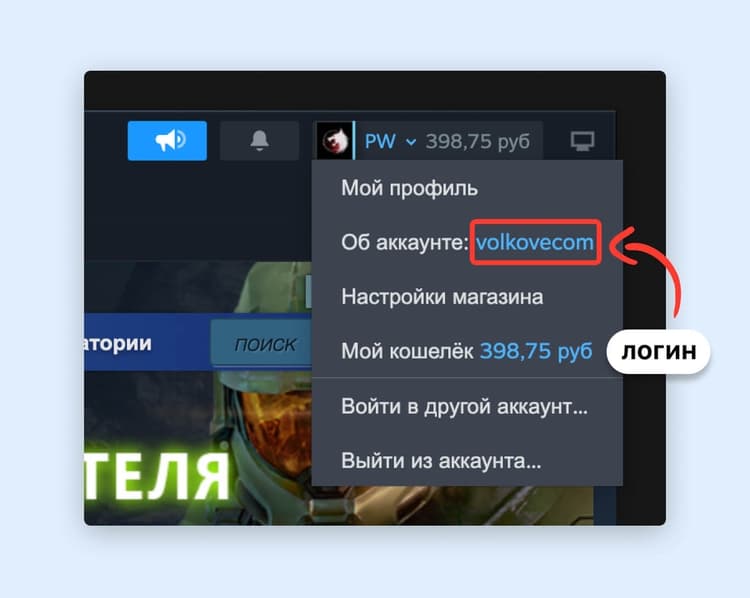
- Log in to the Steam website or launch the Steam app.
- Click on your nickname in the top right corner to open the menu.
- In the menu, next to "About Account", your Steam login will be displayed.
Method 2
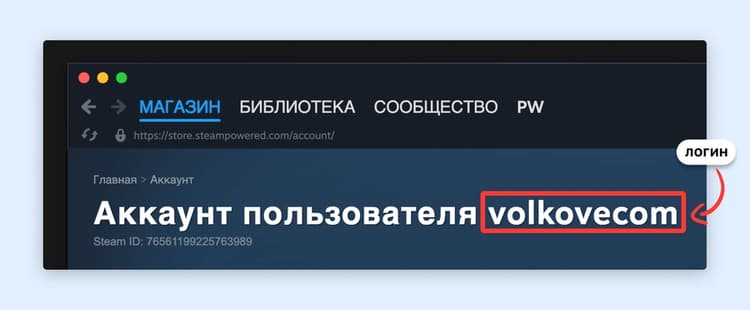
- Log in to Steam or launch the Steam client.
- Click on your nickname in the top right corner.
- Select the "About Account" tab.
- On the page, after or before the word "ACCOUNT", your login will be shown.
Payment Methods
Wallet
Use the wallet available to all Telegram users. Payment in USDT, TON and BTC.
TON Space
A wallet on the TON blockchain inside Wallet. Payment in TON.
Tonkeeper
A non-custodial TON wallet that allows you to top up your Steam balance.
Frequently Asked Questions
Although we strive to show you the actual amount in your account currency that will be credited to your Steam balance, in some cases these amounts may slightly differ. This is because Steam does not provide its internal exchange rates, which vary by region. Sometimes the amount may differ by 1% from the stated amount, but this is rare. Please consider this when topping up to ensure you have enough for a purchase.
If you enter the correct login, the top-up will happen instantly. If funds do not appear within 5 minutes, please contact support, and moderators will help resolve your issue. To speed things up, describe what happened in detail and copy the transaction ID from the history on the Play Wallet website.
Steam top-up gift cards are a fast and convenient way to top up your wallet at a good rate.
Select the desired card amount and quantity. After successful payment, you will receive a top-up card code in your chosen currency, which can be activated in your Steam account settings. Funds will be credited to your account immediately after code activation.
Log into your account and go to the "Games" section. Click "Redeem a Steam Wallet Code" and enter the code received after payment. Confirm activation and the money will be credited to your account instantly.
After successful payment, the gift code will be displayed on screen or available in the history on the Play Wallet website. If this did not happen, please contact support and moderators will help you.
What sets us apart from other services is our commitment to always resolving payment issues. Check our refund terms.
At Play Wallet, we guarantee the security of your transactions and data privacy. We do not require personal data beyond what is necessary for payment and do not have access to your payment methods. We protect your gaming account from fraud and blocking. All payments are processed quickly and safely, and if necessary, funds will be returned to your chosen payment method.