NIKKE top-up: how to buy Gems
GODDESS OF VICTORY: NIKKE is free to play, and Gems are what money buys in it. Here is what they are for, where to find your Player ID, and what to ask before you pay.
In short
- NIKKE is free on iOS, Android and PC.
- Gems are the currency sold for money. They pay for recruiting characters and for items in the game’s shop.
- On our site Gems are bought by player number. The form has one field, Player UID. No password.
- The Player ID is in the Personal Center at the top left.
- If you do not play on the global server, ask support before paying: the form has no server choice.
The game and what it sells
NIKKE is a character-collecting shooter by Shift Up, published by Level Infinite. It came out on 4 November 2022 on iOS and Android, with a PC client. The download is free and there are in-app purchases.
The game’s shop sells Gems and ready-made packs: a 30-Day Supply, recruit packs, upgrade resources. Gems are the flexible part: they pay for recruiting and for shop items.
Guides say the game counts bought and free Gems separately and that some offers take only bought ones. We could not confirm that on official pages. Before spending, look at which currency a price is marked with in the game.
The official ways to pay
- The in-game shop. On a phone, payment goes through the App Store or Google Play.
- Midasbuy. It calls itself the official top-up platform for NIKKE. You choose a country and a server and enter the Player ID. It sells Gems, monthly passes and packs.
Where to find the Player ID
Open the Personal Center
It is at the top left of the main screen.
Copy the Player ID
It is the account’s number. Copy it rather than typing it. A nickname will not do.
How to buy Gems on Play Wallet
Paste the number
Open the NIKKE page and paste the Player ID into the Player UID field. No password, email or sign-in.
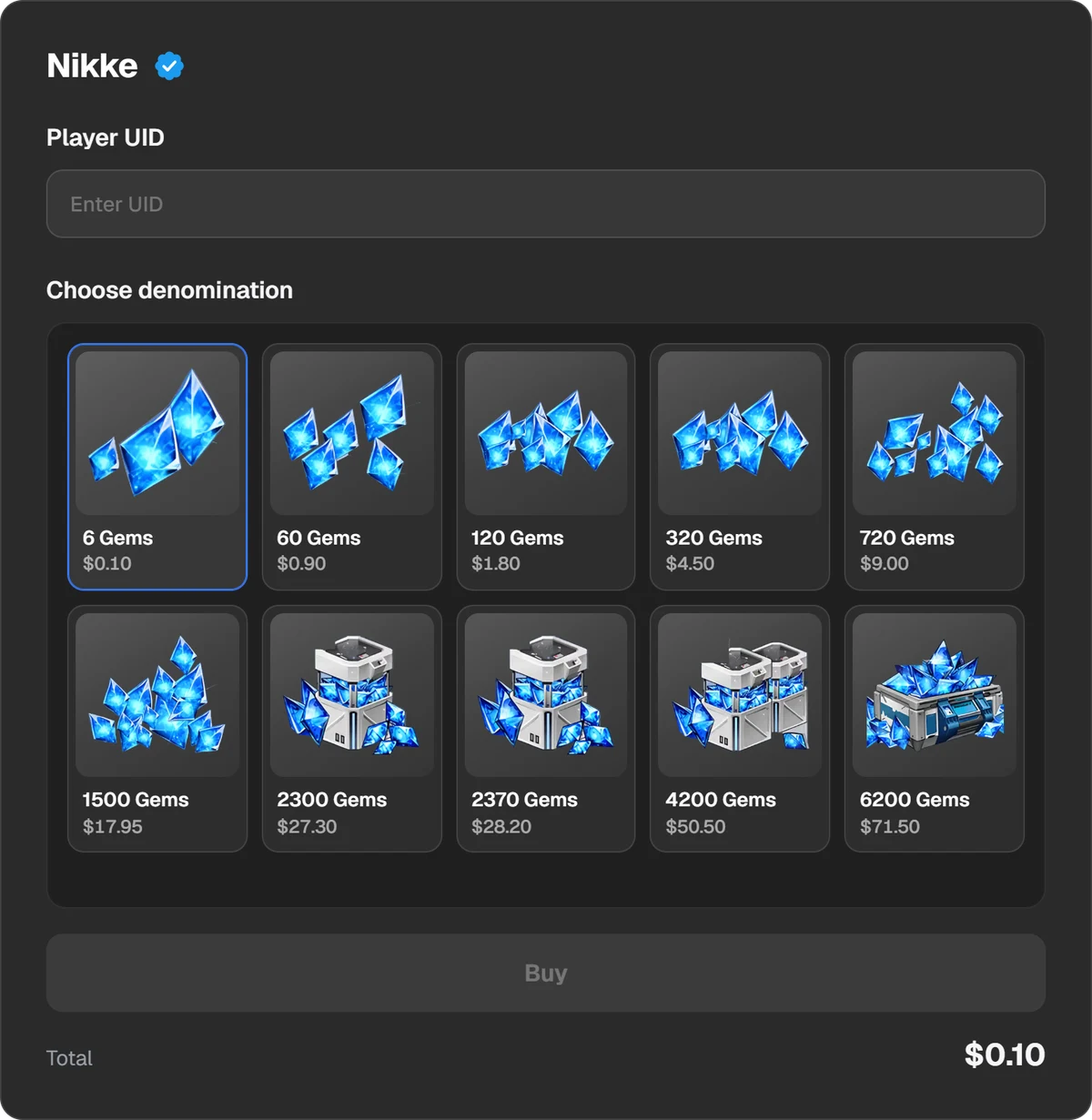
The order form: the Player UID field and the Gem packs.
Choose a pack
Packs go up to 6,200 Gems. The list changes, so check the page. The total and the fee are shown before you pay.
Pay
Select Buy and choose a method: USDT, TON, BTC and other coins, Binance, Walt or TON Connect.
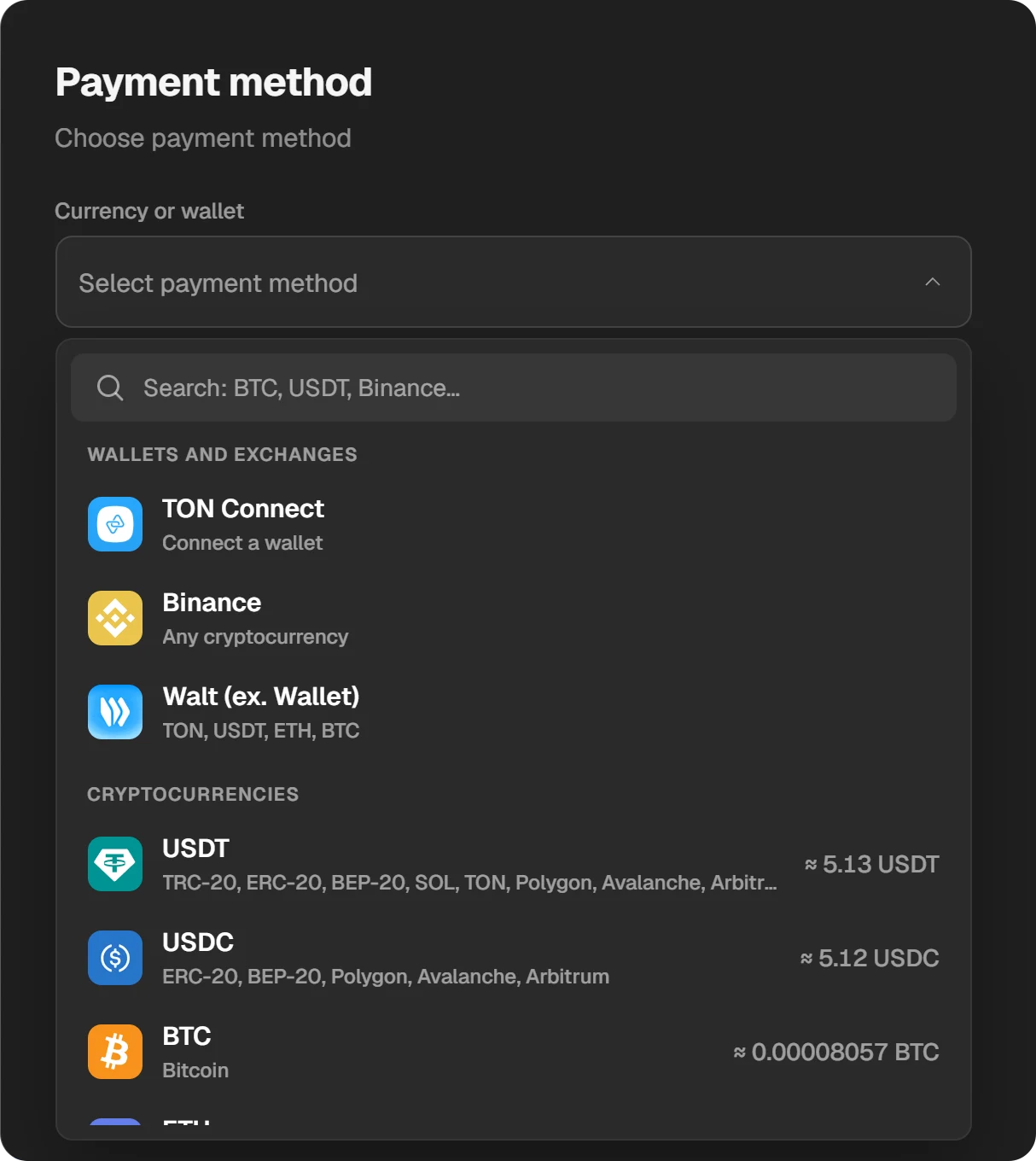
Payment methods.
Open the game
The order’s status is in the order window and in History at the top of the site. When it is done, open the Shop in the game or log in again.
Our form has no server choice, while the official Midasbuy store asks for one. If your account is not on the global server, write to support before paying and ask whether the Gems will reach your server.
What we do not have
- Monthly supplies, passes and packs from the game’s shop. The catalogue has Gem packs only.
- A check of the number. The site will not tell you the number is wrong. Compare it with the game yourself.
Refunds and safety
- Under the game’s licence agreement, game currency has no monetary value and is not refundable unless the purchase is defective.
- A top-up needs only the Player ID. Nobody needs your password or email codes.
- “Free Gems” and generators steal accounts.
- If the Gems have not arrived, write to support with the order ID.
Questions and answers
Is NIKKE free?
Yes, on iOS, Android and PC. Money buys Gems and packs in the game’s shop.
Where is the Player ID in NIKKE?
In the Personal Center at the top left of the main screen. Copy the number from there.
What are Gems spent on?
Recruiting characters and shop items. Check prices in the game: we do not quote them because we could not verify them on official pages.
Are bought Gems different from free ones?
We found no official confirmation. The game shows which currency each price takes, so check there.
Can I get a refund for Gems?
Under the game’s agreement, currency is not refundable when the purchase works. A credited top-up cannot be undone.