Mobile Legends skins: how to buy them and gift one
Mobile Legends skins are not sold on outside sites: you buy them in the game, mostly with diamonds. So “how do I buy a skin” really means “where do I get the diamonds”. Here is that, plus gifting and the things better left alone.
In short
- A skin is bought in the in-game shop with diamonds. The price is on the skin’s card.
- Diamonds can be bought by User ID and Server ID: no password, and they land in the game.
- A skin can be gifted only through the game, on its terms. Topping up a friend’s account is simpler.
- A purchased skin cannot be handed over, sold or moved to another account.
- A skin changer is a third-party program. No skin is added to the account, and the account is put at risk.
Where skins come from
| Source | How it works | What matters |
|---|---|---|
| The in-game shop | You buy a skin with diamonds. The price is on the card. | The clearest way: you know in advance how many diamonds you need. |
| Draw events | Diamonds are spent on attempts. The game’s news announced Collector skins this way, in Grand Collection events for example. | The final cost is unknown in advance. Read the event rules in the game first. |
| First-recharge offers | The game’s season news has announced such offers: a recharge unlocks the right to buy a certain skin for a few diamonds. | The terms differ each time. Whether a top-up by ID counts is up to the game. |
| In-game passes and memberships | The game has paid passes and memberships with their own rewards, Starlight for example. | They are bought in the game. Our site does not sell them. |
We give no “rarity and price in diamonds” table: we found none on Moonton’s official pages, and in-game prices move with discounts. The exact price is always on the skin’s card in the in-game shop.
How to buy a skin, step by step
Check the skin’s price in the game
Open the shop in Mobile Legends, find the skin and note its price in diamonds. Compare it with your balance: you only need the difference.
Find your User ID and Server ID
Tap your avatar at the top left of the main screen. Under your name is a line like 12345678 (1234): the User ID first, the Server ID in brackets.
Choose the region and a diamond pack
Open Mobile Legends. Choose the account region: Russia if the account was created in Russia and the game shows rouble prices, otherwise Global. Enter both numbers and pick a pack that covers the skin.
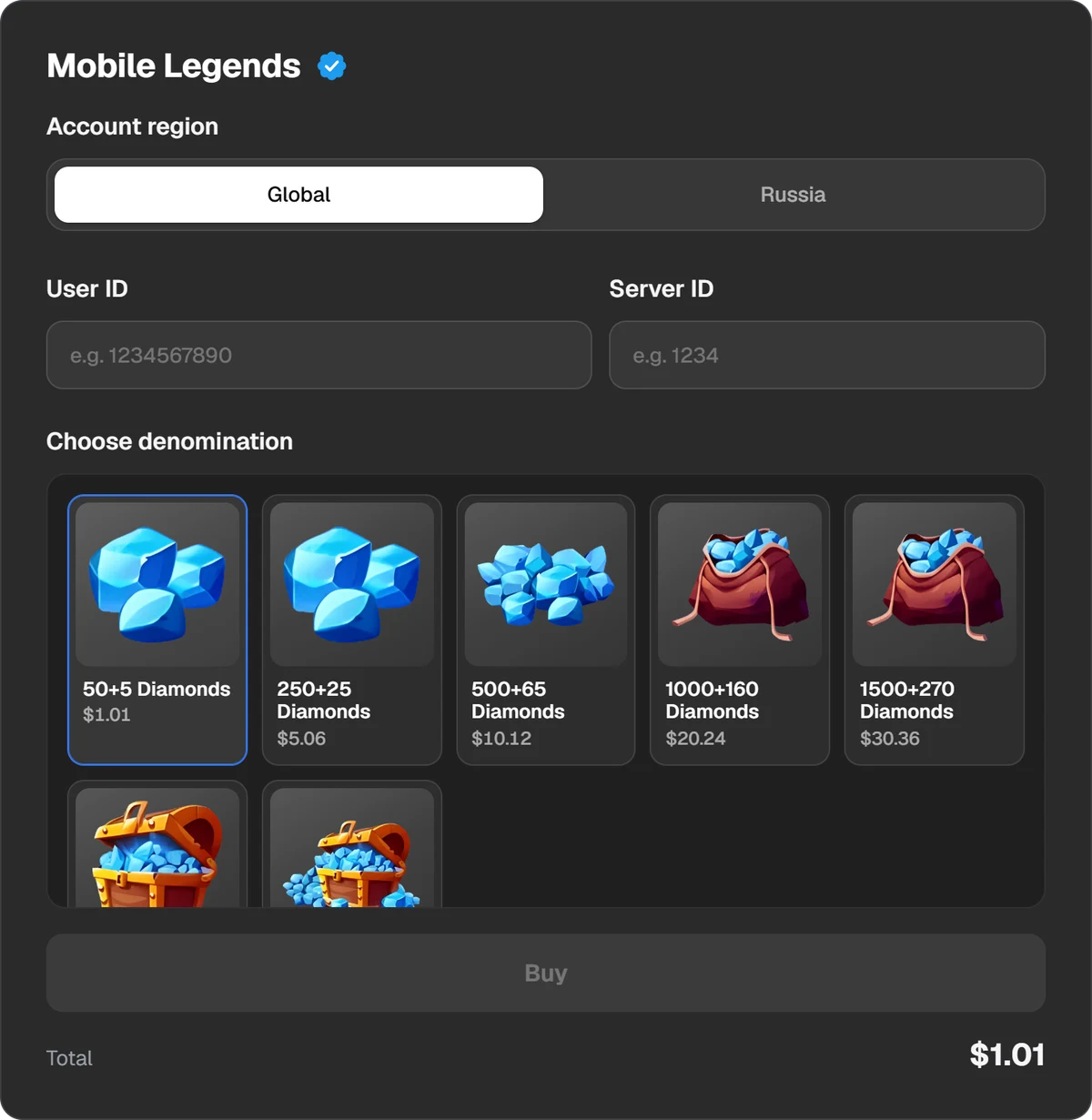
The account region, the numbers and the diamond packs.
Pay
Press Buy and the payment window opens. You can pay in USDT, USDC, BTC, TON and other coins, or through Binance, Walt and TON Connect. The total and the fee are shown before you pay.
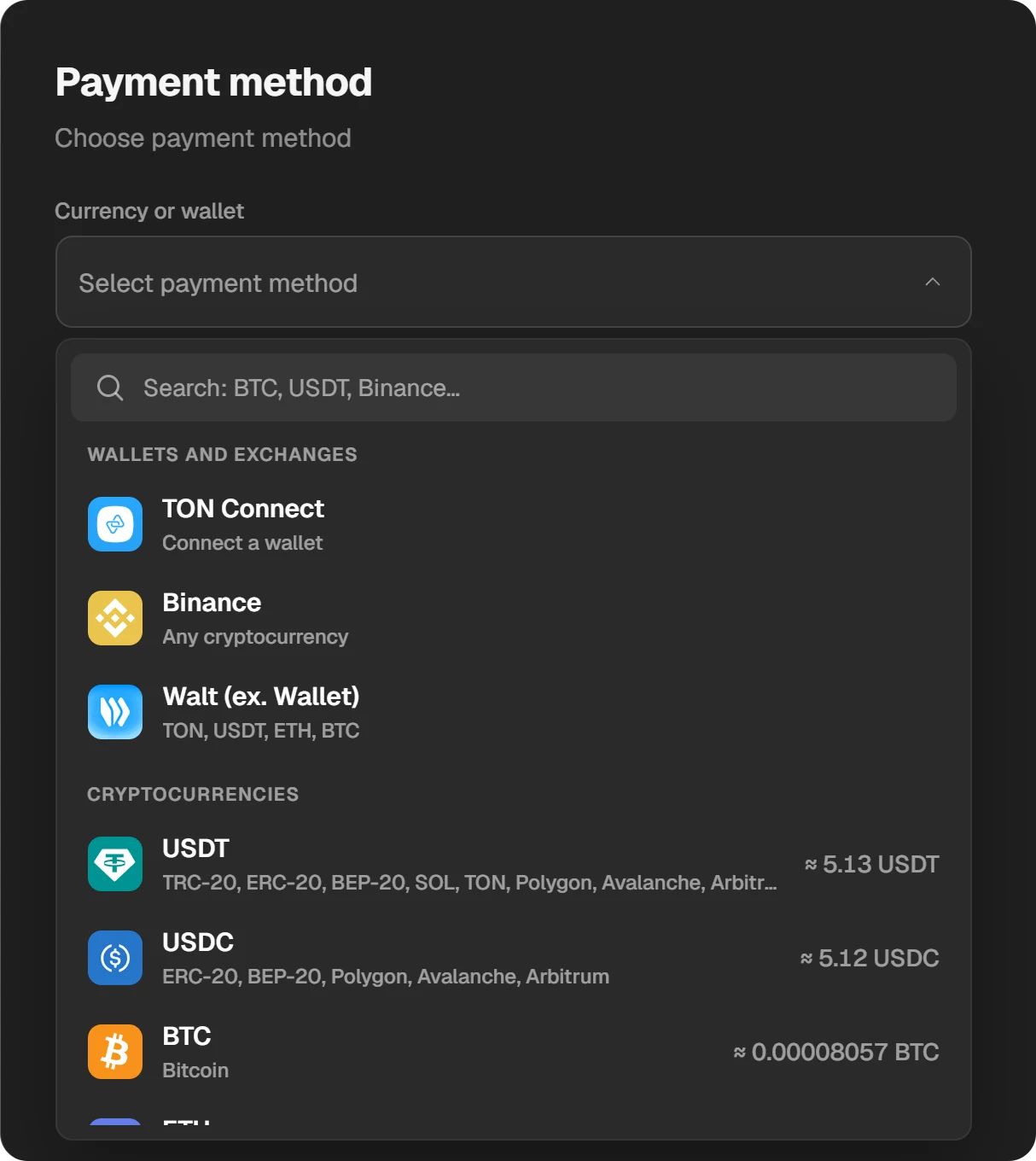
Choosing a coin or a wallet in the payment window.
Buy the skin in the game
When the order is done, the diamonds are on the account. Open the in-game shop and buy the skin. If the balance has not updated, restart the game.
Packs carry a bonus: “250+25” means 250 diamonds and 25 on top. Count the total. If you are a little short, one larger pack can beat two small ones, since larger packs carry a bigger bonus. More in where diamonds are cheaper.
Which region to choose on our page is explained in the Russia region or Global.
Can you gift a skin?
We neither gift nor sell skins: the site has diamonds only. Gifting a skin is possible only inside the game, through its shop.
In-game gifts have conditions: how long you must have been friends and what account level is required. Players on forums quote specific numbers, but we found no official Moonton page that states them, so we will not repeat them. The game shows the condition when you press the gift button.
There is a simpler way, with no waiting and no conditions:
- Ask your friend for their User ID and Server ID. These are not secrets, and no password is needed.
- Check which account they have: a Russian one or Global.
- Place a diamond order for their numbers.
- Your friend buys the skin they want.
Check the numbers twice. The diamonds go to the account whose numbers you entered and cannot be taken back once credited.
What you cannot do with skins
- Hand a purchased skin to a friend. A skin is tied to the account.
- Sell a skin or diamonds. Under Moonton’s terms, in-game items are licensed to you, not sold. They cannot be exchanged for money, sold or transferred.
- Move skins to another account. If you start a new account, purchases from the old one do not follow.
Skin changers and “free skins”
A skin changer is a third-party program or a modified build of the game. It swaps the picture on your device. No skin is added to the account, and in a clean build of the game you will not see it.
- Such programs are installed from outside the app store. Anything can come with them.
- Many ask you to sign in. Accounts are often stolen right after.
- An account may be banned for a modified game client.
The same goes for “diamond generators” and sites with free skins. Diamonds appear only after a purchase or from the game’s own events.
Accounts “with skins”
Buying someone’s account with skins looks cheaper than buying the skins. But the previous owner can reclaim the account through the game’s support, and handing over accounts and items runs against Moonton’s terms. See the risks of buying game accounts.
Questions and answers
How much does a Mobile Legends skin cost?
The price in diamonds is on the skin’s card in the in-game shop and depends on the skin and on discounts. We found no official Moonton price table.
Can I gift a skin to a friend?
Yes, but only in the game and on its terms: the game shows the requirements on the gift screen. Topping up your friend’s account by ID is simpler.
Can I buy a skin directly, without diamonds?
Not from us: we sell diamonds, and you buy the skin in the game. Sites that “deliver a skin” for your login and password are asking for your account. Never share your password.
Does a skin changer work, and is it safe?
It changes the picture on your device only. No skin is added to the account, and you risk both the account and the phone.
Can I sell my skin?
No. Under Moonton’s terms, in-game items cannot be sold, exchanged for money or transferred.