Mobile Legends diamonds: the Russia region or Global?
A Mobile Legends top-up has two regions: Global and Russia. They are separate services, and diamonds bought for the wrong one will not reach your account. Here is how to tell in a minute which account you have and what is sold for each.
In short
- Our Mobile Legends page has two account regions, Global and Russia, each with its own packs.
- Russia is for accounts created in Russia. The sign: the in-game shop shows prices in roubles.
- Global is for every other account.
- Either way you need the User ID and the Server ID from your profile. No password.
- The form cannot tell which region an account belongs to. If unsure, ask support before paying.
Why there are two regions
The supplier that delivers the top-ups splits Mobile Legends into two services: the regular one and a separate one for the Russian server. Accounts created in Russia are topped up through the second. They have their own in-game shop, with rouble prices and their own list of packs.
So on our page you choose the account region first, then enter the numbers and pick the diamonds. Both regions live on one page: Mobile Legends.
We found no official statement from Moonton about a separate Russian region. The rule “created in Russia, rouble prices” reflects how the supplier’s top-up works. If your case is unusual, ask support before paying.
How to tell which account you have
Where you created the account
If in Russia, your region is almost certainly Russia. If anywhere else, choose Global.
The currency of the in-game shop
Open the diamond purchase screen in the game. Rouble prices point to a Russian account.
The diamond packs the game shows
Compare the list in the game with the table below. The 32+3 and 150+15 packs exist only in the Russia region.
What does not tell the region: the game’s language and the Server ID. The Server ID is the number in brackets next to the User ID. Every top-up needs it, and it does not mean Russia or Global.
What is sold for each region
| Global | Russia | |
|---|---|---|
| For | Accounts created outside Russia | Accounts created in Russia |
| Diamond packs | 50+5, 250+25, 500+65, 1000+160, 1500+270, 2500+475, 5000+1000 | 32+3, 50+5, 150+15, 250+25, 500+65, 1000+155, 1500+265, 2500+475, 5000+1000 |
| Weekly Diamond Pass | No | Yes |
| Needed for an order | User ID and Server ID | User ID and Server ID |
The number after the plus is bonus diamonds, delivered together with the base amount. The list follows the supplier’s catalogue, so check the page. The pass has its own guide: Weekly Diamond Pass.
Why a top-up for the wrong region never arrives
Global and Russia are two different services. A Global order goes to the global servers, a Russia order to the Russian one. With the wrong region chosen, the diamonds will not appear on your account.
The order form does not protect you here. It checks that the numbers are filled in, but it does not know which region the account belongs to. A mark that the ID was accepted does not confirm the region.
If you picked the wrong region, do not place a second order on a guess. Write to support with the order number; the ID button in the order window copies it. Credited diamonds cannot be taken back, so check the region and the numbers before paying.
Where to find the User ID and Server ID
- Open Mobile Legends and tap your avatar at the top left of the main screen.
- Under your name is a line like 12345678 (1234).
- The number before the brackets is the User ID. The number in brackets is the Server ID.
Both numbers are needed. A nickname will not do: the order goes by the pair of numbers.
How to top up on Play Wallet
Choose the account region
Open Mobile Legends. At the top of the form is the Account region switch: Global or Russia. The list of packs below depends on it.
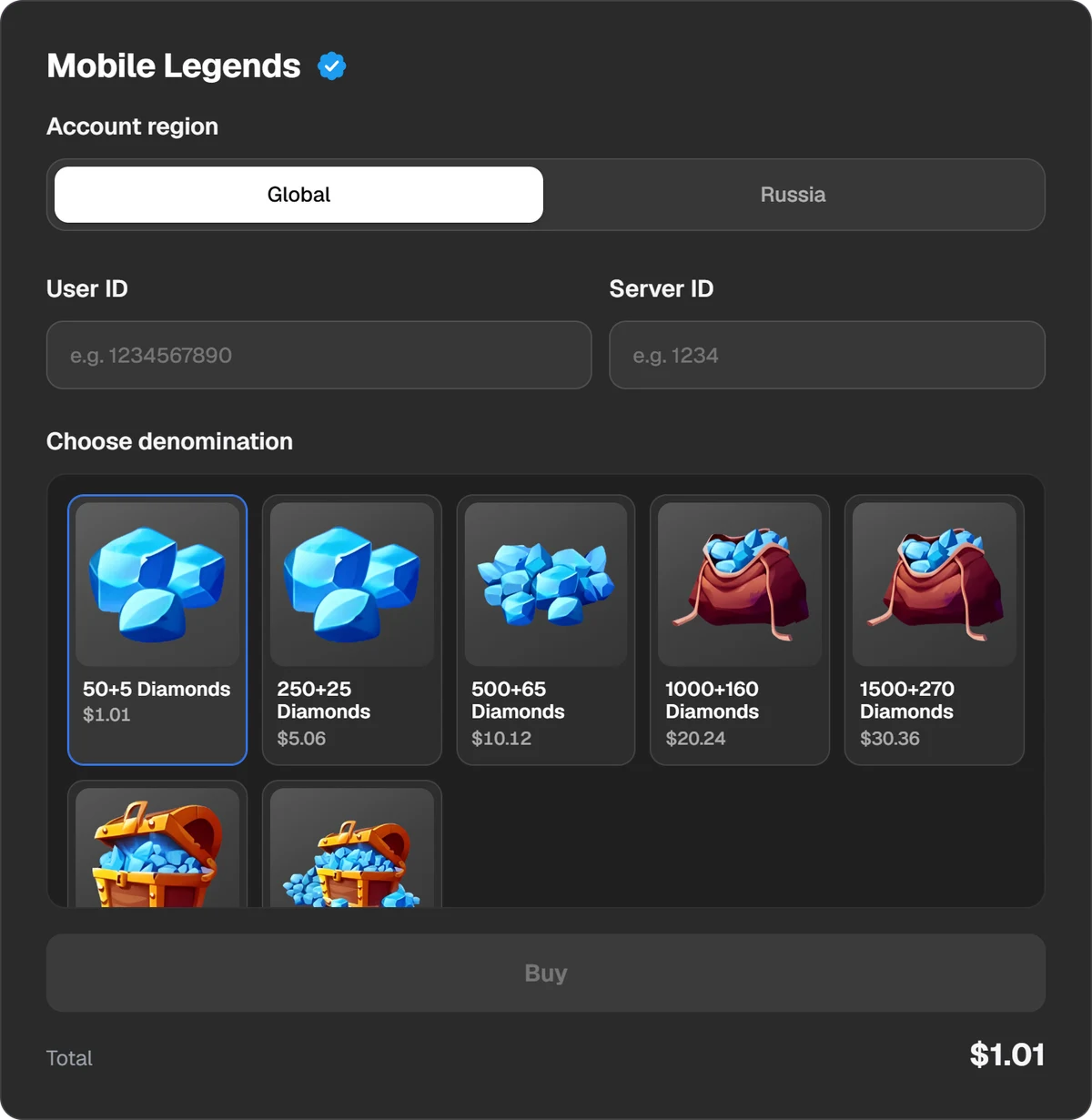
The account region, the User ID, the Server ID and the diamond packs.
Enter the numbers and pick a pack
Put the first number in the User ID field and the one from the brackets in Server ID, with no brackets or spaces. Then choose a diamond pack.
Pay
Press Buy and the payment window opens. You can pay in USDT, USDC, BTC, TON and other coins, or through Binance, Walt and TON Connect. The total and the fee are shown before you pay.
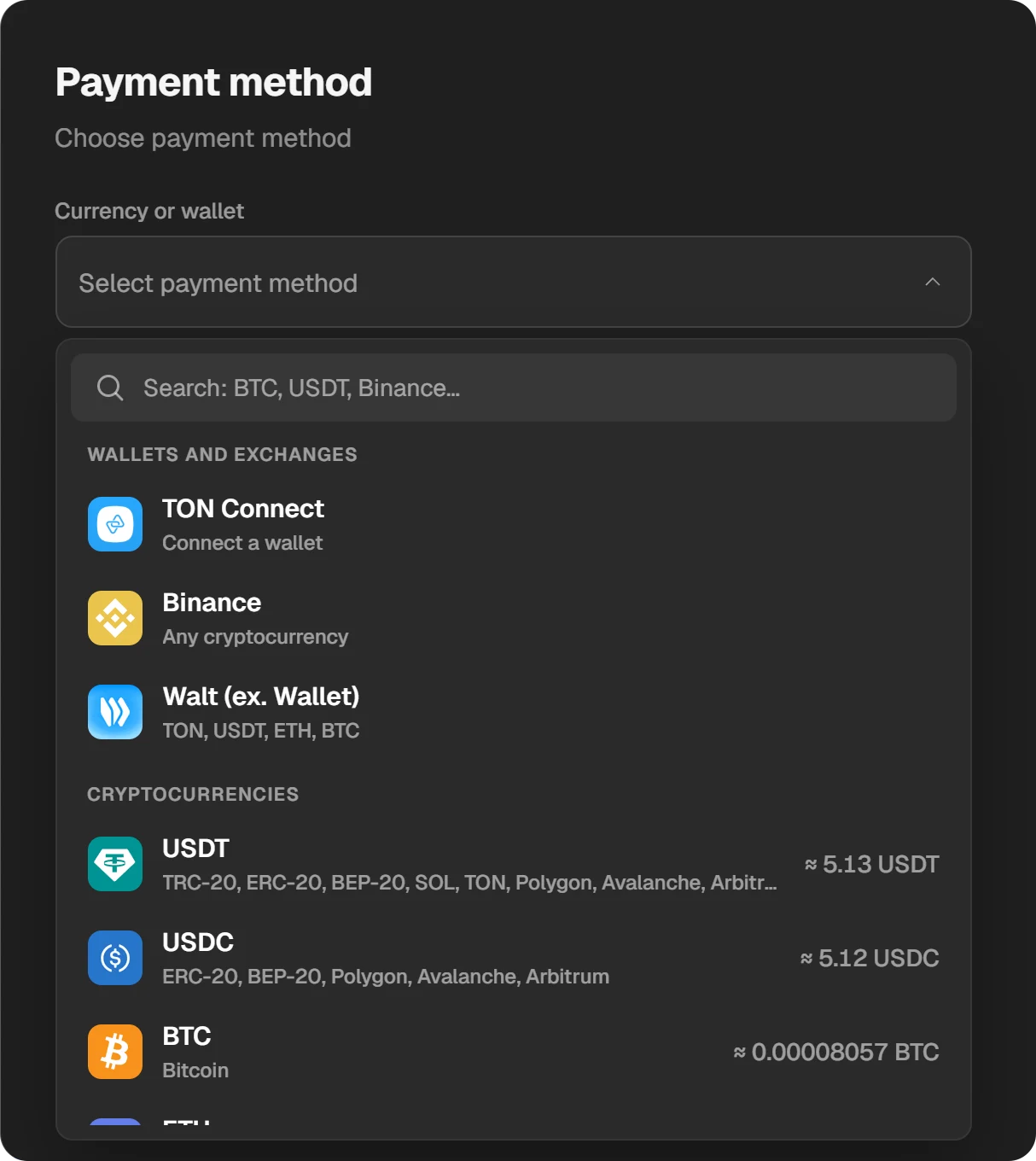
Choosing a coin or a wallet in the payment window.
Check the diamonds in the game
When the order is done, the diamonds are on the account. There is no code to enter. If the balance has not changed, restart the game.
Codes and safety
- We sell no diamond codes. On our site Mobile Legends is topped up only by User ID and Server ID.
- No password is needed. A top-up by ID does not require signing in. Do not answer anyone who asks for your password or an email code.
- Paid “region changes”. We know of no official way to change an account’s region. Services that ask for account access to do it usually end with a lost account.
The basics are in How to buy diamonds in Mobile Legends. For paying less per diamond, see where diamonds are cheaper.
Questions and answers
How do I know my Mobile Legends account is a Russian one?
It was created in Russia and the in-game shop shows rouble prices. Another sign: the game offers 32+3 and 150+15 diamond packs.
What happens if I choose the wrong region?
The diamonds will not reach your account. Write to support with the order number and do not reorder on a guess.
Does the Server ID show the account’s region?
No. It is the number in brackets next to the User ID. Every top-up needs it, and it does not denote a region.
Can I buy the Weekly Diamond Pass for a Global account?
On our site the pass exists only in the Russia region. Global accounts get diamond packs.
Do you need my account password?
No. Only the two numbers from your profile. Never share your password.