PUBG Mobile UC codes: how to buy and redeem one
A UC code is a string of characters that turns into UC on your account. You enter it on the Midasbuy site, not in the game. Here is the whole way: buying, redeeming, common mistakes, and the cases where you do not need a code at all.
In short
- A UC code is redeemed on the Redeem page of Midasbuy. The game itself has no field for it.
- To redeem you need a Midasbuy account, your Player ID and the code.
- On Play Wallet the codes are on the PUBG Mobile page, in the “UC (GIFT)” tab. The code is shown in the order window and in “History”.
- A code is handy as a gift. For yourself, UC by Player ID is simpler: it arrives on the account by itself.
- Neither a code nor a top-up by ID needs your game account password.
What a UC code is
It is a one-time code for a fixed amount of UC. You can redeem it on your own account or send it to a friend, as long as nobody has used it yet.
Midasbuy describes itself as the only officially authorised top-up store for PUBG Mobile, and it hosts the page where codes become UC. According to its FAQ, once a code is redeemed the UC is sent to the game account with the Player ID you entered.
Do not confuse a UC code with the “promo codes” from videos and chats. Code generators and “free UC” giveaways exist to take over accounts. See Free UC: why it is a scam.
A code or a top-up by ID
| UC code | UC by Player ID | |
|---|---|---|
| Where the UC appears | After you redeem the code on Midasbuy | Straight on the account, nothing to enter |
| What you need | A Midasbuy account, Player ID, the code | Only the Player ID |
| What you can buy | UC only | UC, passes, packs, Prime |
| Best for | A gift, or to use later | Yourself, when you need UC now |
If you are buying for yourself and know your Player ID, take the top-up by ID: fewer steps and no Midasbuy account. A code makes sense when you are giving UC and do not want to ask for an ID, or when you want to redeem later.
How to buy a code
Open the tab with codes
On the PUBG Mobile page choose the “UC (GIFT)” tab. It holds the codes; the “UC (ID)” tab next to it is the top-up to an account. They are different products, so check which one is selected.
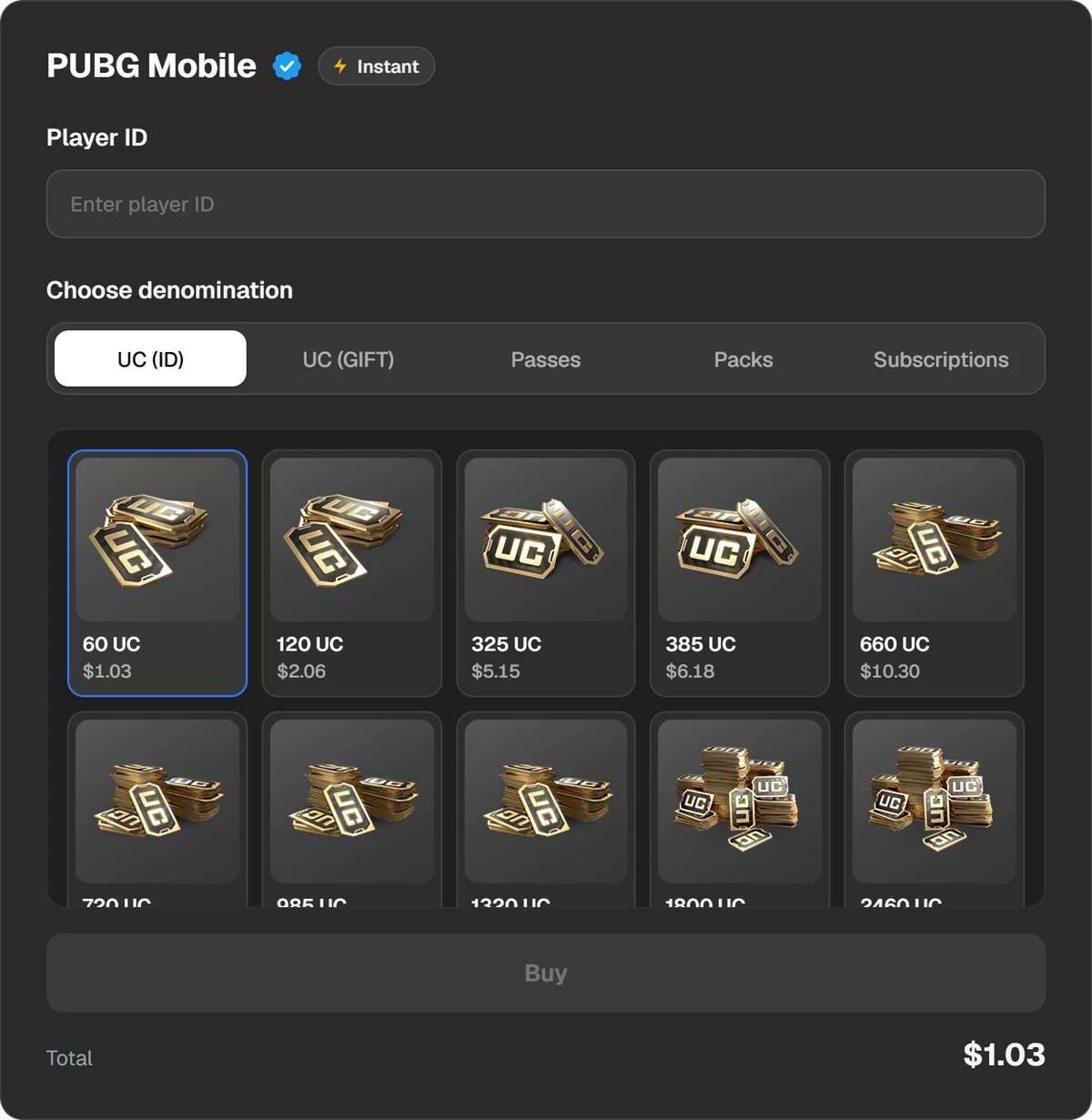
The PUBG Mobile page: the “UC (ID)” and “UC (GIFT)” tabs and the amounts.
Choose the amount
Codes come in several sizes, from small to large. The amount is fixed: a 660 UC code gives exactly 660 UC. The total and the fee are shown before you pay.
Pay
Press “Buy” and the payment window opens. You can pay in USDT, USDC, BTC, TON and other coins, or through Binance, Walt and TON Connect.
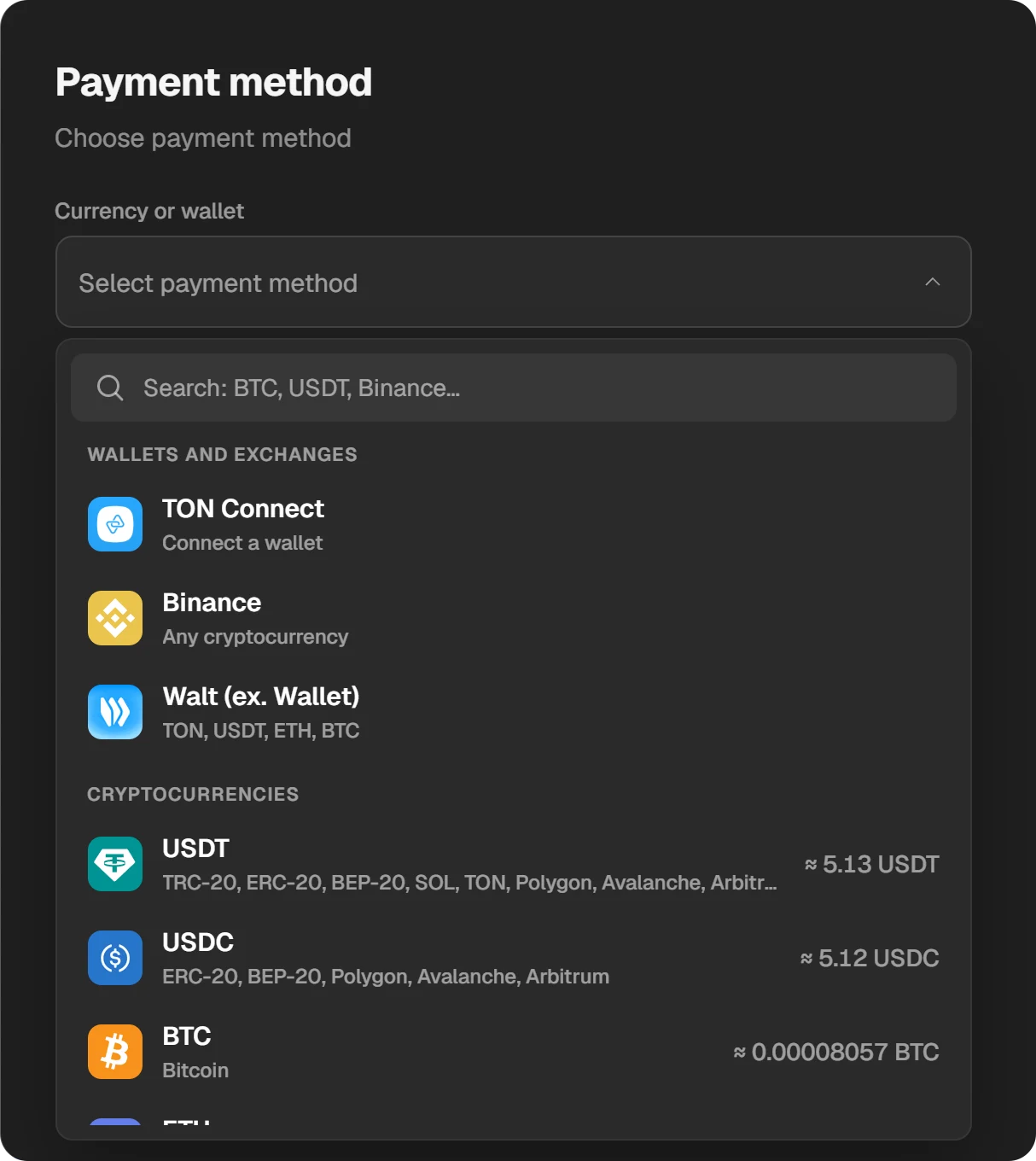
Choosing a coin or a wallet in the payment window.
Get the code
When the order is done, the code is shown in the order window. It also stays in “History” at the top of the site. We do not ask for an email, so no letter with the code will come.
How to redeem the code on Midasbuy
Find your Player ID
Open PUBG Mobile and tap your avatar in the upper left corner. The ID is on the profile, under the nickname. Copy all of it. The nickname will not work.
Open the Redeem page
Go to midasbuy.com, choose PUBG MOBILE and then REDEEM. Check the address bar: it must be midasbuy.com.
Sign in and choose the region
The page asks you to sign in to a Midasbuy account and choose a country or region. That is an account on the Midasbuy site, not your game password. The game account password is never entered here.
Enter the Player ID and the code
The page has two steps: the Player ID first, then the code. Compare the nickname the site shows with yours, then confirm.
Check the balance in the game
Go back to PUBG Mobile. The UC balance is at the top right. If the UC is not there, restart the game.
The UC goes to the Player ID you typed on Midasbuy. One wrong digit sends it to another player, and it cannot be returned. Check the ID and the nickname before you confirm.
If the code does not work
- Wrong place. Neither the game nor the app stores have a field for it. You need the Redeem page on Midasbuy.
- A typo. Copy the code from the order window instead of retyping it, and make sure there are no spaces around it.
- Already used. A code works once. If you sent it to someone, ask whether they have redeemed it.
- The site refuses it for your region. The Midasbuy FAQ does not say whether codes are tied to a region. If the site refuses, do not keep retrying; write to us.
- No UC after redeeming. Midasbuy says delivery can take a few minutes. If nothing arrives within 24 hours, it asks you to contact its support with the Player ID, region, item and time.
With a code bought from us, write to our support first and send the order number: the “ID” button in the order window copies it. Under the PUBG Mobile agreement the seller answers for a code, so we handle questions about it, not the publisher.
What we cannot promise
Play Wallet is a top-up service, not the publisher’s store. We cannot promise that the Midasbuy page will load for you without trouble or that a Midasbuy account will register on the first try. If you would rather not depend on another site, choose UC by Player ID: it does not involve Midasbuy.
Safety
- Show the code to nobody before it is redeemed. Whoever enters it first gets the UC.
- Never type your game account password on other sites. Neither a code nor a top-up by ID needs it.
- Do not buy codes from strangers in chats. You cannot check such a code before paying and there is nobody to refund you.
- How to tell the real store from a copy: Official PUBG Mobile top-up.
Questions and answers
Where do I enter a PUBG Mobile UC code?
On Midasbuy, in the REDEEM section for PUBG MOBILE. You enter the Player ID and the code there. The game itself does not take such codes.
Do I need a Midasbuy account?
Yes, the Redeem page asks you to sign in to Midasbuy. If you do not want one, buy UC by Player ID: it arrives without any redeeming.
Can I give the code to a friend?
Yes. Send them the code and they redeem it with their own Player ID. Once it is redeemed it cannot be passed on.
Where is the code after I pay?
In the order window and in “History” at the top of the site. It is not emailed: we do not ask for an email address.
Can a code buy a pass or Prime?
A code gives UC only. You then buy the pass in the game with that UC. Prime and ready-made packs can be bought directly by Player ID.
Are there free UC codes?
No. Sites and videos with “code generators” collect passwords and account details. UC comes only from purchases and from rewards inside the game.