How to gift Telegram Premium
You can gift Telegram Premium to any user for 3, 6 or 12 months. The recipient has nothing to activate: Premium switches on by itself. Here are three ways, from a gift inside the app to paying with crypto by @username.
In short
- In Telegram: your friend’s profile → ⋮ or ⋯ → Send a Gift. Terms of 3, 6 or 12 months.
- You can pay for the gift entirely with Stars from your balance.
- On Play Wallet you get Premium by @username and pay with crypto.
- You cannot gift 1 month: both Telegram and Play Wallet gift 3, 6 or 12 months.
- The recipient enters nothing. If a “gift” asks you to follow a link and type a code, it is a scam.
Way 1. A gift in Telegram itself
- 1Step 1
Open your friend’s profile
Find the person in your chats or contacts and open their profile.
- 2Step 2
Choose Send a Gift
Tap ⋮ on Android or ⋯ on iPhone and choose Send a Gift. Telegram Premium is among the gifts.
- 3Step 3
Choose the term and pay
3, 6 and 12 months are available. You can pay with money through the app store, or with Stars from your balance.
Gifted Premium is paid in advance for the whole term. Telegram says gifts use a global rate rather than local prices, so a gift may cost differently from a subscription for yourself.
Way 2. A gift paid with Stars
Since March 2025 you can pay for someone else’s Premium entirely with Stars. The path is the same: profile → ⋮ or ⋯ → Send a Gift. If you are short of Stars, you can buy more. How to buy Stars when in-app payment fails: How to gift Telegram Stars to a friend.
Way 3. Premium by @username on Play Wallet
This suits you if App Store or Google Play payments fail. You need only the recipient’s @username.
- 1Step 1
Enter the recipient and the term
Open Telegram Premium and paste the @username into the Recipient Telegram field. The form shows the name and picture of the account it found. Under Subscription length choose 3, 6 or 12 months. Each term shows its price.
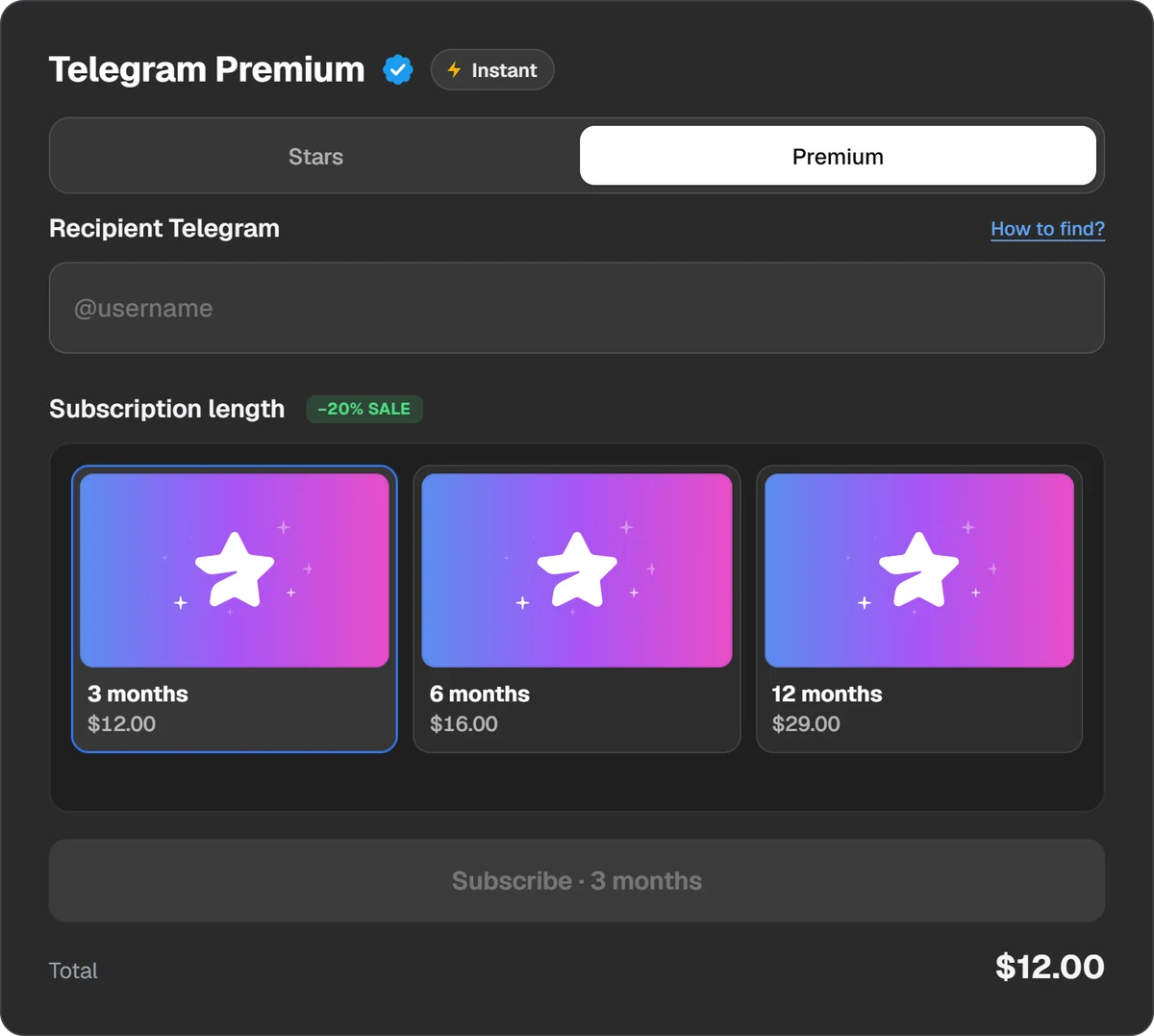
The recipient and the term. The total is shown before you pay. - 2Step 2
Pay for the order
Press Subscribe and choose a coin or a wallet: USDT, TON, BTC and others, or Binance.
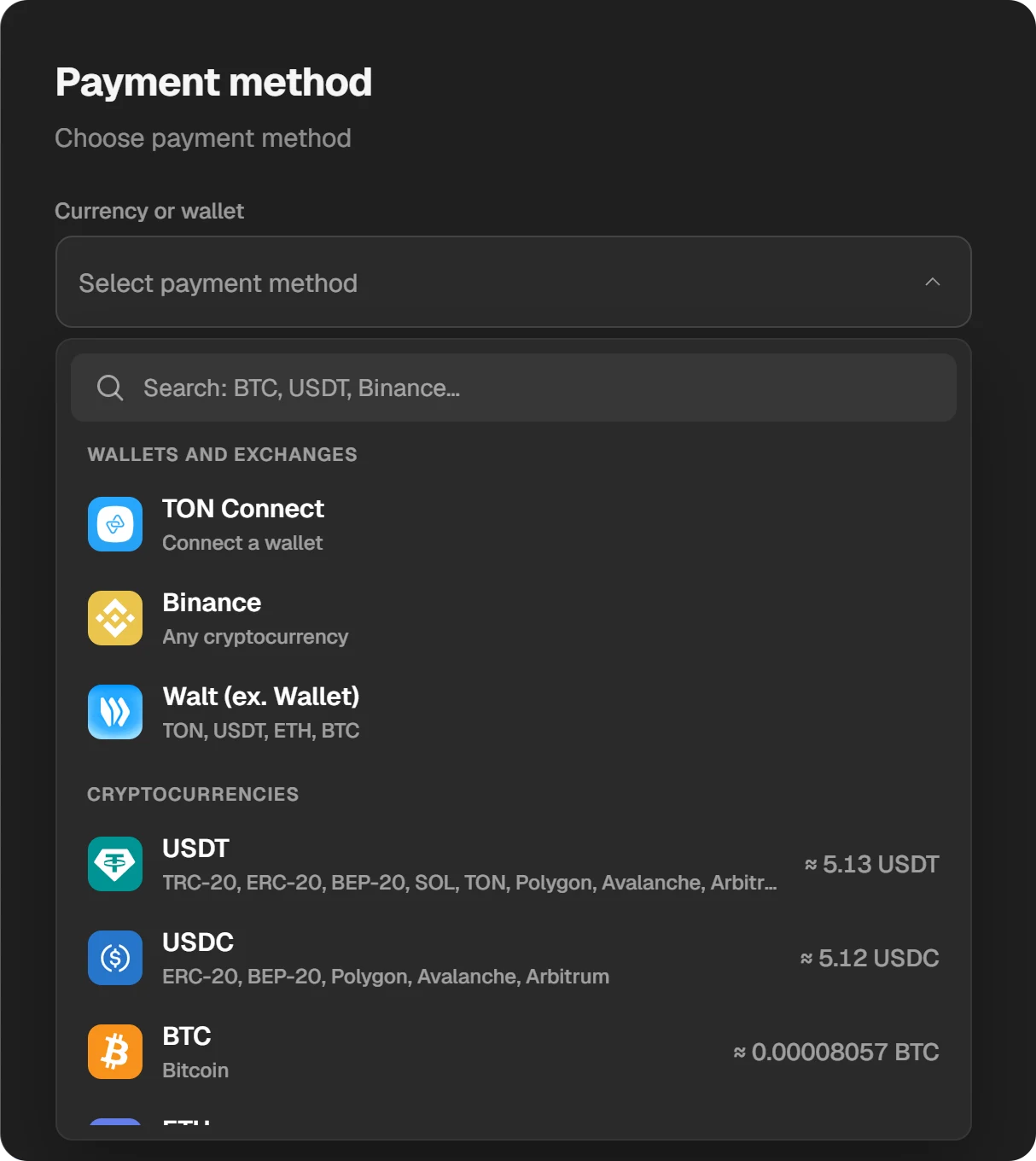
The amount needed in each coin is in the list. - 3Step 3
Wait for Premium to switch on
The order window shows the status. Premium switches on for the recipient and shows in Settings → Telegram Premium.
Premium goes to whoever owns the @username you entered. Telegram does not let Premium move to another account, so check the name and picture in the form before paying.
Which way to choose
| Way | How you pay | When it suits |
|---|---|---|
| A gift in Telegram | With money through the app store | If in-app payments work for you |
| A gift paid with Stars | With Stars from your balance | If you already have Stars |
| Play Wallet | With crypto | If in-app payment fails |
How much it costs to gift Premium
We do not quote a price here because it changes. In Telegram the gift price is on the screen where you choose the term. On Play Wallet each term’s price is in the form, and the total with the fee is in the payment window, before you pay. A year is usually cheaper per month.
What the recipient does
Nothing. There is no activation: once the order is done, Premium already works on the account. You can check it under Settings → Telegram Premium or by the Premium badge next to the name.
What your friend gets
- Files up to 4 GB and faster downloads.
- Voice-to-text for voice and video messages.
- No ads in channels.
- Twice as many channels, folders and pinned chats.
- Custom emoji, an emoji status and the Premium badge.
The full list: What Telegram Premium gives you in 2026. When the gift term ends, Premium switches off, and all chats and messages stay.
How not to fall for “free Premium”
- A real gift needs no action. If a message asks you to follow a link and sign in, or to enter your phone number or a Telegram code, someone is trying to steal the account.
- Nobody needs your login code. Not Telegram, not a shop, not a “friend”.
- There is no free Premium for joining a channel or filling in a survey, except giveaways a channel runs through Telegram itself.
Questions and answers
Can I gift Telegram Premium for one month?
No. Gifts come in 3, 6 or 12 months, and Play Wallet offers the same terms. The shortest gift is 3 months.
How do I activate Premium I received as a gift?
You do not need to; it switches on by itself. If you do not see it, restart Telegram and check Settings → Telegram Premium.
Can I gift Premium with Stars?
Yes. On your friend’s profile tap ⋮ or ⋯ → Send a Gift and pay with Stars from your balance.
What do I need to know about the recipient?
Only their @username. No phone number, password or codes.
Can I gift Premium to myself?
Yes: on Play Wallet enter your own @username. You get Premium for the chosen term with no recurring charges.
Can gifted Premium be passed to someone else?
No. Telegram ties Premium to one account and it cannot be moved.