A site for game top-ups: how to choose and check it
There are hundreds of game top-up sites and they look alike from outside. Five minutes is enough to tell a normal shop from a scam if you know what to look at. Here is an eight-point checklist. At the end we go through it ourselves, including what we lack.
In short
- A normal shop needs only the player ID, sometimes a server. Never a password, an SMS code or a sign-in to your account.
- How much currency arrives and what you pay with the fee is shown before payment.
- After paying you have an order with a status, an order number and a receipt. A code sits in the order, not in a private message.
- Currency “three times cheaper” or “free” points to a scam or to stolen currency the publisher can take back.
- Make the first purchase a small one.
Eight signs of a normal shop
It asks only for the ID
A top-up by ID needs the player’s public number and sometimes a server. A code needs nothing. If a site asks for a password, a code from email or SMS, a “sign in through the game” on its own page, or your account “for five minutes”, close it.
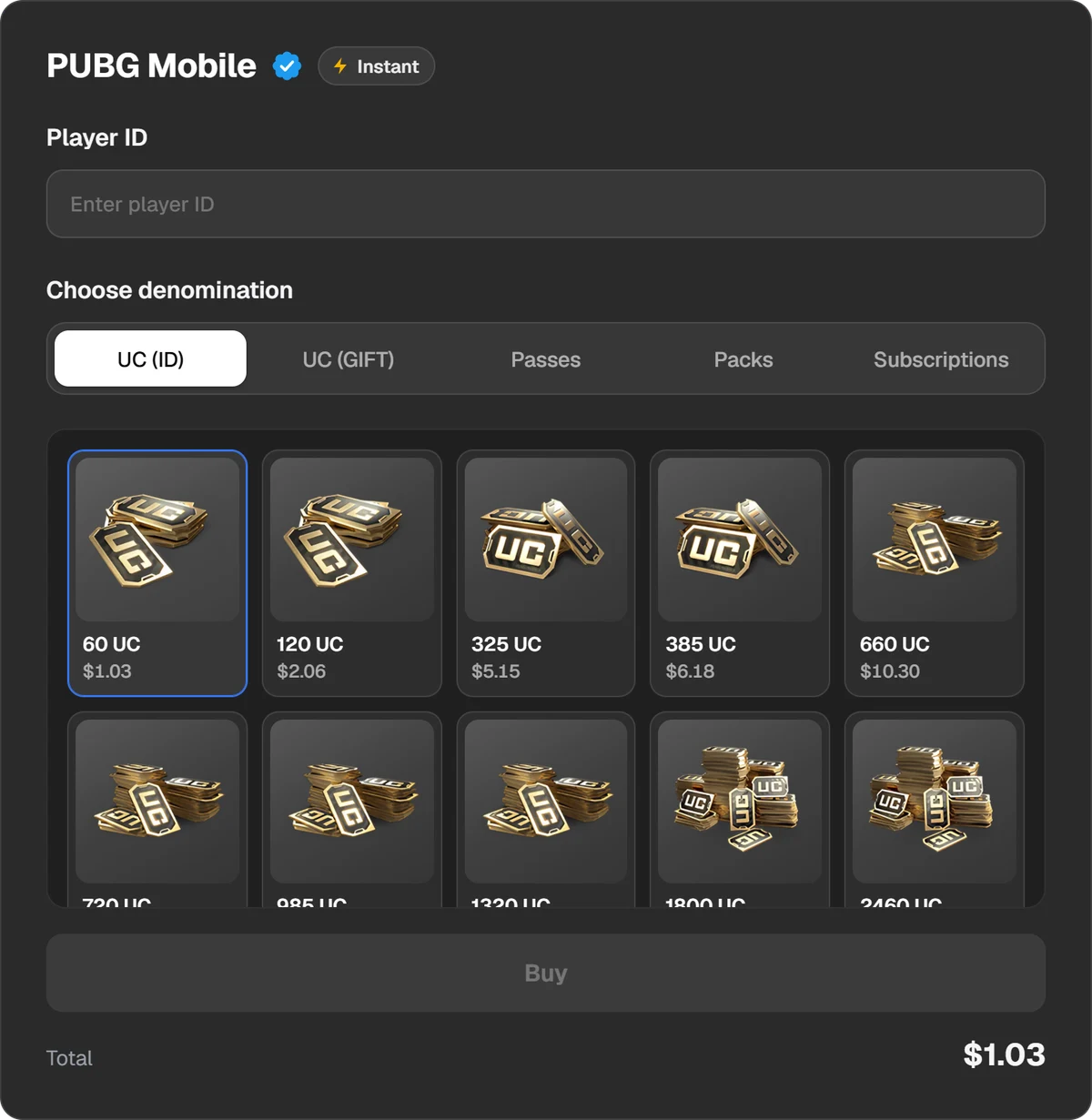
An order form: a player ID and a pack. No password field.
It shows the total before payment
Before you send money you should see what you are buying, what arrives on the account and what you pay with the fee. “We will confirm the fee after payment” means you learn the price when it is too late to argue.
It says plainly whether it is an ID top-up or a code
A top-up by ID arrives by itself. A code has to be redeemed, and may not suit your region or platform. A good shop says so on the product page, not in a support reply after the purchase.
It gives an order, a status and a receipt
A purchase should have a number and a page showing its status. With the number, support can find the payment. If all you have is a chat with a “manager”, proving anything is hard.
It keeps the code in the order
A gift card code should appear in the order and stay in the purchase history. A code sent in a private message is easy to “lose” or to hand to two people.
Its support answers and it has a refund policy
Write to support before buying and see whether anyone answers. Find the refund terms and read what they say about an undelivered order and a code that does not work.
It has reviews outside its own site
A shop writes the reviews on its own site. Look on independent platforms and in player communities, for fresh reviews with details.
It promises no miracles
Free currency, a generator, a “transfer from another account”, a price several times below everyone else’s. Behind each is either account theft or currency that will be taken away later.
Why very cheap currency can be dangerous
The publisher sets the price of currency, so the gap between honest shops is usually small: fee, exchange rate, promotions. Compare the total to pay for the same pack, not the number on the banner.
- A sign-in to your account. The seller buys the currency “from inside” in a cheaper region. That takes your password, and afterwards the account is no longer only yours.
- Stolen cards and chargebacks. The currency was bought with someone else’s card or the payment was later reversed. The publisher is entitled to take such currency back. PUBG Mobile’s licence agreement, for one, recognises only codes from the publisher and its authorised retailers.
- Getting around the region. Advice to “turn on a VPN and change the country” breaks platform rules. Steam may close access to the account for it.
- A plain scam. The money is taken, nothing arrives, the “manager” is gone.
A card or an app “for top-ups”
- A “card for top-ups” can mean two things. A gift card of a store or a game is a code for a set amount, entered on a redemption page. A foreign bank card is a payment instrument. We do not issue or sell bank cards.
- A gift card works in its own country. An Apple or Google Play card suits only an account of the country it was issued for. See Where to buy a gift card online.
- An “app for top-ups”. A top-up by ID needs no app: you order in a browser. An app that asks for your game login and password, or is installed from a file outside the app store, is dangerous.
A five-minute check before the first purchase
- Open the page of the game you need. Is there a password field? If so, leave.
- Go as far as the payment step without paying. Do you see the pack, the amount credited and the total with the fee?
- Find the refund terms and the support contacts. Send a simple question.
- Search for the site’s name with “reviews” and “scam”, outside the site itself.
- Buy the smallest pack. Make sure it arrives, and only then buy more.
If you pay with crypto, the check matters twice as much. A blockchain transfer cannot be reversed and no bank returns it.
The same checklist applied to Play Wallet
It would be unfair to hand out a list and not go through it ourselves. These are facts about our site, without ratings.
| Point | How it is here |
|---|---|
| What the form asks for | A player ID and sometimes a server: a Player ID for PUBG Mobile, a UID and server for Genshin Impact. Nothing for codes such as Roblox. No page has a password field. |
| The total before payment | The pack, the amount and the fee are on the product page before you pay. |
| ID or code | The form usually shows it: an ID field means the currency arrives by itself; no field means you get a code. The exceptions are named below. |
| Order and status | The status is in the order window and in History at the top of the site, where the order ID is copied too. The receipt lists the order number, date, product, game ID, payment method and amount. |
| Where the code is | In the order window and in History. It stays hidden until you tap it. |
| Support and refunds | Support on the site. The rules are in the Refund Policy: requests go by email and are handled manually. |
| An account on the site | You can buy without signing in. Signed in, your order history is available on any device. |
What we lack and what to know
- Crypto only. A transfer cannot be reversed, so check the order before paying.
- The site does not verify a game ID. For most games it will not tell you the number is someone else’s or mistyped. A tick in the field does not mean the number is yours. The currency goes where you typed. Copy the ID from the game.
- Not every product page says everything. Marvel Rivals has no ID field, and Red Dead Online does not state the code’s platform. In such cases ask support before paying.
- Region limits remain. Apple, PlayStation and Xbox cards suit only accounts of the card’s country.
- Reviews. Do not trust reviews on our site more than on any other. Check us the way you would check a shop you do not know, and start with a small purchase.
Questions and answers
Which game top-up site should I choose?
One that asks only for the player ID, shows the amount and fee before payment, gives an order with a status and a receipt, answers in support and has clear refund terms. Start with a small purchase.
Where is the cheapest in-game currency?
The publisher sets the price, so honest shops are close to each other. Compare the total with the fee. A price several times lower usually means a sign-in to your account or stolen currency.
A site asks for my account password. Is that normal?
No. A top-up by ID needs no password. Whoever asks for it gets access to the account and can take it.
Do I need an app to top up a game?
No. A top-up by ID is ordered in a browser. Apps that ask for your game login and password are dangerous.
What if the currency did not arrive?
Check the order’s status and the ID you entered, then write to the shop’s support with the order number. Do not pay again until the first payment is sorted out.