

Telegram Premium payment error: what to do
A failed Premium payment is almost never Telegram’s own doing. The app store or a payment provider declines it. In that case you can buy Premium on Play Wallet by @username with crypto. Below: what the error means and how to order.
In short
- If the in-app payment fails, you can buy Premium on Play Wallet by @username for 3, 6 or 12 months with crypto.
- Since 1 April 2026 the App Store takes no subscription payments in Russia; only an existing Apple Account balance pays.
- Google Play has paused payments for users in Russia since 2022, so purchases end in an error.
- One Apple ID or Google account supports only one Premium subscription.
- Retrying with the same card does not help: the error comes back.
Where the error is and what it means
| Where you paid | Why it fails | What to do |
|---|---|---|
| App Store on iPhone | The payment method is not accepted; in Russia Apple stopped billing on 1 April 2026 | Buy Premium on Play Wallet by @username. Our Apple cards do not fit a Russian account |
| Google Play on Android | The card is declined; for users in Russia Google paused billing in March 2022 | Buy Premium on Play Wallet by @username |
| A gift from a friend | The friend’s payment failed for the reasons above | The friend can order Premium on Play Wallet for your @username |
A message like “An error occurred while processing your payment” usually comes from the store or the bank. Repeating the same payment rarely helps.
Check in this order
Where Telegram came from
Apps from the App Store and Google Play pay only through the store. The store’s error does not affect buying by @username on Play Wallet.
Whether this Apple ID or Google account already has a subscription
Telegram says one Apple ID or Google account supports only one ongoing subscription. If it already pays for another Telegram account, a second one fails.
Whose card and from which country
Local pricing works only with a card issued in that country. A card from elsewhere may go through at another price, or not at all; the payment provider decides.
Whether there is enough with fees
Payment providers may add their own fees and conversion rates. With just enough money, the payment can fail.
Do not change your Apple ID or Google country to pay, and do not use someone else’s address. You lose the balance and subscriptions, and it still does not guarantee the payment.
How to get Premium when payments fail
If no store takes your payment, get Premium on Play Wallet as a gift to your own account. Your app store does not process a gift, so its errors do not apply. Premium switches on across all your devices.
Find your @username
In Telegram, open Settings and look for the Username line. If it is empty, set any free name.
Enter the @username and the term
Open Telegram Premium, paste the @username into “Recipient’s Telegram” and check the name and picture the form shows. Choose 3, 6 or 12 months.
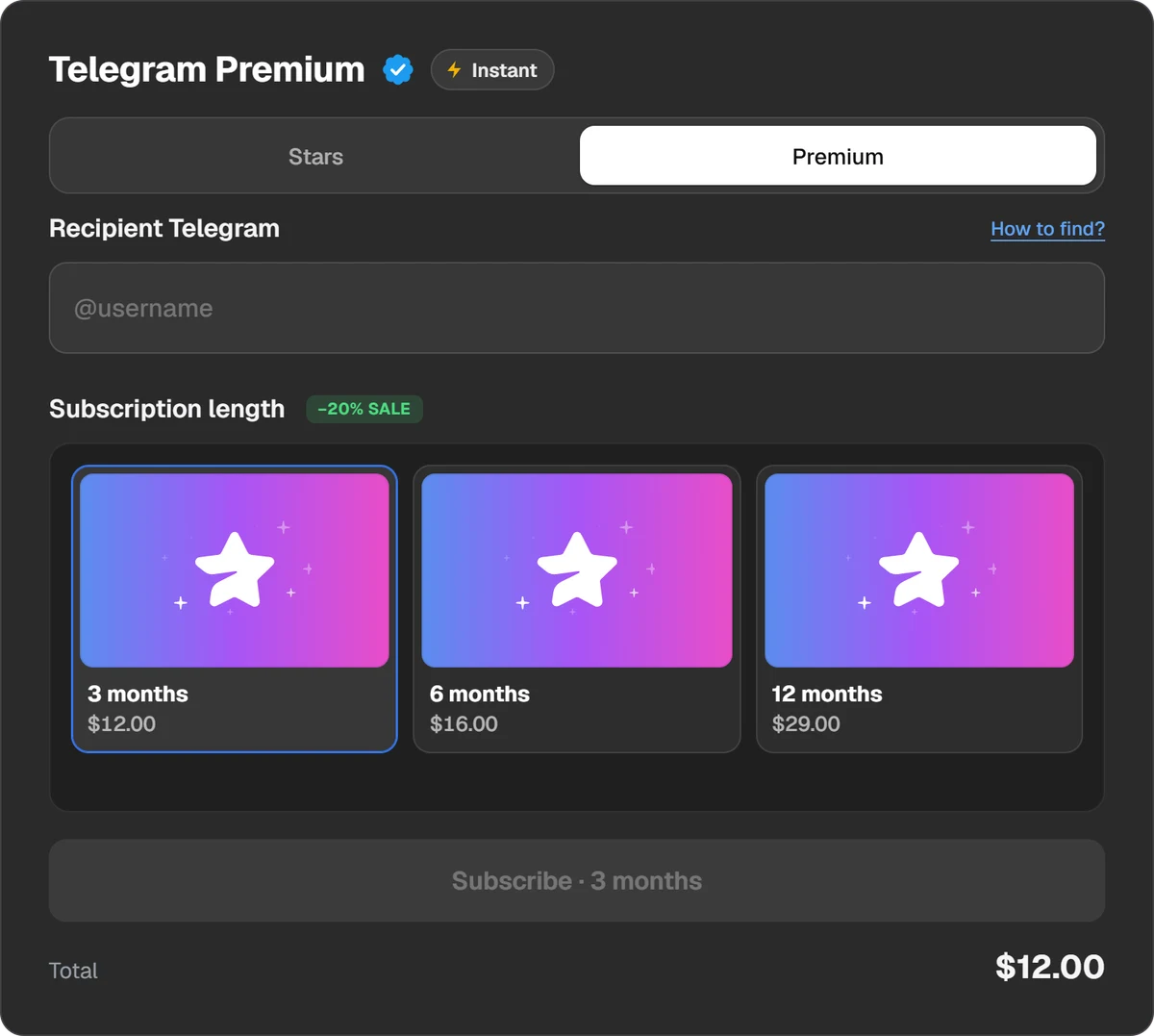
The recipient and the term. The price is shown before you pay.
Pay with crypto
Press the order button and pick a coin or a wallet: USDT, USDC, TON, BTC and others, or Binance. No bank card is needed.
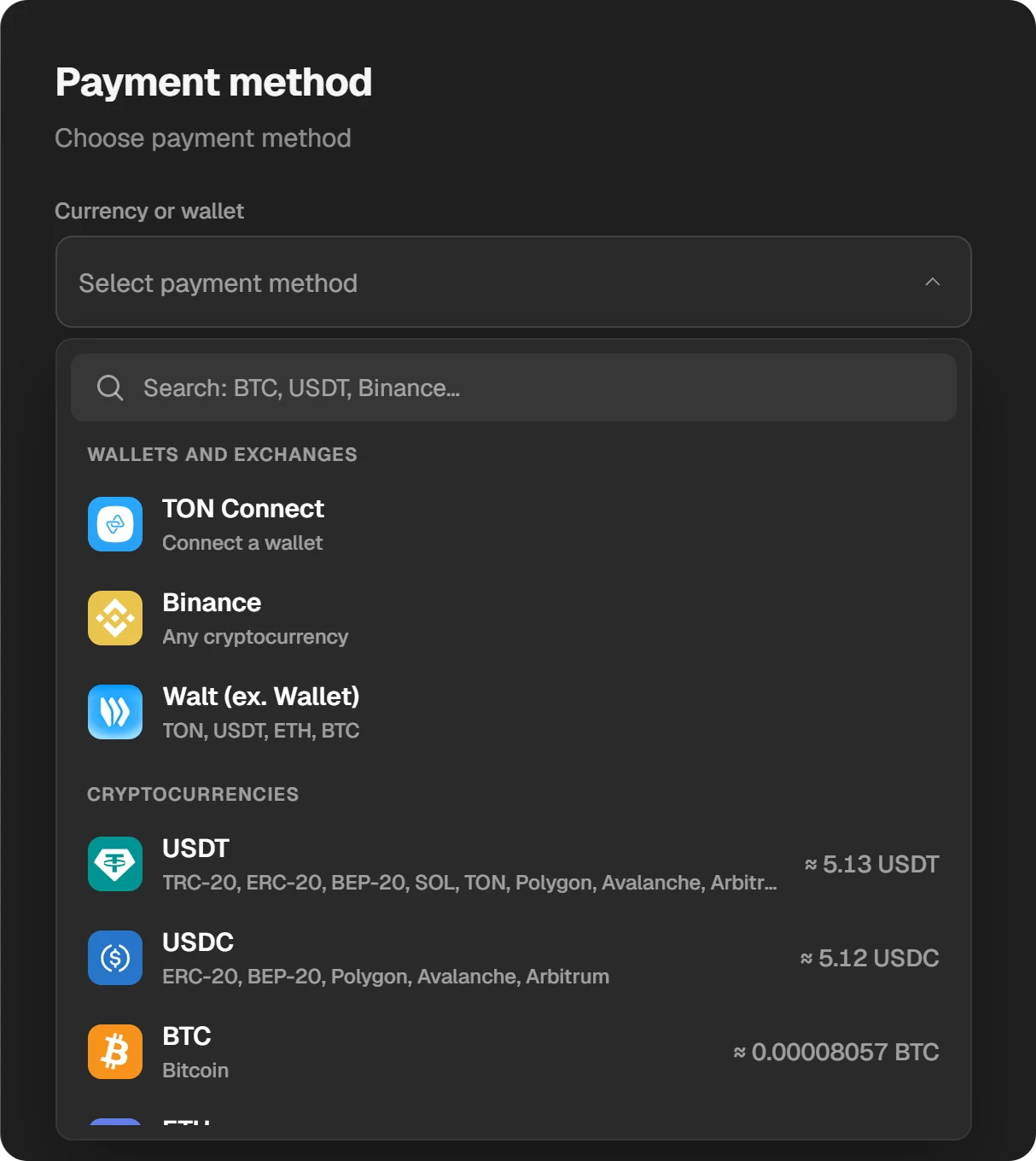
The amount in each coin is right in the list.
Wait for Premium
The window shows by itself when the payment arrives. Check Settings → Telegram Premium in Telegram.
Paid on Play Wallet but Premium is not on
- Open the order in “History” at the top of the site. If it still waits for payment, the network has not confirmed the transfer yet.
- Check the network and the amount. A transfer on another network, or a smaller one, is not credited automatically.
- Check the @username in the order. Premium went to the account named there.
- Restart Telegram and look at Settings → Telegram Premium.
- If something is wrong, write to support with the order ID; the “ID” button in the order window copies it. If you used the wrong network, add the transaction hash.
More on paying for Premium where cards fail: How to pay for Telegram Premium from Russia. On an iPhone, see the iPhone article.
Was it the app store’s error? Choose a term on the Telegram Premium page and enter the same @username.
Questions and answers
Why does my card fail for Telegram Premium?
The app store or the payment provider does not accept it. In Russia, the App Store stopped subscription billing on 1 April 2026, and Google Play paused payments in 2022.
What does “an error occurred while processing your payment” mean?
The app store, the bank or the payment provider declined the payment. Retrying with the same card rarely helps. On Play Wallet you can buy Premium without a card, with crypto.
I have money on my Apple balance. Why does it still fail?
Check that the balance covers the whole price and that this Apple ID does not already pay for Premium on another Telegram account. One Apple ID supports one subscription.
Was I charged if there was an error?
Usually a failed payment is not charged. If money did leave your card and there is no Premium, contact the support of the store or service you paid through.
How do I get Premium if nothing works?
Order it for your own @username on Play Wallet and pay with crypto.
Will a VPN help?
We do not suggest one, and it does not change your card: a card declined by the store stays declined from any IP address. A gift by @username is simpler.

