

How to pay for Telegram Premium when your card fails
When your card fails, you can get Telegram Premium on Play Wallet: a gift to your own @username for 3, 6 or 12 months, paid with crypto. It needs no app store and works the same on an iPhone. Here are the steps and why paying in the app ends in an error.
In short
- On Play Wallet you get Premium by @username for 3, 6 or 12 months and pay in USDT, TON, BTC and other coins.
- It is a fixed term with no recurring charges. We have no one-month term and take no bank cards.
- Premium belongs to your account, not your phone, so it works on an iPhone too.
- In Russia the App Store has taken no card or phone-bill payments for subscriptions since 1 April 2026, and Google Play has paused payments since 2022.
- If Premium is already on, order after it ends: a new term may not add to the current one.
How to pay for Premium on Play Wallet
Find your @username
In Telegram open Settings and find the Username line. If there is none, set any free name.
Enter the @username and the term
Open Telegram Premium, paste the @username into the Recipient Telegram field and check the name and picture the form shows. Choose 3, 6 or 12 months; each term shows its price.
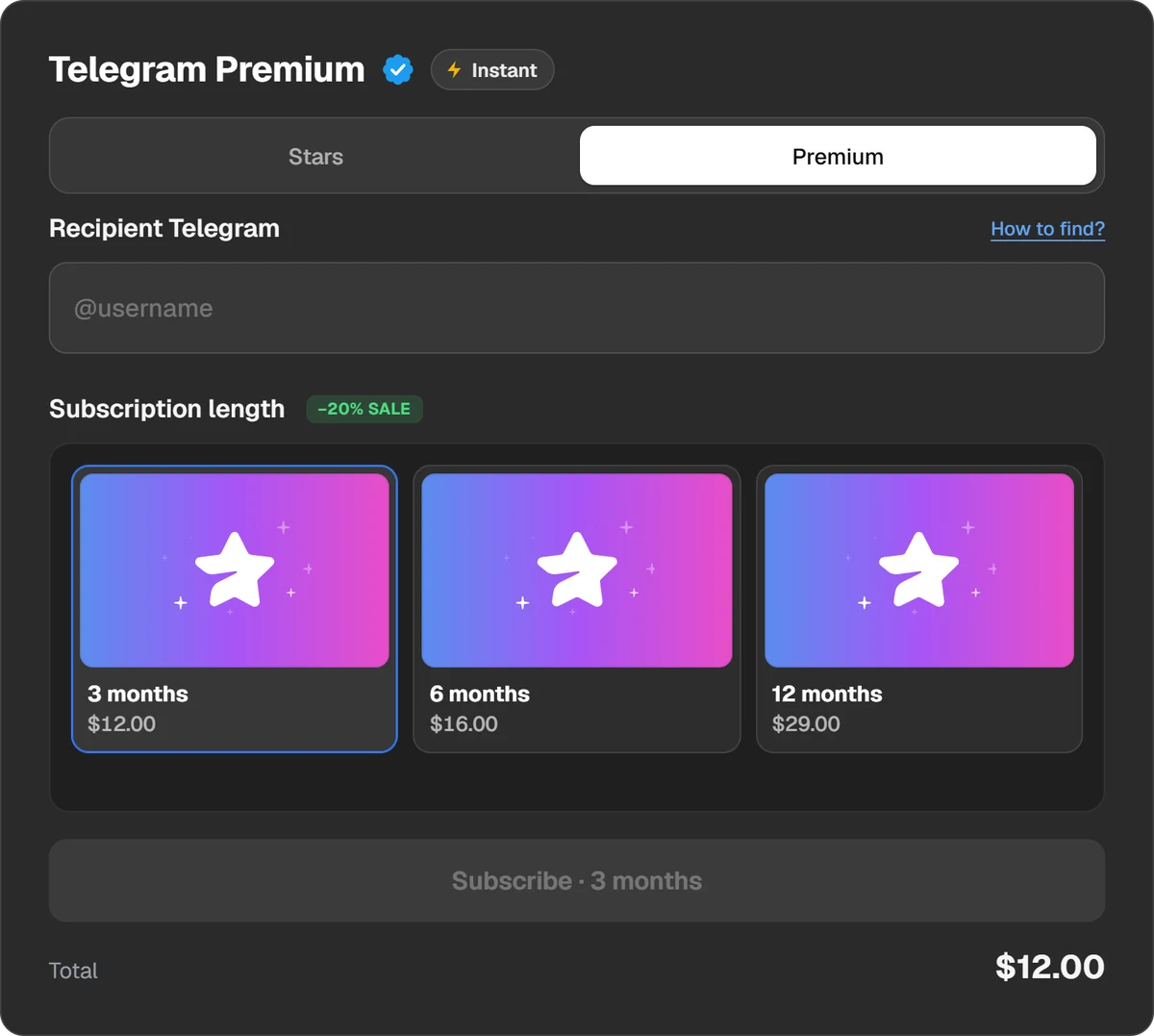
The recipient and the Premium term. The total is shown before you pay.
Choose a coin and pay
Press Subscribe. In the payment window choose a coin or a wallet: USDT, USDC, TON, BTC, or Binance. For USDT and other coins on several networks, pick the network you send from.
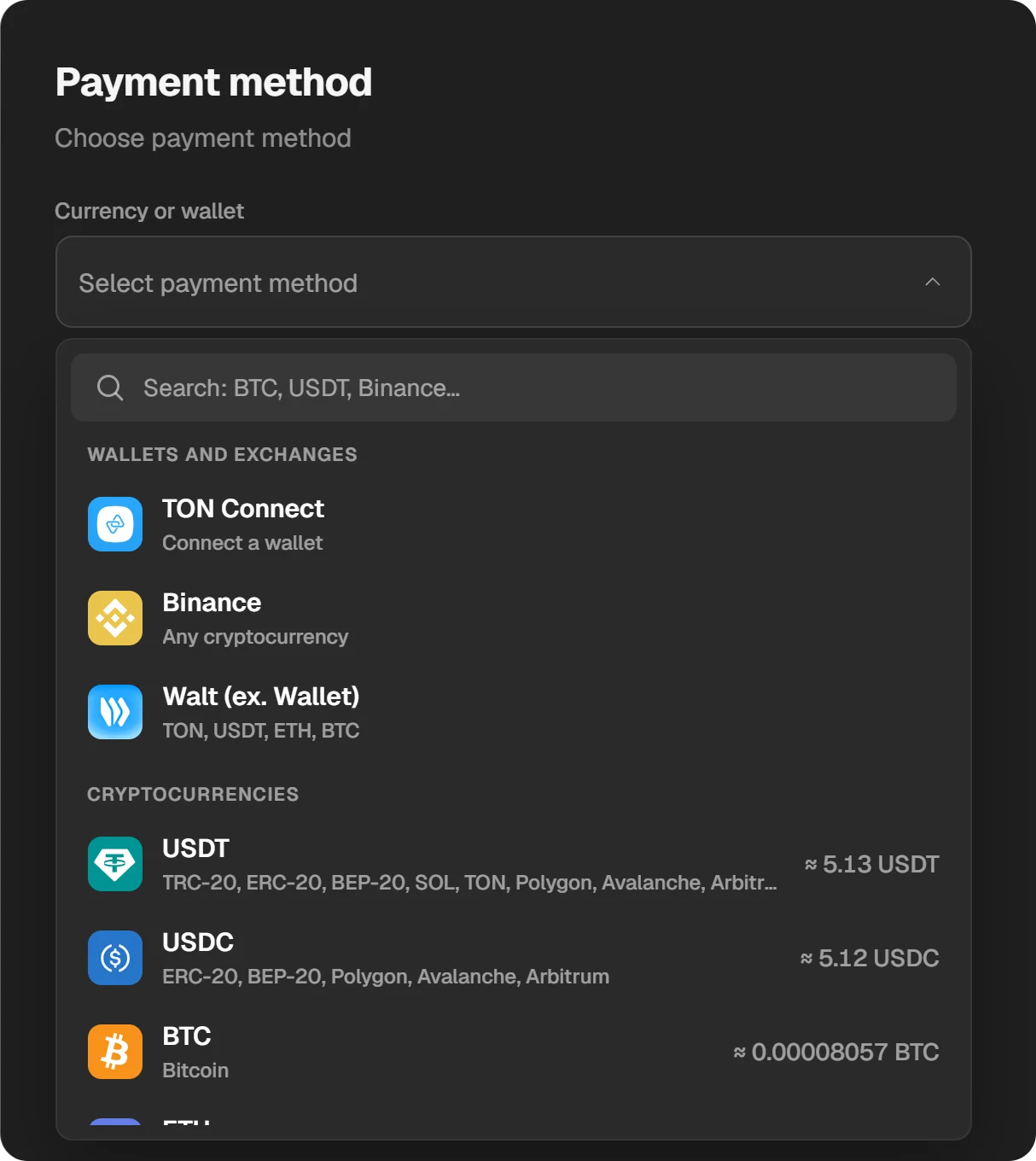
The amount needed in each coin is right in the list.
Wait for Premium to switch on
The window shows by itself when the payment arrives. Premium switches on for the account; check it under Settings → Telegram Premium. The order stays in History at the top of the site.
Send exactly the amount, on exactly the network, you chose in the payment window. A transfer on another network is not credited automatically.
Why the payment in the app fails
- The app store does not accept your card or country. Then the error appears whatever the amount.
- Russia. Since 1 April 2026 Apple takes no cards and no usual phone-bill payments there, and Google Play has paused billing. Our Apple gift cards do not fit a Russian Apple Account.
- A subscription on another Apple or Google account. Telegram says one Apple or Google account can hold only one active subscription.
An order by @username on Play Wallet does not depend on these limits.
If Premium did not switch on after payment
- Open the order in History at the top of the site. If it still waits for payment, the network has not confirmed the transfer yet.
- If the order is done, restart Telegram and check Settings → Telegram Premium.
- Check the @username in the order: Premium went to whoever owns it.
- If something is wrong, write to support with the order ID. The “ID” button in the order window copies it.
Telegram Premium on an iPhone
Telegram ties Premium to the account. Wherever it was paid for, it switches on on your iPhone as soon as you are signed in to that account. Nothing needs setting up in the App Store.
If you already had an App Store subscription, you cancel it only in the iPhone settings: Settings → your name → Subscriptions. Deleting Telegram does not cancel it. More: How to cancel Telegram Premium.
Premium as a gift to a friend
The steps are the same: just enter your friend’s @username in the Recipient Telegram field. More: How to gift Telegram Premium.
If the payment in the app failed, get Premium on Play Wallet: enter the @username, pick a term and check the total.
Questions and answers
Will Premium work on my iPhone if I did not pay through the App Store?
Yes. Premium belongs to your Telegram account and works on every device you are signed in on.
Does the site need access to my account?
No. Only the @username. Never tell anyone your Telegram login code or password.
Will I be charged again automatically?
No. On Play Wallet Premium is a term of 3, 6 or 12 months. When it ends, you can place a new order.
Why does Telegram show a payment error?
Most often the app store did not accept the card or the country. Google Play, for example, has paused billing for users in Russia.
Can I get Premium for one month?
Not from us: gifted Premium comes in 3, 6 or 12 months. The shortest term is 3 months.

