

Can’t buy Telegram Stars: what to do
A failed Stars purchase is almost never Telegram’s own doing. An app store or a bank declines the payment. In that case you can buy Stars on Play Wallet by @username with crypto. Here are the causes, the username check and the steps.
In short
- If the in-app payment fails, you can buy Stars on Play Wallet by @username with crypto.
- The App Store takes only payment methods Apple accepts where your account is registered; in Russia it stopped billing on 1 April 2026.
- Google Play has not taken payments from users in Russia since March 2022.
- On Play Wallet, check that your username is set and spelt right. The form shows the account it found.
- Paid but no Stars: open the order in “History” and write to support with the order ID.
Where the error is and what it means
| Where you bought | Why it fails | What to do |
|---|---|---|
| App Store on iPhone | Apple does not accept your payment method, e.g. any card in Russia since April 2026 | Buy Stars on Play Wallet by @username |
| Google Play on Android | Payments for users in Russia paused since March 2022 | Another card will not help. Buy Stars on Play Wallet by @username |
| Play Wallet | No username set, a typo, or the name has changed | Copy the @username from Telegram’s settings and paste it again |
Telegram does not process these payments itself: the Stars terms say the store handles in-app purchases, and payment providers apply their own fees and rates. So a “payment failed” message nearly always comes from the store or the bank. Repeating the same payment rarely helps.
Check in this order
Where Telegram came from
Apps from the App Store and Google Play sell Stars through the store, and the error is the store’s. It does not affect buying by @username on Play Wallet.
Whose card, from which country
An app store takes only the payment methods of its own country, and only where it operates.
Enough money including fees
Exchanges and networks take their own fees. With no margin, the transfer may fail or arrive short.
The right account
Stars go to an account, not a phone. With two accounts, check which one you buy for and which one shows My Stars.
Do not change your Apple or Google account country or use someone else’s address to pay. You lose the balance, and it does not guarantee the payment. A VPN does not help either: a card stays tied to its country whatever your IP address.
If buying on Play Wallet fails
- No username set. Without an @username you cannot buy Stars by name. In Telegram Settings find Username and set any free one.
- A typo. Copy the name from Settings rather than typing it from memory. The @ sign is optional. A username has only Latin letters, digits and underscores, 3 to 32 characters.
- A recently changed name. The Stars go to whoever owns the name now. Check it again before paying.
- Outside the limits. On Play Wallet one order is 67 to 2,000 Stars. For more, place several orders.
On Play Wallet the form checks the name itself. While checking it says “Checking username…”, then shows the found account’s name and photo or says “User not found — double-check the username”. The buy button turns on once the account is found.
If the form says “User not found” and you are sure the name is right, do not look for workarounds. Write to support with the @username and we will check.
How to buy Stars when nothing else works
Enter the @username and the amount
Open Telegram Stars, paste the @username into the Recipient Telegram field and wait for the form to show the account. Enter 67 to 2,000 Stars or pick a pack.
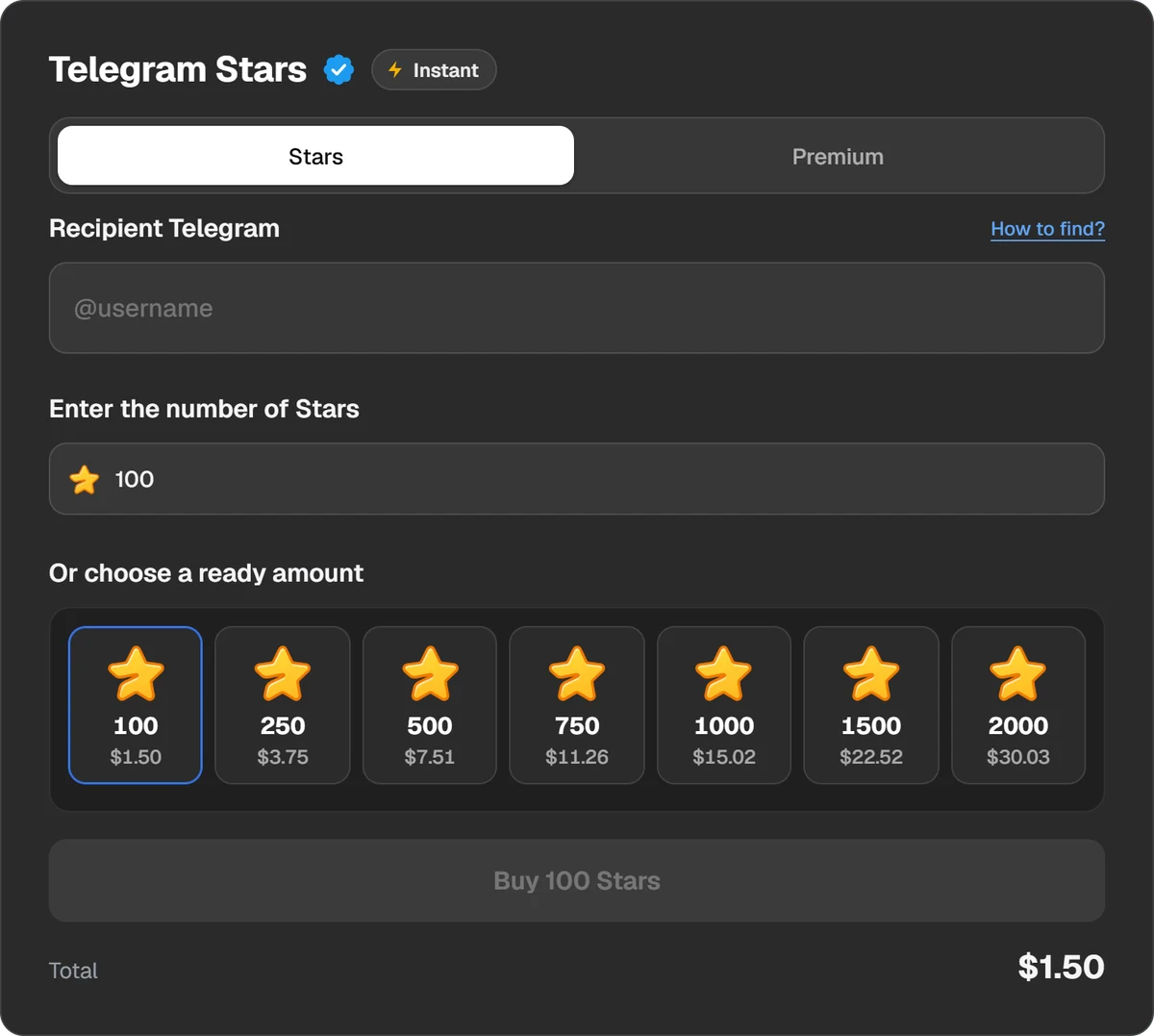
The form shows the account it found. The amount to pay shows before you pay.
Pay in crypto
Press Buy and choose a coin or a wallet: USDT, TON, BTC and others, or Binance. No bank card, so app store errors do not reach you here.
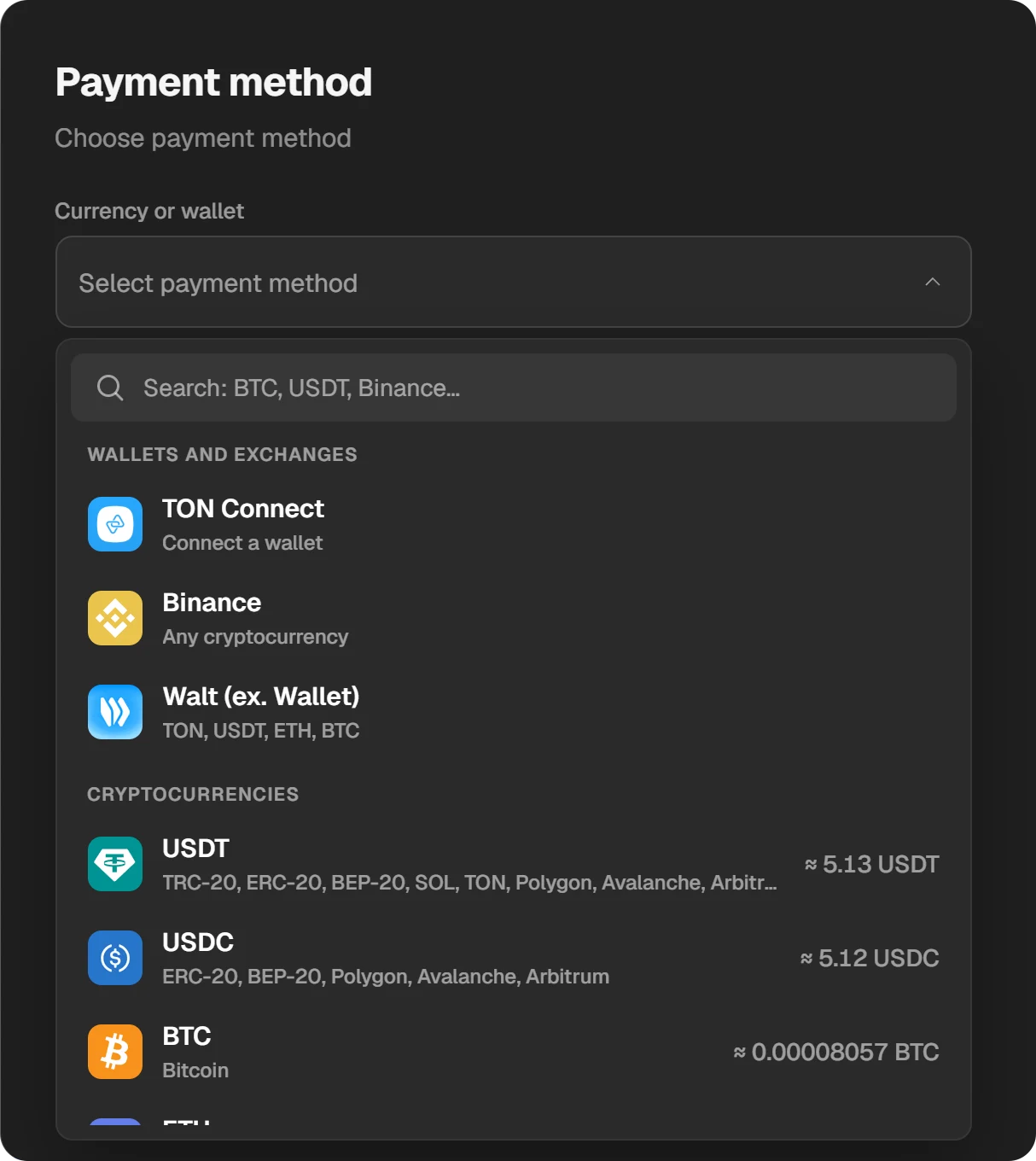
The amount needed in each coin is right in the list.
Check the balance
When the order is done, the Stars are in Settings → My Stars. The order stays in “History” at the top of the site.
Paid on Play Wallet but no Stars
- Open the order in “History” at the top of the site. If it still waits for payment, the network has not confirmed the transfer yet.
- Check the network and the amount sent. A transfer on another network, or for less, is not credited automatically.
- Check the @username in the order: the Stars went to that account.
- If the window says the payment went through but the order could not be completed, the money returns to your wallet automatically within 24 hours.
- If anything is off, write to support with the order ID, copied by the “ID” button in the order window. For a wrong network, add the transaction hash.
Was it the app store’s error? Order Stars on Play Wallet for the same @username.
Questions and answers
Why can’t I buy Telegram Stars?
Usually the store declines the payment because it does not accept your payment method or country. On Play Wallet, a typo or an unset username is the usual cause.
What does an error when buying Stars mean?
The app store, the bank or the payment provider did not accept the payment. Retrying with the same card rarely helps. Without a card, you can buy Stars on Play Wallet with crypto.
Was I charged if there was an error?
Usually a failed payment is not charged. If money left and no Stars came, contact the support of the store or service you paid through.
Why can’t the site find my @username?
Check that a username is set in Telegram’s settings and copied without mistakes. If it is right and the form still says “User not found”, write to support.
Will a VPN help?
No. A card stays tied to its country whatever your IP address, and the store looks at the account’s and the card’s country.

