How to buy Robux when in-app payments fail
In some countries the Roblox app cannot take payments: the app stores do not accept local cards, or do not work at all. Russia is the clearest case. Here is what stops working and the way that remains.
In short
- In the Roblox app, Robux are paid through the App Store or Google Play. If they cannot take your payment, the purchase fails.
- In Russia, Google Play has not taken payments since 2022 and the App Store since 1 April 2026.
- Roblox itself was restricted in Russia from 3 December 2025. On 11 June 2026 Roblox confirmed that access was restored.
- What still works is a Roblox gift card: a code you redeem at roblox.com/redeem.
- A code from any country works on an account from any country; the value converts by itself.
- Play Wallet sells Roblox cards for crypto. The code appears in the order window.
What stops working
| Way | What happened |
|---|---|
| Buying in the Android app | Google Play paused its billing for users in Russia on 10 March 2022. In-app purchases fail. |
| Buying in the iPhone app | Since 1 April 2026 Apple has not taken mobile-carrier payments in Russia, and the usual ways to top up the Apple Account balance are off. An existing balance can be spent. |
What works: a Roblox gift card
A Roblox gift card is a code you redeem on the official page roblox.com/redeem. Roblox says its codes work worldwide: a card issued for one country works on an account from any other. You pay nothing in Roblox itself; the code is already paid for.
- A Robux card, such as 400 or 800 Robux, adds Robux to the balance at once.
- A card for an amount in dollars or euros adds Roblox Credit. You turn it into Robux with “Get Robux” or pay for Roblox Plus with it.
How to buy a code on Play Wallet
Choose a card
Open the Roblox page. Pick a tab: Robux, USD or EUR. Tap the amount, set the quantity and press “Buy”. No Roblox account, login or password is needed to buy.
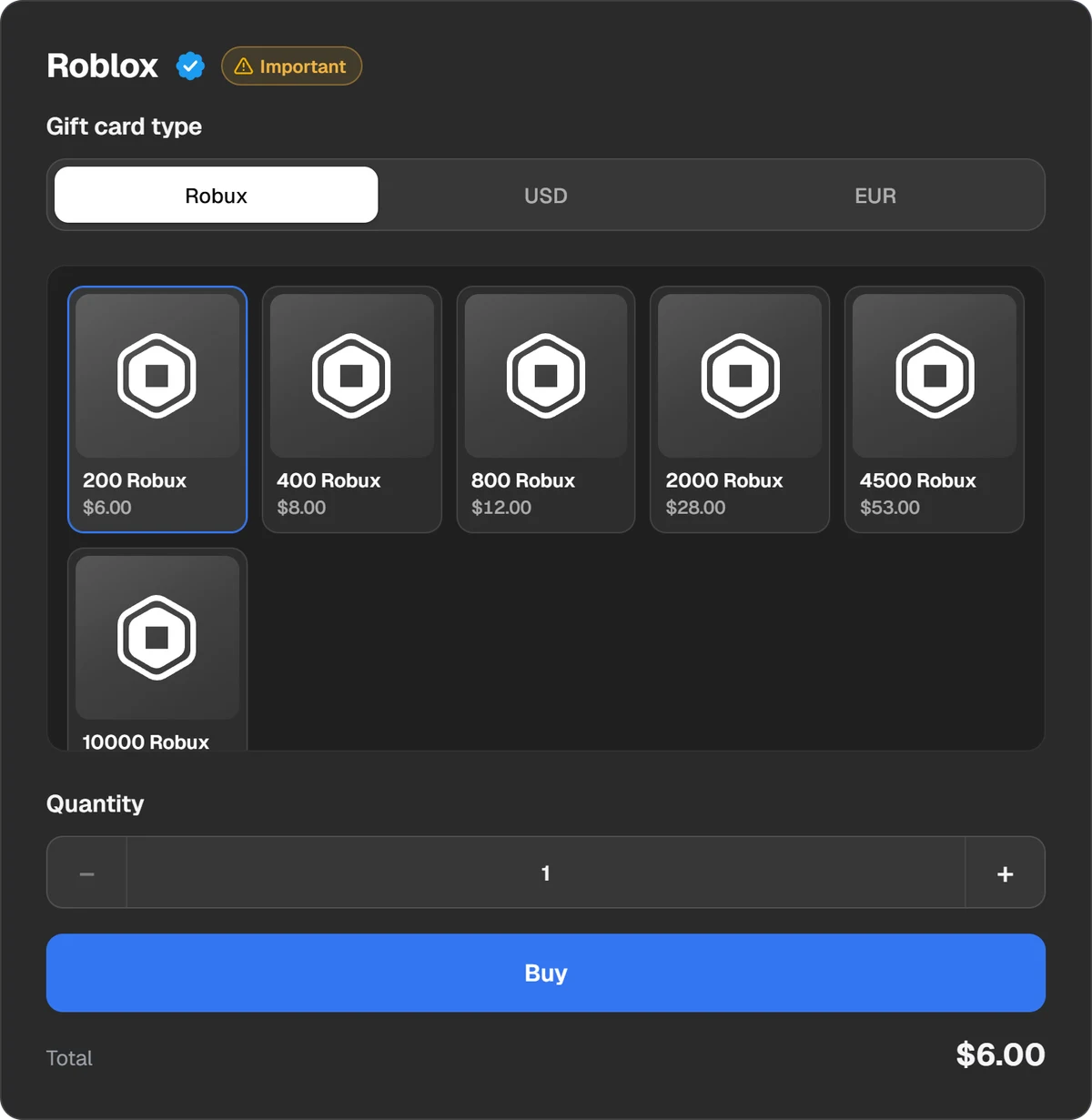
Robux cards and cards for an amount, each with its price.
Choose how to pay
The payment window has two parts. “Wallets and exchanges”, such as Binance or Walt in Telegram. “Cryptocurrencies”: USDT, TON, BTC and other coins, each with the amount you need. The service fee is shown before you pay.
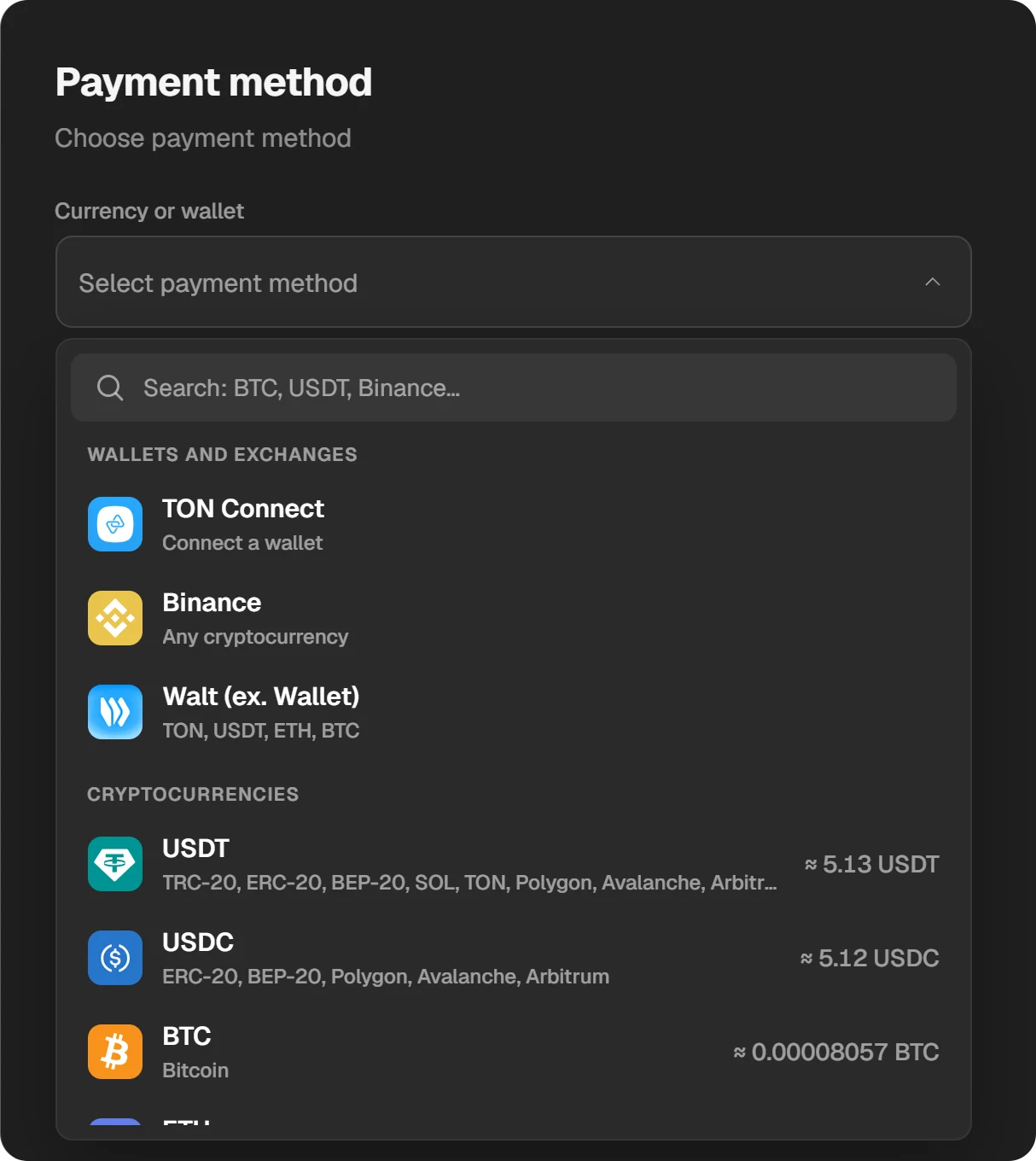
The amount in each coin is right in the list.
Pay and get the code
Send exactly the amount, on the network you chose. When the network confirms the transfer, the order completes and the window shows “Your code”. You can close the window: the order and the code stay in “History” at the top of the site.
If the Robux are for a child, it is best for an adult to make the payment. How to pay with coins and what to do if an order waits for payment: How do I pay with crypto.
How to redeem the code
- Open roblox.com/redeem in a browser on a computer or phone. Most Roblox apps have no code field.
- Sign in to your Roblox account.
- Paste the code and press “Redeem”.
- A Robux card tops up the balance at once. For a card for an amount press “Get Robux”, then “Buy”.
Step by step, with errors and fixes: Where to enter a Robux code.
Which card to choose
| What you need | Which card |
|---|---|
| Robux for a purchase in a game | A Robux card: the number of Robux is known in advance |
| A Roblox Plus subscription | A USD or EUR card: the credit pays for 3, 6 or 12 months of Plus |
| A gift for a friend | Either. Pass the code on and your friend redeems it on their account |
If a code is refused, check look-alike characters. Roblox suggests trying 0 as O, 1 as I, 2 as Z, 5 as S, 8 as B. Codes go in one at a time. If nothing helps, write to support with the order ID.
Spending Robux in a game
Supporting a particular Roblox game means buying something there with Robux: a pass, an item or the game’s own currency. With Robux on the balance, open the game and tap the purchase. Roblox always shows a confirmation with the price and the balance left.
Roblox does not give Robux back for purchased items, even accidental ones. Check what you are buying before you confirm.
Stay safe
- Never give anyone your Roblox password. Neither a shop nor a “Robux seller” needs it.
- Redeem codes yourself, only at roblox.com/redeem. Never send a code to someone who offers to “redeem it for you”.
- Free Robux generators do not exist. Roblox calls them a scam.
- Robux “ten times cheaper” are most likely a scam or a stolen card, and Roblox can take such Robux back.
More signs of an honest seller: Where to buy Robux safely.
Questions and answers
Why does my Robux payment fail in the app?
The App Store or Google Play cannot charge your payment method in your country. A Roblox gift card avoids that: you buy the code elsewhere and redeem it at roblox.com/redeem.
Will a U.S. Roblox card work on my account in another country?
Yes. Roblox says all its codes work worldwide, and the value converts to the account’s currency.
How do I add Robux from a phone?
Buy a card code, then open roblox.com/redeem in the phone’s browser, sign in and enter the code. The Robux show up in the app too.
Can I get Robux back if I did not like a purchase?
No. Roblox does not refund Robux for items and passes. Read the description before buying.
How do I support a game’s creator?
Buy a pass or an item in their game with Robux. The creator gets the Robux after a holding period, minus Roblox’s fee.