

How to buy Telegram Stars with crypto
If you hold crypto, you can buy Telegram Stars and Premium on Play Wallet by username, for yourself or a friend. You can pay in USDT, TON, BTC and other coins. Here are the steps, the choice of network and the common mistakes.
In short
- On Play Wallet, Stars and Premium are bought by @username with crypto, for yourself or a friend.
- The TON coin was renamed Gram (GRAM) in 2026. Many wallets and sites, ours included, still say TON.
- Pay through Binance, Walt, TON Connect or by sending USDT, TON, BTC and other coins. We do not take bank cards.
- One order is 67 to 2,000 Stars. You only need the username.
- Stars cannot be refunded or transferred after purchase. Check the @username before paying.
How to buy Stars with crypto on Play Wallet
You do not have to swap your coin for TON. We take it and credit Stars to the account you name. No password, phone number or Telegram code is needed, only the username.
Enter the @username and the number of Stars
Open Telegram Stars, enter the recipient’s username (yours or a friend’s) and choose a pack or your own number of Stars. For Premium, open Telegram Premium and pick 3, 6 or 12 months. The price and the fee are shown before you pay.
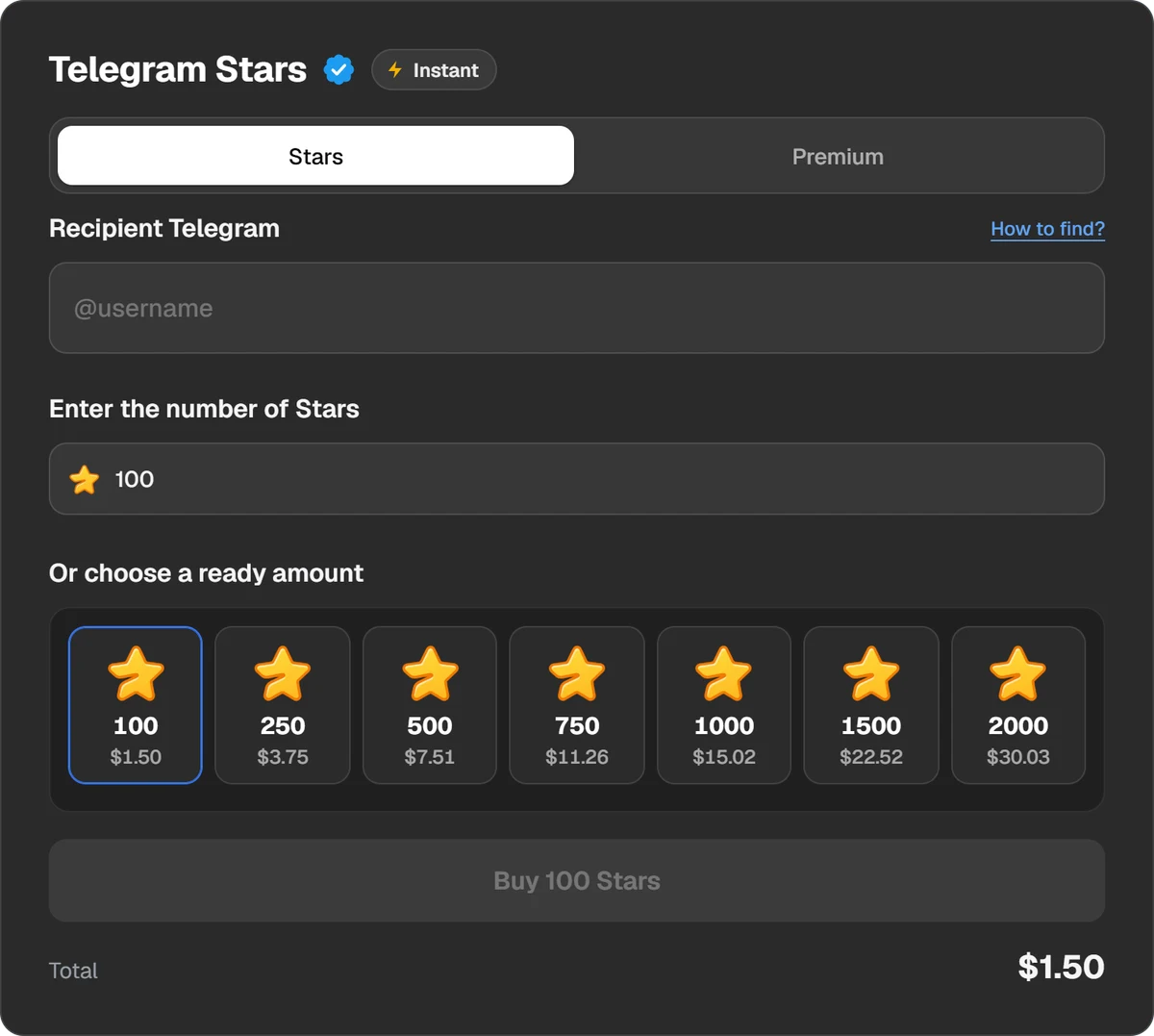
The order form: username and number of Stars.
Choose a coin or a wallet
The payment window has two parts. “Wallets and exchanges”: Binance, Walt, TON Connect. “Cryptocurrencies”: USDT, USDC, BTC, ETH, TON and others, each with the amount you need.
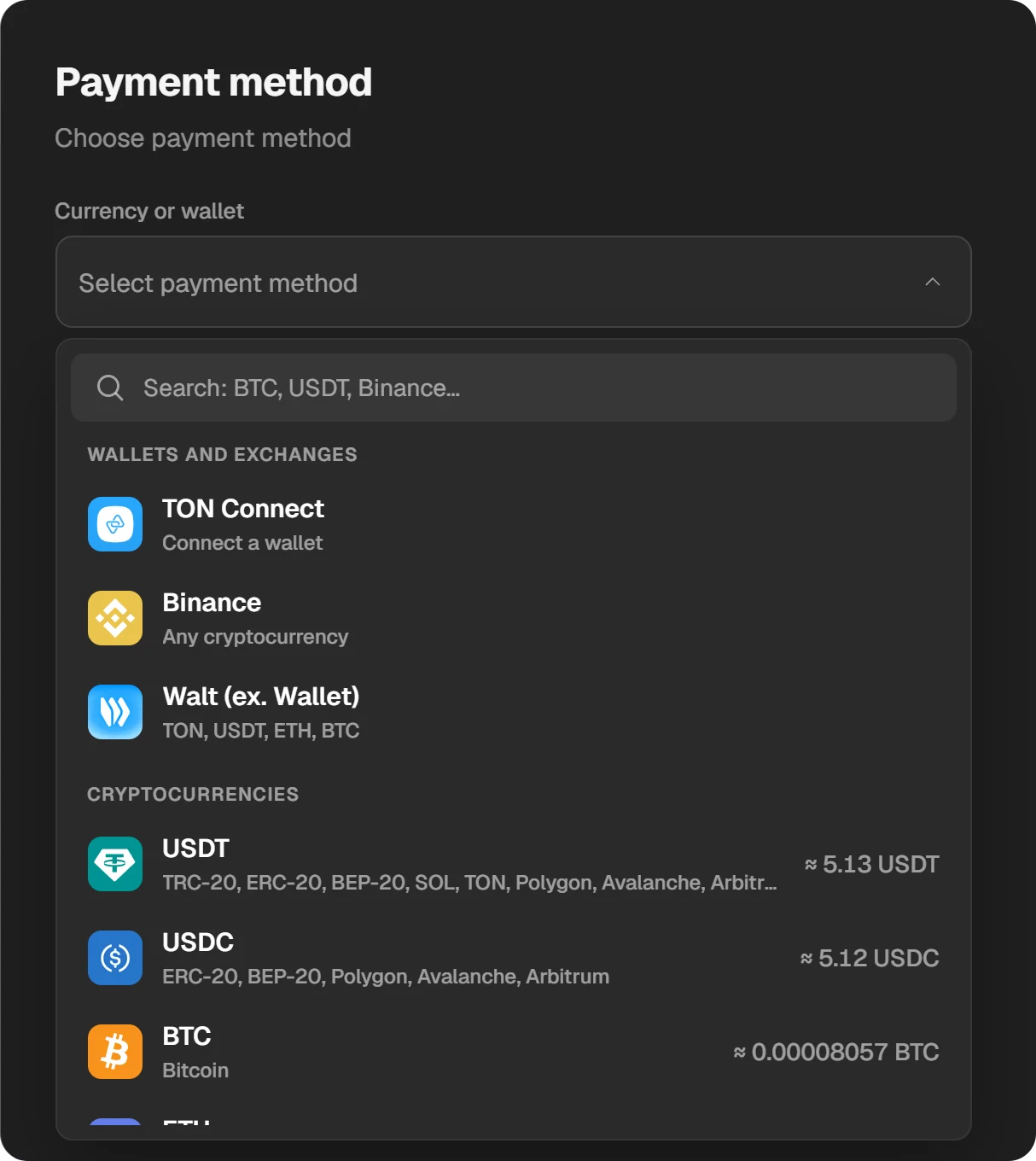
The amount needed in each coin is right in the list.
Choose the network
USDT runs on several networks: Tron (TRC-20), TON, BNB Smart Chain, Ethereum and others. Pick the one your coins are on. A transfer on another network is not credited automatically.
Send exactly the amount shown
A page opens with the address, the amount and a QR code. You have 30 minutes to pay. You pay the network fee, so send enough for the full amount to arrive.
Check the Stars
When the order is Done, open Settings, then My Stars in Telegram. The order stays in “History” on the site.
Which USDT network costs less: Which USDT network to choose. Paying with TON Connect: How to pay with TON.
Bought Stars show in Telegram under Settings, then My Stars. What Stars are and what they buy: What are Telegram Stars.
What to pay with
- Coins in TON. Choose TON Connect and approve the payment in your wallet, such as Tonkeeper. Connecting does not give a site access to your money: you approve every transaction yourself.
- Coins in USDT, BTC or on Binance. Choose your coin or Binance in the payment window.
- Coins in Walt. Walt is the wallet inside Telegram, formerly called Wallet. Choose it under “Wallets and exchanges” in the payment window. More: How to pay with the Telegram wallet.
- Stars as a present. Enter your friend’s username as the recipient. More: How to gift Telegram Stars.
Common mistakes
- The wrong @username. The Stars go to someone else and cannot be returned. Copy the name from the recipient’s profile.
- The wrong network. USDT sent on BEP-20 to a TRC-20 address is not credited automatically. Write to support with the transaction hash.
- Less arrived. An exchange keeps its withdrawal fee out of what you send. Send a little extra.
- A wallet connected to a fake site. If a site asks you to approve a strange transaction after connecting, reject it.
Under Telegram’s rules a Stars purchase is final, and Stars cannot be sold or transferred. Telegram also says purchases may be restricted in some jurisdictions.
Have the coins and the @username? Order Telegram Stars or Premium. You see the amount in your coin before paying.
Questions and answers
Can I buy Telegram Stars with crypto?
Yes. On Play Wallet by @username with USDT, TON, BTC and other coins, or through Binance and Walt.
How much are Stars in crypto?
The total with the service fee and the amount in each coin are shown before you pay. The network fee and an exchange’s withdrawal fee are on top.
Can I buy Telegram Premium with crypto?
Yes: on the Telegram Premium page with USDT, TON, BTC and other coins, for 3, 6 or 12 months.
Do you need my password or a Telegram code?
No. A purchase needs only the recipient’s @username. Never share your Telegram login code.
What is Gram and how is it different from TON?
It is the same coin: Toncoin was renamed Gram (GRAM) in 2026. Our site still calls it TON.
Can Stars be refunded?
No. Under Telegram’s rules a Stars purchase is final.

