

Telegram gifts for Stars: how to buy and send them
Telegram gifts are animated items bought with Stars and sent to friends or channels. A regular gift can later be converted into Stars or upgraded to a collectible, and collectibles can be bought from other users. Here is how to buy and send one.
In short
- You send a gift from a profile: ⋮ or ⋯ → Send a Gift, paid with Stars.
- Add a message and hide your name from others; the recipient still sees who sent it.
- Each gift shows its price. Telegram publishes no general price list.
- Collectible (NFT) gifts come from upgrading a regular gift or buying one from another user for Stars.
- If paying for Stars in the app fails, buy them by @username on a website.
Kinds of gifts
| Gift | What it is | Where to get it |
|---|---|---|
| Regular | An animated gift you can send any number of times | The Send a Gift window |
| Limited | A limited edition; when it sells out, no new ones | There while it lasts; afterwards only from owners |
| Premium only | Some sets are only for Premium subscribers | The gift window, with Premium on |
| Collectible (NFT) | A unique version with its own number, model and backdrop | Upgrade yours or buy one from another user for Stars |
How to buy and send a gift
Open the recipient’s profile
Open the chat with the person or channel and tap the name at the top. Gifts can go to users and to channels.
Tap Send a Gift
Tap ⋮ on Android or ⋯ on iPhone and choose Send a Gift. The gift showcase opens, with each price in Stars.
Pick a gift and write a message
Tap a gift and add a greeting or emoji; by default Telegram allows up to 128 characters.
Decide whether to show your name
You can hide your name from people who view the recipient’s profile. The recipient still sees the gift is from you.
Pay with Stars
Confirm the purchase. If you are short of Stars, Telegram offers to buy more. The gift arrives in the recipient’s chat at once.
Star purchases are final. A sent gift cannot be taken back, so check the recipient before paying.
What gifts cost
Each gift has its own price, shown right on the showcase. Telegram’s pages have no price list, and the range of gifts changes from time to time. To find a cheap gift, open Send a Gift and look at the prices. Limited gifts come in a fixed edition: once it sells out, you can only buy one from an owner.
What the recipient can do
- Show it on the profile. It appears in the Gifts tab for visitors to see; settings decide which gifts show.
- Convert it into Stars. You get back part of its price, and only within a limited time after receiving it. More: How to convert a Telegram gift into Stars.
- Upgrade it to a collectible. For a small number of Stars the gift becomes unique. The sender can prepay the upgrade so the recipient upgrades for free.
Collectible (NFT) gifts for Stars
A collectible is a unique version of a regular gift, with its own number, model and backdrop. You can transfer it to another user, list it for Stars, wear it as a status on your profile or move it to the TON blockchain. There are two ways to get one.
- Upgrade your gift. Open a gift you received and choose to upgrade it; free if the sender prepaid.
- Buy one from another user. Open Send a Gift in any profile, switch on the collectible filter and pick one. You pay in Stars and see the price first.
- Offers. You can offer the owner your price. Your Stars are reserved and return by themselves if the owner declines or the offer expires.
- Auctions. New collections are sold through auctions in several rounds. Auction gifts cannot be converted into Stars.
- Signatures. Since August 2026 you can add your signature and a comment to a gift bought on the marketplace.
- Moving to TON. It needs your two-step verification password, and sometimes is allowed only from a certain date. A moved gift stays yours even if you delete the account.
Collectible gifts are collectibles, not an investment. Users set the prices, and prices change. Do not spend money you need, and do not trust promises to “resell it for more”.
Avoiding scams
- Buy gifts only inside Telegram. Bots and channels selling “cheaper NFT gifts” for a card or crypto transfer often just take the money.
- Never share your login code or password. The two-step password is needed to move a gift to the blockchain. A “buyer” or “support” asking for it wants your gifts and account.
- Check the recipient. The gift goes to the profile you sent it from.
Where to get Stars for gifts
If paying for Stars in the app fails, buy them by your @username on a website. They land on your balance, and you pay for the gift as usual.
Enter your @username and the amount
Open Telegram Stars, paste your @username into the Recipient Telegram field and choose 67 to 2,000 Stars. Check the name and photo the form shows.
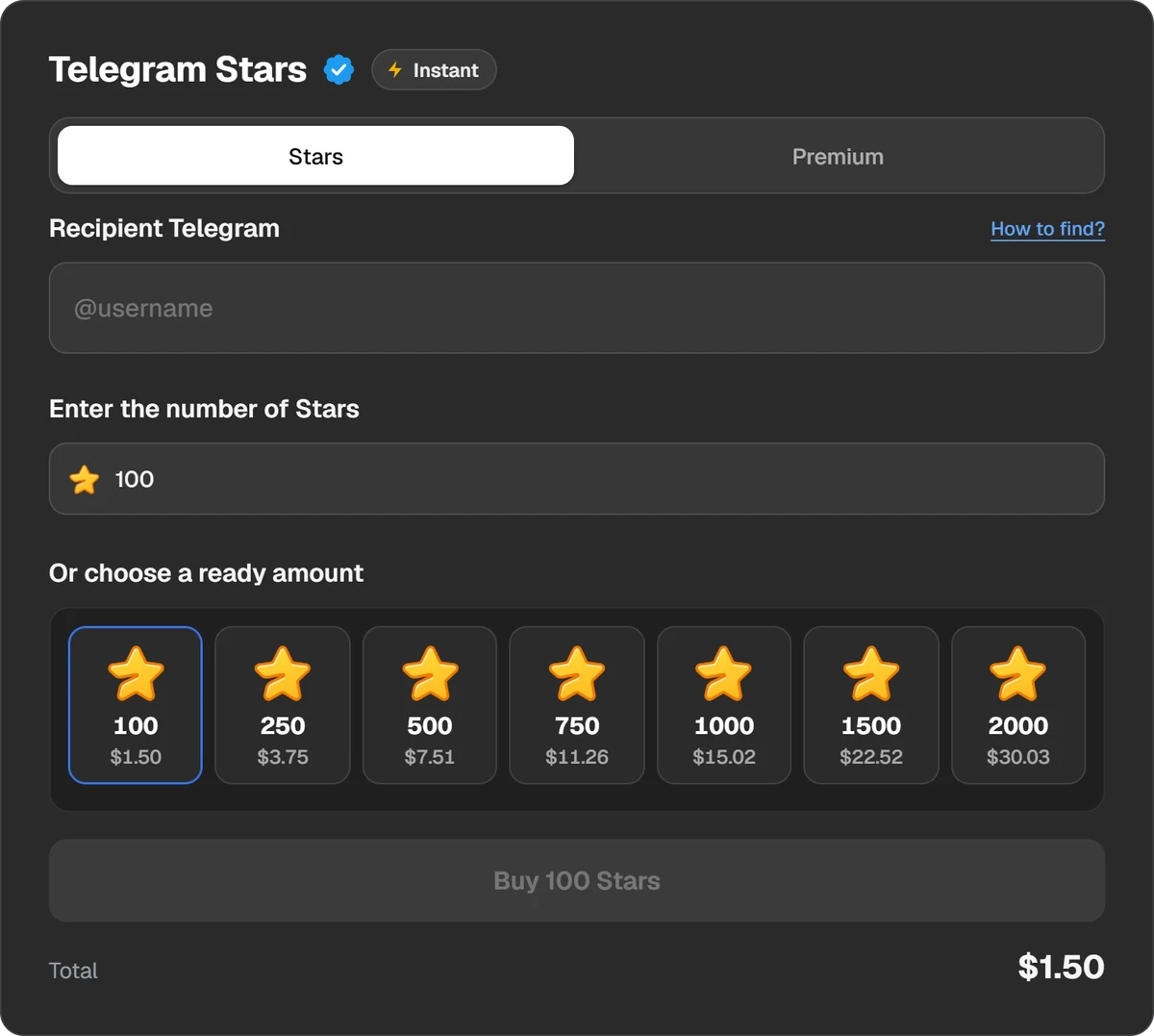
Recipient, number of Stars and the amount to pay.
Pay and send the gift
Press Buy and choose a coin or a wallet. When the Stars reach Settings → My Stars, open your friend’s profile and send the gift.
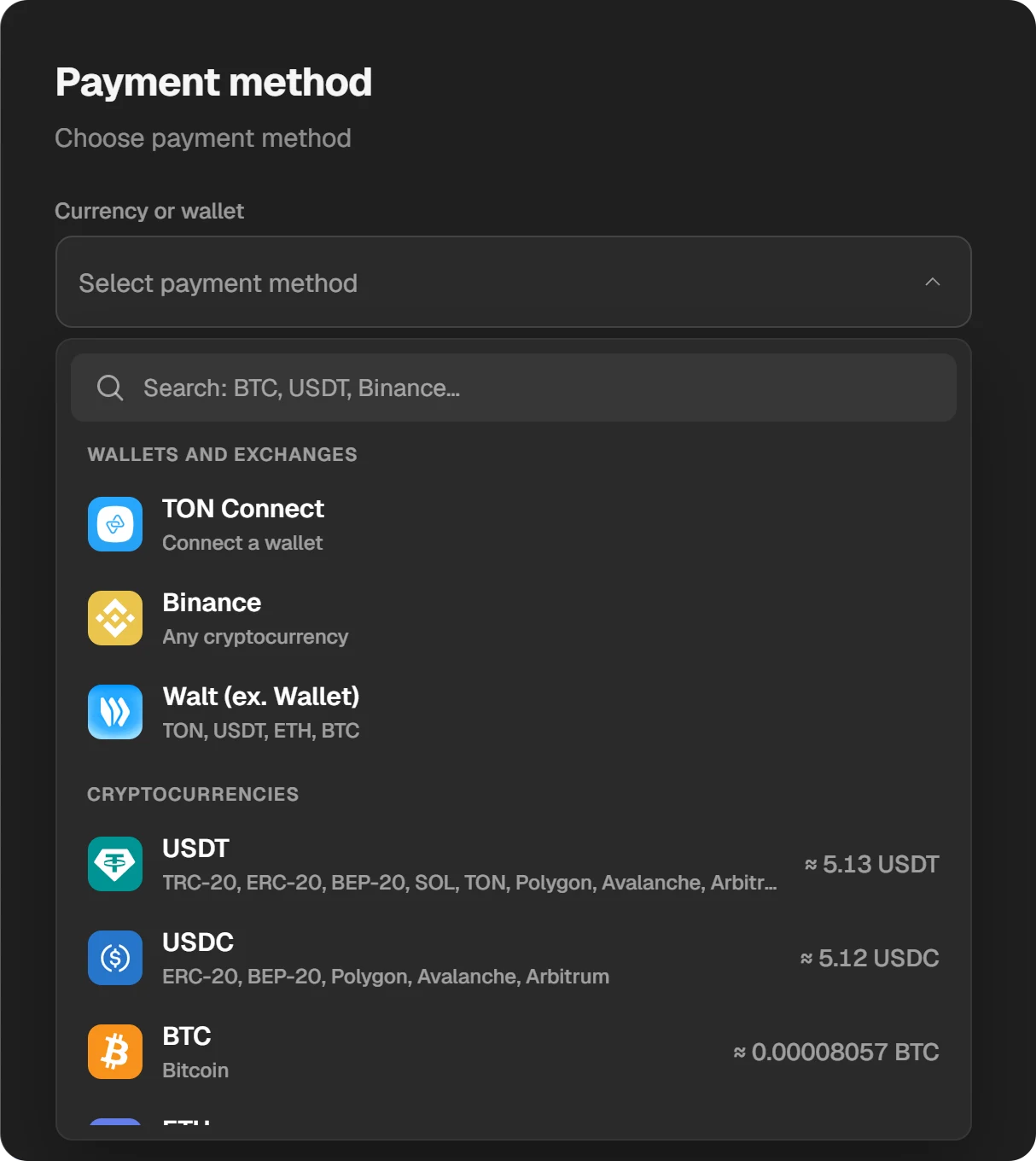
The amount needed in each coin is right in the list.
Questions and answers
How do I buy a Telegram gift with Stars?
Open the recipient’s profile, tap ⋮ or ⋯, choose Send a Gift, tap a gift and pay with Stars.
How do I buy an NFT gift with Stars?
Open Send a Gift in any profile, switch on the collectible filter and buy one for Stars, or upgrade a regular gift you received.
Can I send a gift anonymously?
You can hide your name from other people viewing the recipient’s profile. The recipient still sees who sent it.
Where can I buy Telegram gifts?
Only inside Telegram: regular ones in the Send a Gift showcase, collectibles there through the filter or from owners on the marketplace. Outside “gift shops” are often scams.
Can I get a gift or its Stars back?
No, the purchase is final. The recipient can convert the gift into Stars, for less than its price.

