

How to buy skins and items on the Steam Community Market
To buy a skin or an item on Steam, top up the Steam Wallet on Play Wallet by login and pay in crypto. The balance can then be spent in two official ways: with another player on the Steam Community Market, or with the developer in the game’s store. Their rules and refunds differ.
In short
- Top up Steam on Play Wallet to pay for items: by login for Russia, Ukraine, Kazakhstan and the CIS, with a code for countries such as the US. You pay in crypto.
- The Market needs Steam Guard for at least 15 days, a purchase older than 7 days and younger than a year, and an account that is not limited.
- Buy a listing at once, or place a buy order for a commodity item at your price.
- Fees are already in the price a buyer sees. The total is shown before you confirm.
- Market purchases are final. There are no refunds.
The Market or the game’s store
| Community Market | Game’s store | |
|---|---|---|
| Seller | Another player | The developer |
| Price | Moves, set by players | Set by the developer |
| Choice | Whatever players listed | What is on sale now |
| Payment | Steam Wallet only | Through Steam, such as the wallet |
| Refund | None | Valve’s games: 48 hours. Others: if the developer allows |
Examples of game stores are Mann Co. inside Team Fortress 2 and the Rust Item Store on Steam’s site. Look there first for a new item. An older or rare one is usually found only with players. If you want TF2 Premium, buy in Mann Co.: that is the upgrade Steam Support describes.
Who can buy on the Community Market
The account is not limited
The Market is closed until 5 dollars have been spent on Steam.
There is a qualifying purchase
It is older than 7 days and younger than a year. Steam names wallet funds, games, DLC and software. Key activations, gift purchases and gifts you received do not count.
Steam Guard has run for 15 days
E-mail or the app both count. Turning it off and on restarts the wait.
No temporary block
A new device without the mobile authenticator blocks the Market for 7 days, a reset of a forgotten password for 5 or 30 days, removing the authenticator for 15 days.
The money can be used there
After funding inside Steam by some methods, such as an unverified card, Market purchases open in 3 days.
Steam’s rule on a qualifying purchase says nothing separate about top-ups through intermediaries. Before counting on an urgent listing, open the Market and check whether a restriction is shown.
How to buy an item now
Find the item
Open steamcommunity.com/market, or Community → Market. Choose the game and type the name. Type the address yourself rather than following a link from a chat.
Check the name and properties
Similar skins cost different money because of quality, wear and other properties. Open the item and read all of it. Look at the price history, not at one cheap listing.
Top up the difference
If the balance is short, top up the Steam Wallet by login or with a code for the account’s country. We take crypto. Leave a margin: the credited sum may differ by about 1%, and a listing’s price can move. By login one operation takes 0.5 to 400 dollars.
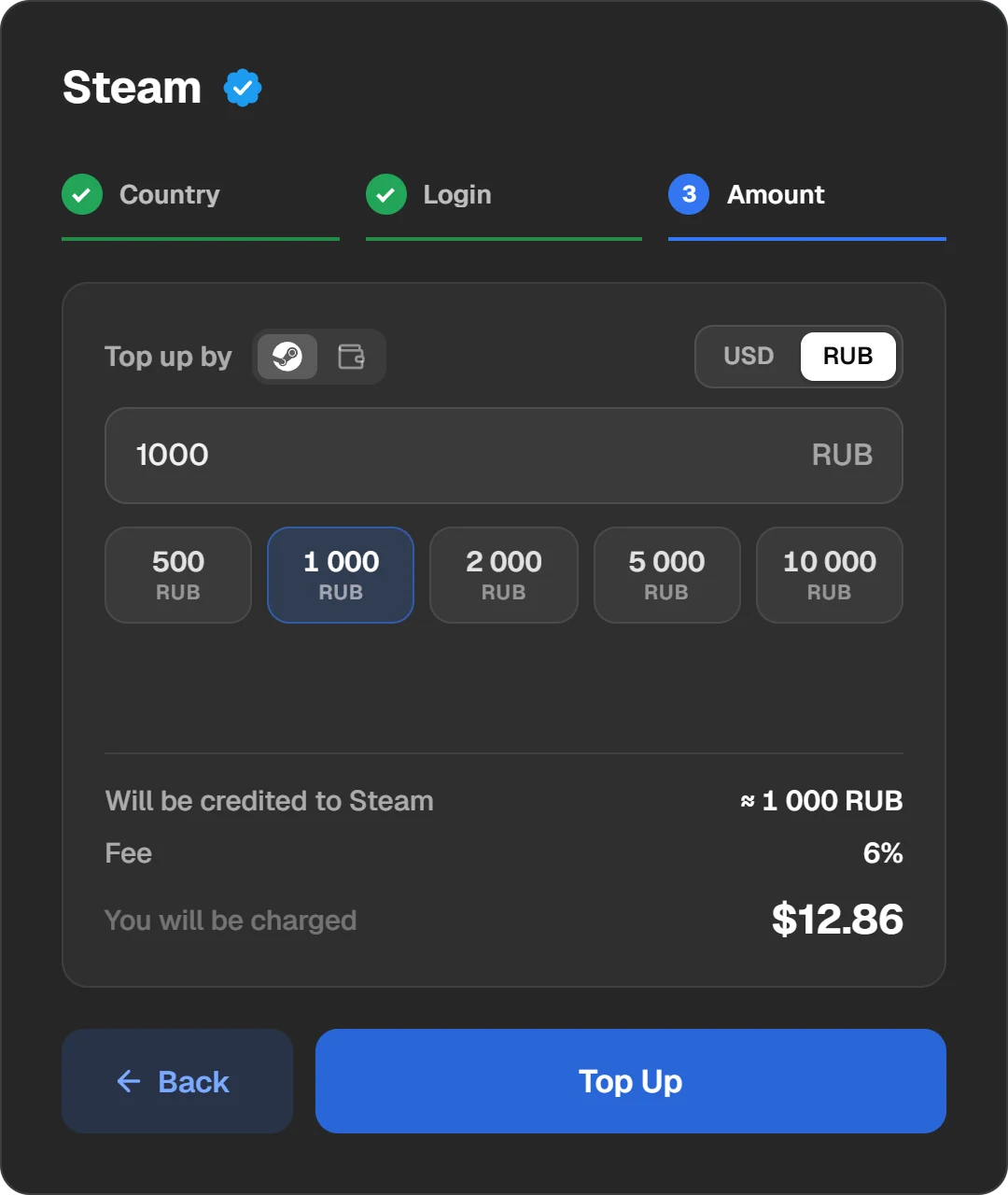
Country, login and amount. The fee is shown before you pay.
Press “Buy now” and check the total
Steam shows the sum with fees before confirmation. A completed purchase cannot be cancelled, so read the name once more.
Find it in the inventory
Pick the game in your inventory. The deal is in your Market history.

The Steam inventory: game tabs and items. The numbers are an example.
A buy order: your own price
Commodity items, which are all identical, have no separate listings. You name the most you will pay and the quantity. Steam buys when a matching listing exists.
- You may pay less. If a listing is cheaper than your price, you pay its price.
- The full sum is not needed in advance. Active orders can total up to 10 times the wallet balance. If the money is short when one matches, that order is cancelled.
- No time is promised. An order can wait or never match. Steam also cancels orders when the item, the balance or the account changes.
- You can cancel it. Active orders are on the Market’s front page.
If you need the item today, buy a listing. If you can wait, order a little below the current price and do not keep orders you are not ready to pay for.
The fee and the currency
The buyer pays the fee. Steam takes 5%, at least $0.01, and the publisher adds its own: 10% in CS2, Dota 2 and TF2. There is nothing to add yourself, as the displayed price includes both. If a CS2 seller wants $10, a buyer sees about $11.50. “Steam fees” has the full sum.
Prices appear in your wallet’s currency. Steam converts listings in other currencies at a rate updated daily. If the currency looks wrong, check that you are signed in. An account that was never funded may not see the local currency on the Market.
When a bought item can be traded
Items from the Market and from game stores often cannot be traded or resold at once. Steam writes the exact date in the item’s description in the inventory. There is no single term for every game, and Support does not shorten it.
This is not CS2 Trade Protection, which covers items received in trades: for 7 days they cannot be passed on and the trade can be reversed. The kinds of waiting are gathered in “Funds on hold in Steam”.
If the skin is a present, check its trade date first. It may not be tradable by the day you need it.
How not to lose money
- Do not buy an item “to trade” at a stranger’s request. Steam describes the scheme: you pay a lot for a cheap item listed by an accomplice, and the trade never comes.
- Do not pay in a chat. A Steam trade window holds no money. A promise to “send wallet funds” cannot be kept.
- Do not sign in through a link you were sent. A fake Market takes the password and the Steam Guard code.
- Do not chase a sudden jump. Rare items have few listings, and a few deals can move the price.
Is the Market open to you and the item picked? Top up Steam with the difference and check the total once more.
Questions and answers
Why can’t I buy on the Community Market?
Usually one condition is unmet: a limited account, no purchase older than 7 days, Steam Guard younger than 15 days, a new device or an unverified card. Steam shows the reason.
Can I refund a skin bought on the Market?
No. Steam Support says all Market purchases are final.
Where do I buy Rust skins?
The Rust Item Store on Steam sells new ones, and players sell earlier ones on the Community Market. Both are paid through Steam.
Can I buy Market items with Steam Points?
No. The Market takes wallet funds. Points are spent in the separate Points Shop.
Can I buy Market items from Russia?
The Market works through the Steam Wallet. If the wallet is topped up and the account has no restrictions, you buy the item with the balance.
What is the most one listing can cost?
About $1,800 or the same in another currency. That is Steam’s cap for a listing.
