

How to pay an order with Walt (Wallet) in Telegram
Wallet in Telegram is now called Walt. It is the same service with the same balance, and it pays a Play Wallet order in a couple of taps: no address, no network, no QR code. Here is the whole path, plus how to fund Walt and how to pay by QR code when Walt does not suit you.
In short
- Wallet was renamed Walt. Its Telegram handle is now @walt; the balance and account are unchanged.
- In the payment window choose Walt (ex. Wallet) under “Wallets and exchanges” and press Pay.
- A payment link opens in Telegram. Check the amount and confirm in Walt.
- Pay with TON, USDT, ETH or BTC from your Walt balance, with no network or address.
- Walt is not available in some countries, including the US and the UK; check its list first.
What Walt is
Walt is a crypto wallet that works inside Telegram. It used to be called Wallet. Walt’s help centre says it is the same app with the same products; the name, the logo and the handle changed, and it is now @walt. It no longer appears in Telegram’s settings, so you find it through search.
Walt is custodial: the service holds the keys and you sign in through Telegram. A payment to a shop is therefore a transfer inside Walt, not an ordinary on-chain transfer.
In 2026 Toncoin was renamed Gram, ticker GRAM. The network is the same and there is nothing to swap or migrate. Walt may call the coin GRAM, while the Play Wallet payment window still says TON.
Who can pay with Walt
- Check the restricted list. Walt is not available in the US and its territories, most of the EU, the UK, several disputed territories and a number of other countries.
- No VPN. Walt says you may not use a VPN to get around regional restrictions.
- Basic verification. Name, date of birth and phone number are required for everyone; higher levels raise limits and open P2P purchases.
Step by step
Place the order
Choose a product, for example Telegram Stars by username or a Steam top-up by login, and set the pack or amount. What arrives and the fee are shown before you pay. Press the buy button.
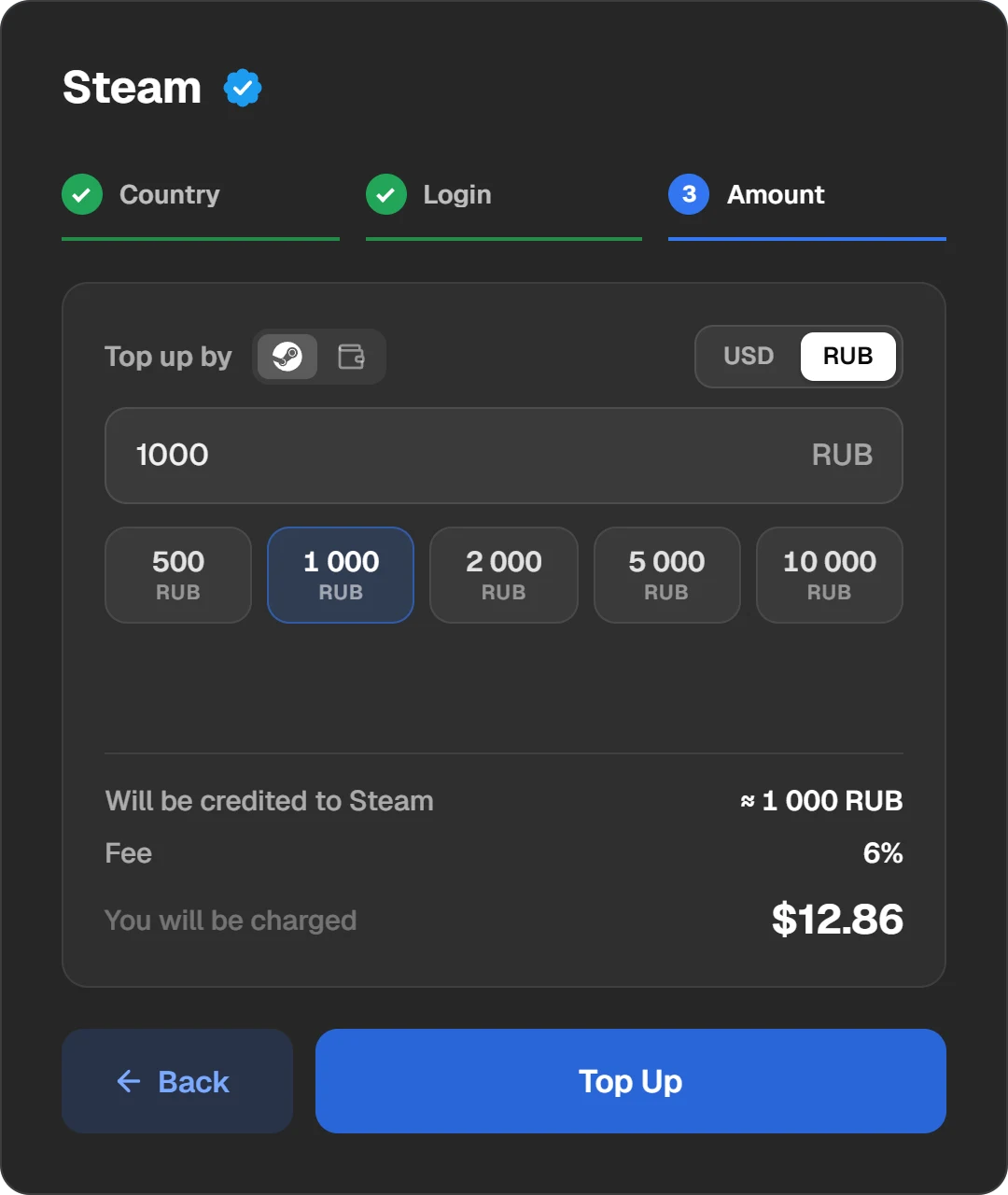
The order form: the product, the amount and the total.
Choose Walt
In the “Currency or wallet” field choose Walt (ex. Wallet) under “Wallets and exchanges”, labelled TON, USDT, ETH, BTC. If Walt is missing, it is not available for this product right now.
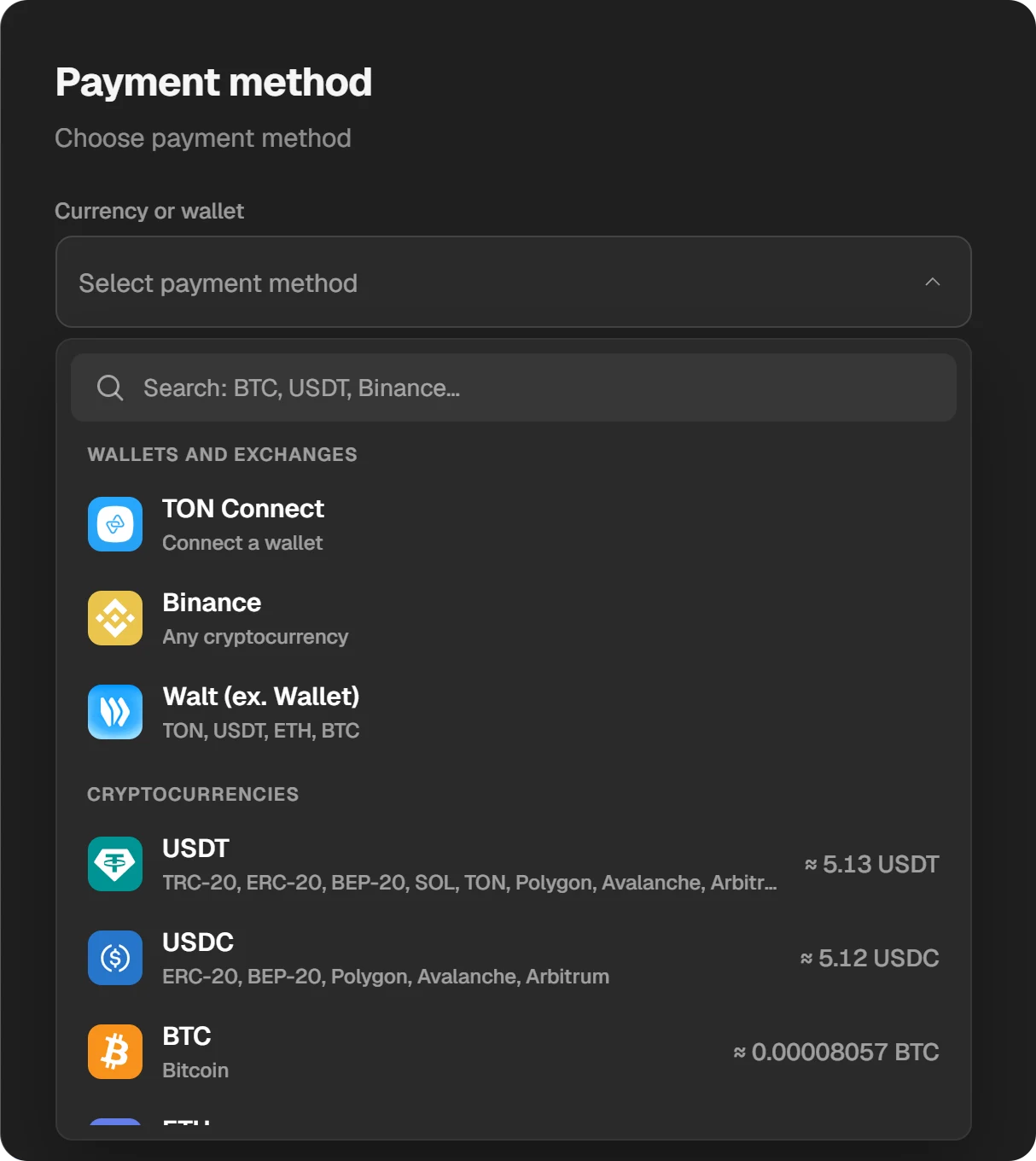
Walt under “Wallets and exchanges”.
Press Pay
Check the username or login and the USDT total on the right. A Walt payment link opens in a new tab, and the order window moves on to the payment status.
Confirm in Telegram
The link opens Telegram and Walt. Check the order amount, pick a coin if Walt offers a choice, and confirm. If you are new to Walt, it will ask for the basic verification first.
Back to the order
The order window notices the payment by itself. The status goes Created, Paid, Topping up, Done; for a code the third step is Issuing, and the code appears in the window.
You can close the window: the order stays in History at the top of the site. If Telegram opened over the browser on your phone, just switch back after paying.
How to fund Walt
- A transfer from an exchange or wallet. In Walt open Deposit, then Crypto Deposit, choose the coin and copy the address or the QR code. Check the coin and the network: an unsupported coin may be lost. No memo is needed.
- The P2P Market. Users sell crypto to each other inside Walt, and Walt holds the seller’s coins until the deal is done. The seller sets the payment method. P2P purchases need a higher verification level.
Walt’s help says TON arrives within a few minutes, USDT on Tron within 10 minutes and BTC 30–60 minutes after network confirmations.
Paying by QR code
If Walt is not listed or your coins are in another wallet, choose a coin under “Cryptocurrencies”, for example USDT and its network. After Pay a Cryptomus page opens with the address and a QR code. Scan it in your wallet app, check the amount and the network and send. You have 30 minutes. More on networks: Which USDT network to choose.
The QR code and address belong to one order. Never reuse them for a new purchase.
Beware of fakes
- Only the real Walt. Fake bots and “support” accounts appeared after the rename. Open Walt through Telegram search for @walt and check the handle.
- Never share codes. Neither Play Wallet nor Walt asks for your Telegram login code or password.
- Payment links only from the order window. Do not pay through links sent to you in private messages.
Paid, but the order still waits
- Check in Walt that the payment went through and shows in the history.
- Open the order in History on the site and wait a couple of minutes.
- If nothing changes, write to support with the order ID; the ID button in the order window copies it.
Questions and answers
Are Wallet and Walt the same?
Yes. Wallet in Telegram was renamed Walt. The balance, account and addresses stay; the name, logo and Telegram handle changed.
Which coins can I pay with through Walt?
The payment window lists TON, USDT, ETH and BTC for Walt. The payment comes from your Walt balance, with no network to choose.
Can I pay with crypto by QR code?
Yes. Choose a coin and network under “Cryptocurrencies”; the payment page shows a QR code with the address. Scan it in your wallet app.
How do I buy Telegram Stars with crypto?
Open the Stars page, enter the username and a pack, press Buy and choose Walt, TON Connect or a coin.
Does Walt need verification?
The basic level (name, date of birth, phone) is required for everyone. Higher levels are for larger amounts and P2P purchases.

