

Paid Steam region change: what is sold, what gets banned
Steam has no paid region change. The country updates when someone who has moved buys with a local payment method. A seller of the “service” can only imitate a move, and the account holder answers for it. If your country sells the game, no change is needed: top up the wallet on Play Wallet by login and pay in crypto.
In short
- There is no official paid region change. We advise against buying one, for any country.
- Is the game sold in your account’s country? Top up Steam on Play Wallet by login or with a code for that country and leave the region alone. You pay in crypto.
- Your store country must be where you live, and you need a local payment method.
- The agreement says Valve may end your access for disguising your residence.
- An account closed for a violation gets no refund, not even of wallet funds.
- If a seller had your login, sign out everywhere and change the password now.
How the country changes by the rules
Steam Support describes one case: you moved or live abroad for an extended period. You complete a purchase with a payment method of the new country, and the store country updates. It can change once every 3 months. Wallet codes and game keys cannot change it.
None of this needs a middleman. One is needed only when a condition is missing: you do not live there, or you have no payment method of that country.
How to check your Steam account region
Open “Account details”
Click your profile name at the top right of Steam and choose “Account details”. On a phone, open store.steampowered.com/account in a browser and sign in.
Find the “Country” line
It is in the “Store & Purchase History” block. That is your account’s region: prices and the wallet currency depend on it.

The “Country” line, shown on an example account.
What is sold as a region change
| The offer | What it really is | The problem |
|---|---|---|
| “We pay with a local card” | A purchase on somebody else’s card | You must be the authorized user of the payment method. The owner can dispute it. |
| “We connect from that country” | A proxy or VPN | It disguises your residence, which the agreement forbids by name. |
| “Send your login, we do the rest” | A stranger inside your account, with your password and Steam Guard code | Sharing the password is forbidden, and the stranger can change your details. |
| “We do it through a gift” | A game the seller buys and sends | Steam’s help page lists no such method. Locked gifts do not redeem and disputed ones are removed. |
| “A ready account of that country” | Someone else’s account | Steam locks accounts found with anyone other than their creator. |
Words like “no login needed” or “guaranteed” change nothing. If you do not live there, the store country is false, whoever pressed the buttons.
The clauses it breaks
This is the meaning of the Steam Subscriber Agreement of 10 September 2026, in our words.
- 1.C, the account. Do not share the password or let others use the account. It is personal and cannot be sold or transferred.
- 2.G, commercial use. Steam may not be exploited commercially unless the agreement allows it.
- 3.A, payment. By giving a payment method you state that you are its authorized user.
- 3.A, residence. No proxies or other ways to hide where you live, whether for blocked games, for prices or for anything else. Valve may terminate access for it.
- 3.B, responsibility. You answer for purchases of anyone who uses your account.
- 9.C, consequences. Valve may restrict or cancel an account for a breach, with no refund of games or of the wallet.
Do accounts get banned for it?
Changing the country after a real move is a normal store function. For a faked move Valve may restrict or close the account. It does not publish how often it does so or how it detects it, so both “nobody gets banned” and “everybody gets banned” are unproven. A quiet month is not forgiveness: we found no time limit in the agreement.
How accounts are lost
- Valve ends access. The whole library is at stake, and the wallet with it.
- The card’s owner disputes the charge. Steam restricts the account and the purchase until that owner reverses the dispute with the bank, which takes up to 60 days. A stranger will not do it for you.
- The seller takes the account. A password and a code are enough to sign in, spend the balance or move items.
- The game disappears. A gift refunded for fraud or a dispute is removed from the library.
- You are stuck. The store now expects payment methods of the new country, and the next change is 3 months away.
Why a seller’s guarantee does not help
A seller can refund the fee. They cannot return a library, achievements or a balance, because Valve holds those and owes the seller nothing. That is also why we quote no price for the service: what you stake is everything on the account.
If you already paid
Remove other devices
Open the list of authorized devices in Steam and sign out everywhere.
Change the passwords
Steam first, then the e-mail of the account, each with its own password. Check that the e-mail and phone are yours and that Steam Guard is on.
Read the purchase history
Open it from Account details. Note what was bought without you and remove any saved payment method that is not yours.

The purchase history opens from Account details.
Do not pay for a change back
A second middleman repeats the same violation. The country can be changed again only by the same rule: living there and paying with your own local method.
If restricted, write to Steam Support
Use help.steampowered.com only and describe what happened. Lost accounts are recovered there too. Ignore anyone in Discord or Telegram who offers to lift a ban.
What remains within the rules
- You moved. Pay with your own method of the new country. No service is needed.
- A game is not sold where you live. The store will not sell it to your account: see Unavailable in your region.
- The game is sold but the wallet is short. The region is not the problem. Top up the wallet in your account’s currency, with no password.
- You mean Kazakhstan in particular. See a Kazakh Steam account.
Play Wallet sells no region change. Steam may set the country of a new account without purchases at its first top-up, so start small. It is not a way to choose a country.
Check the country and the game
The country is in Account details. The game needs a price and a buy button for it.
Top up the wallet
On Play Wallet choose that country, then the login and amount or a code value. The fee is shown before you pay. By login one operation takes 0.5 to 400 dollars.
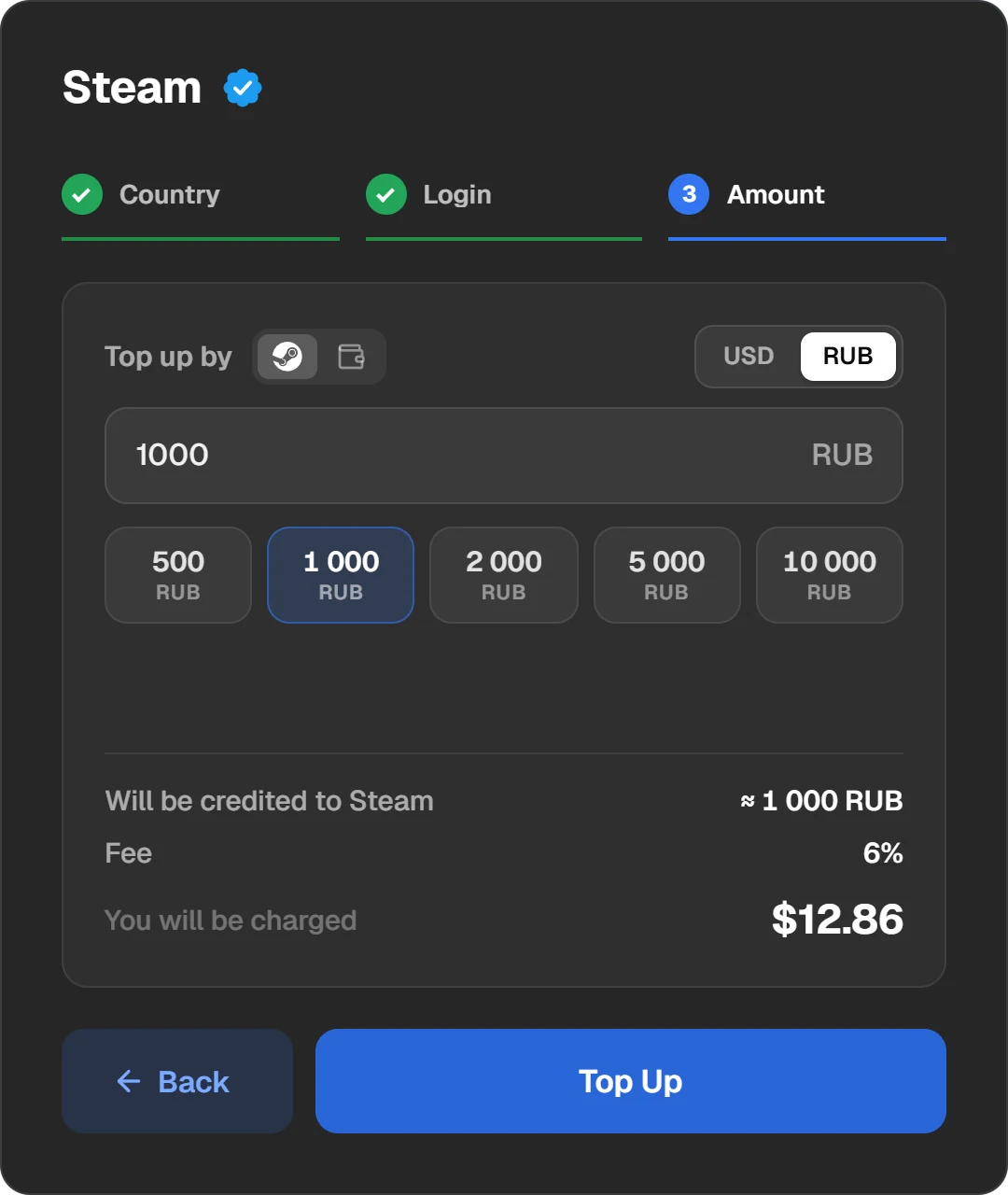
A top-up with no region change: country, login and amount.
Instead of paying for a region change, put the money on your own wallet: you can top up Steam and hand the account to nobody.
Questions and answers
Can Steam ban you for changing region?
Not for a change after a real move. For disguising your residence Valve may terminate access, under section 3.A of the agreement.
How much does a Steam region change cost?
Steam has no such paid service. The country updates with an ordinary purchase after you move. We do not quote sellers’ prices.
Is it safer through a marketplace?
No. Steam’s rules are the same with any seller, and a marketplace cannot restore a closed account.
What if the seller never asks for my password?
Theft is less likely. The false country and possibly someone else’s payment remain, and you answer for the account.
Does a wallet code or a game key change the region?
No. Steam states that neither can be used to change the store country.
