

Steam keys: where to buy safely and how to activate
You can buy a Steam key outside Steam, but third-party keys carry risks: the key may be for another region, or it may be revoked later. Here is how to tell a sound key from a bad one, how to activate it, and when it is simpler to buy the game in Steam with wallet funds.
In short
- A Steam key (product code) adds a game to your library. Activate it in the client: Games → Activate a Product on Steam...
- Publishers and stores sell keys. Steam does not refund keys bought elsewhere: problems go to the seller.
- The main risks: a key for another region (“Game not available in your territory”) and a stolen key the publisher later bans.
- Play Wallet does not sell keys. We top up the Steam Wallet by login, and you buy the game in Steam itself.
- Buying in Steam is safer: the game is yours at once and Steam’s refund rules apply (14 days, under 2 hours played).
Key, gift or top-up: the difference
| What | How it works | Risks |
|---|---|---|
| Product key | A string of letters and numbers. You enter it in Steam and the game appears in your library. | It may not fit your account’s region. A key obtained dishonestly can be banned by the publisher. |
| Steam gift | A friend buys the game on Steam and sends it to you through the Friends List. | Gifts between regions often fail because of price differences. |
| Wallet top-up | Money lands on your Steam balance and you buy the game in the Steam store yourself. | Hardly any: the game is bought on Steam and Steam’s refunds apply. |
If the goal is simply to get a game on your account, the third way is the calmest. A key makes sense when the publisher sells it directly, or when the game cannot be bought on Steam from your region and the seller has a key made for it.
Where to buy keys without losing money
The key’s region is stated
Steam says region restrictions on keys are set by the publisher and suggests asking the seller before buying. If the product page does not say, assume the key may not work for you.
The price is not too good
A key at a third of the Steam price is often resold or stolen. Steam’s developer documentation says plainly that publishers may ban keys that were stolen or purchased fraudulently. The game then leaves your library.
There is a receipt and support
If a key does not activate, Steam sends you to the seller. Without a receipt, an order number and a support team, there is no one to ask for your money back.
No access to your account
You enter the key yourself. A store never needs your password, a Steam Guard code or a Steam sign-in on its own site.
No VPN needed
If a seller says “activate it with a VPN”, walk away. Steam forbids hiding your location to get around region restrictions and may restrict the account.
How to activate a Steam key
Open Steam and sign in
A key is tied to the account for good, so check you are signed in to the right one.
Open the activation window
In the Games menu at the top of the client, choose Activate a Product on Steam... Another way: the “+ Add a Game” button at the bottom left, then “Activate a Product on Steam...”.
Enter the key
Paste the whole key and follow the prompts. If the game is not out yet, it unlocks on release day.
No client: use a browser
You can also enter a key on the website: sign in to Steam and open store.steampowered.com/account/registerkey. Handy on a phone.

The “Product Activation” page: the field for the key.
A Steam Wallet code is redeemed on a different page, “Redeem a Steam Gift Card or Wallet Code”. See Steam gift cards.
If the key will not activate
| What Steam says | What it means | What to do |
|---|---|---|
| “Invalid Product Code” | A typo, or the key is not for Steam. | Check look-alike characters: 0 and O, Q, D; 1 and I, L; B and 8; G and 6. Still failing? Contact the seller. |
| Duplicate product code | The key is already tied to some account. | If not yours, ask the seller for a replacement or a refund. |
| “Game not available in your territory” | The key is for another region. | Ask the seller for a refund. Steam Support cannot remove region restrictions. |
Keys and your account’s country
A key does not change your store country. The country follows where you live and changes only when you move, with a payment method from the new country. More in How to check your Steam account’s region.
How to check your Steam account region
Open “Account details”
Click your profile name at the top right of Steam and choose “Account details”. On a phone, open store.steampowered.com/account in a browser and sign in.
Find the “Country” line
It is in the “Store & Purchase History” block. That is your account’s region: prices and the wallet currency depend on it.

The “Country” line, shown on an example account.
The safe alternative: buy the game on Steam
If you have no way to pay on Steam, top up your wallet by login and buy the game in the Steam store with the balance. No region risk, and the game is yours for good.
Top up the wallet by login
Open Steam top-up, choose your account’s country, enter your login (not the nickname) and an amount that covers the game. The amount credited and the fee are shown before you pay. No password needed.
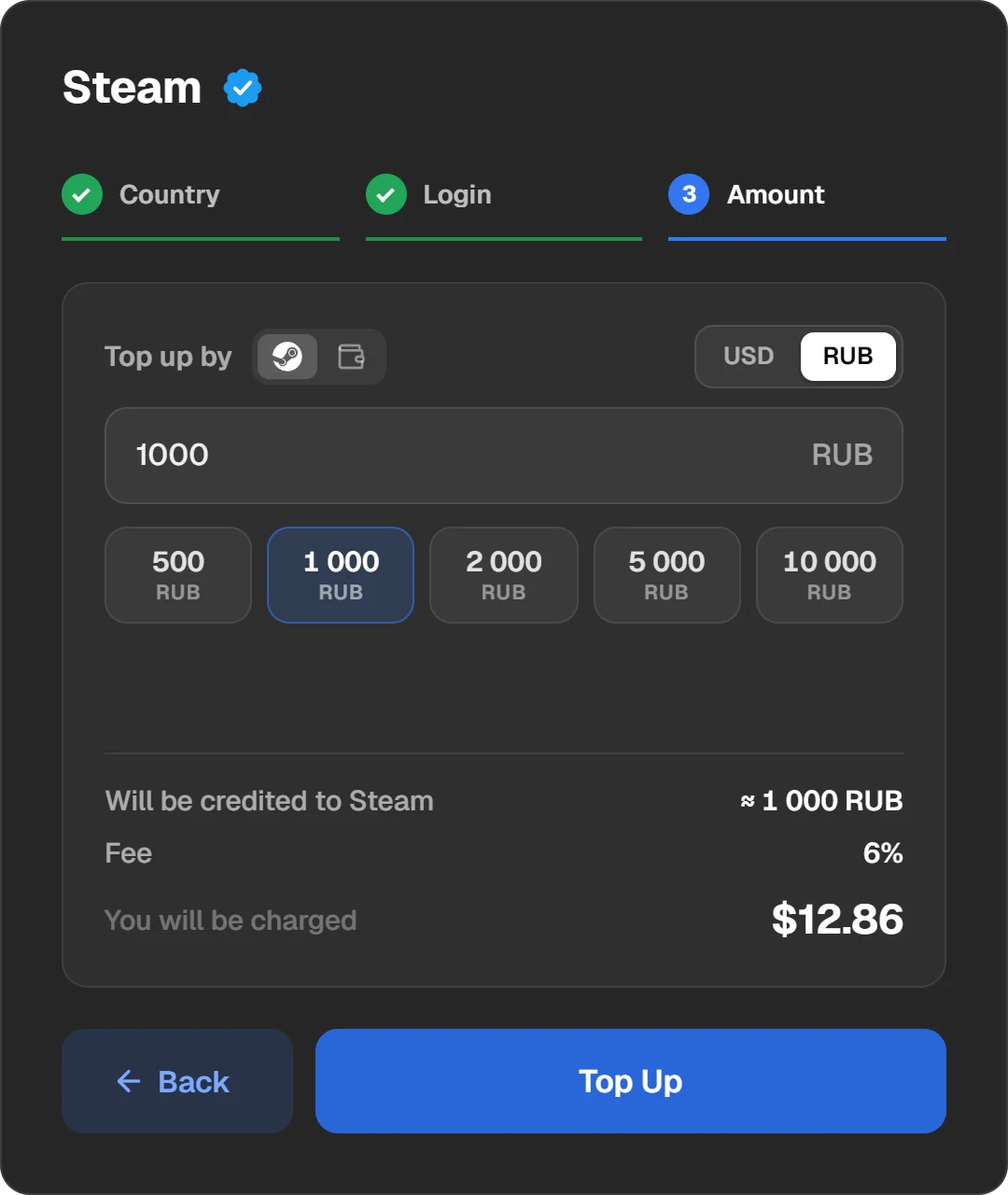
Country, login and amount. What reaches Steam is shown at once.
Pay with crypto
In the payment window choose Binance, Walt, TON Connect or a coin such as USDT or TON. Play Wallet does not take bank cards. Details in How to top up Steam with crypto.
Buy the game with the balance
Steam Wallet funds are used first at checkout. See How to buy a Steam game from Russia.
Questions and answers
Do you sell Steam keys?
No. Play Wallet tops up the Steam Wallet by login. You buy the game in Steam itself, with the balance.
Why are reseller keys so cheap?
Some were bought with stolen cards or stolen outright. The publisher may ban such keys and the game disappears from your library. Steam will not refund them.
What if a key is “not available in your territory”?
It is a key for another region. Ask the seller for a refund. Do not use a VPN: it breaks Steam’s rules.
Can I refund a game activated with a key?
Not through Steam: Steam does not refund keys from third-party sellers. Only the seller can refund, on its own terms.
Where do I enter a key on a phone?
In a browser: sign in to Steam and open store.steampowered.com/account/registerkey.
