Topping up Steam without a fee: does it exist
Plenty of sites promise a “Steam top-up with no fee”. In reality only Steam itself adds funds without one; any intermediary earns on something. Here is where to look for the margin and how to tell where it is cheaper.
In short
- Only Steam’s own add-funds page has no fee: the price equals the amount. You need a payment method Steam accepts in your region.
- Top-up services charge a fee. When there is “none”, it usually sits in the exchange rate.
- Compare one number: how much reaches Steam for the same payment.
- With crypto, the network and the exchange charge their own transfer fees.
- On Play Wallet the fee is shown before you pay, and you can enter a promo code in the payment window.
Is there a Steam top-up with no fee
Yes, in Steam itself. On the add-funds page the amount and the price are the same. Open it from your name at the top right → “Account details” → “Add funds to your Steam Wallet”. Steam lists the payment methods at checkout, and they depend on your account’s region. Only your bank or payment provider may charge something on top.
If none of Steam’s payment methods works for you, the options are intermediaries: wallet codes and top-up services. They are never free. The question is how much they take and how openly they show it.
Where the fee hides
| Where | What it looks like | How to check |
|---|---|---|
| Service fee | A separate “Fee” line, in percent or money. | The most honest version: you see it at once. |
| Exchange rate | “0% fee”, yet noticeably less than you paid reaches Steam. | Look at what reaches Steam, not at the “no fee” label. |
| Network and exchange | With crypto, the network charges for the transfer and the exchange for the withdrawal. | Check in your wallet before sending. This money does not go to the service. |
| Bank | Currency conversion or a transfer fee. | Your bank’s or provider’s terms. |
If a site promises a top-up well below the rate, or “no fee plus a bonus”, check it twice. How to tell a reliable service: Is it safe to top up Steam through a website.
How to compare where it is cheaper
- Pick one amount you are ready to pay, say 15 USDT.
- On each site, see how much reaches your Steam Wallet for that payment, in your account’s currency.
- Add any network or bank fee that applies to only one of the options.
- The cheaper one is where more reaches Steam. Labels like “0%” are meaningless to compare.
To see what the same amount is worth in different currencies at Steam’s rate, open the Steam exchange rates.
A made-up example
Two imaginary sites, the same payment. The labels promise different things; the last row decides.
| Site A | Site B | |
|---|---|---|
| What it says | “0% fee” | “5% fee” |
| You pay | 20 USDT | 20 USDT |
| Reaches Steam | 18 dollars | 19 dollars |
Site B shows its fee openly and still gives more. Site A has “no fee”, but its margin hides in the rate. Wallet codes work the same way: the seller earns something too, so compare a code’s price with its face value in your wallet currency.
How to pay less on Play Wallet
Check the fee before paying
On the Steam top-up page, after the country, login and amount you see three lines: what will be credited to Steam, the fee and what you will be charged. The “Top up by” switch lets you type the amount you pay and see at once what arrives.
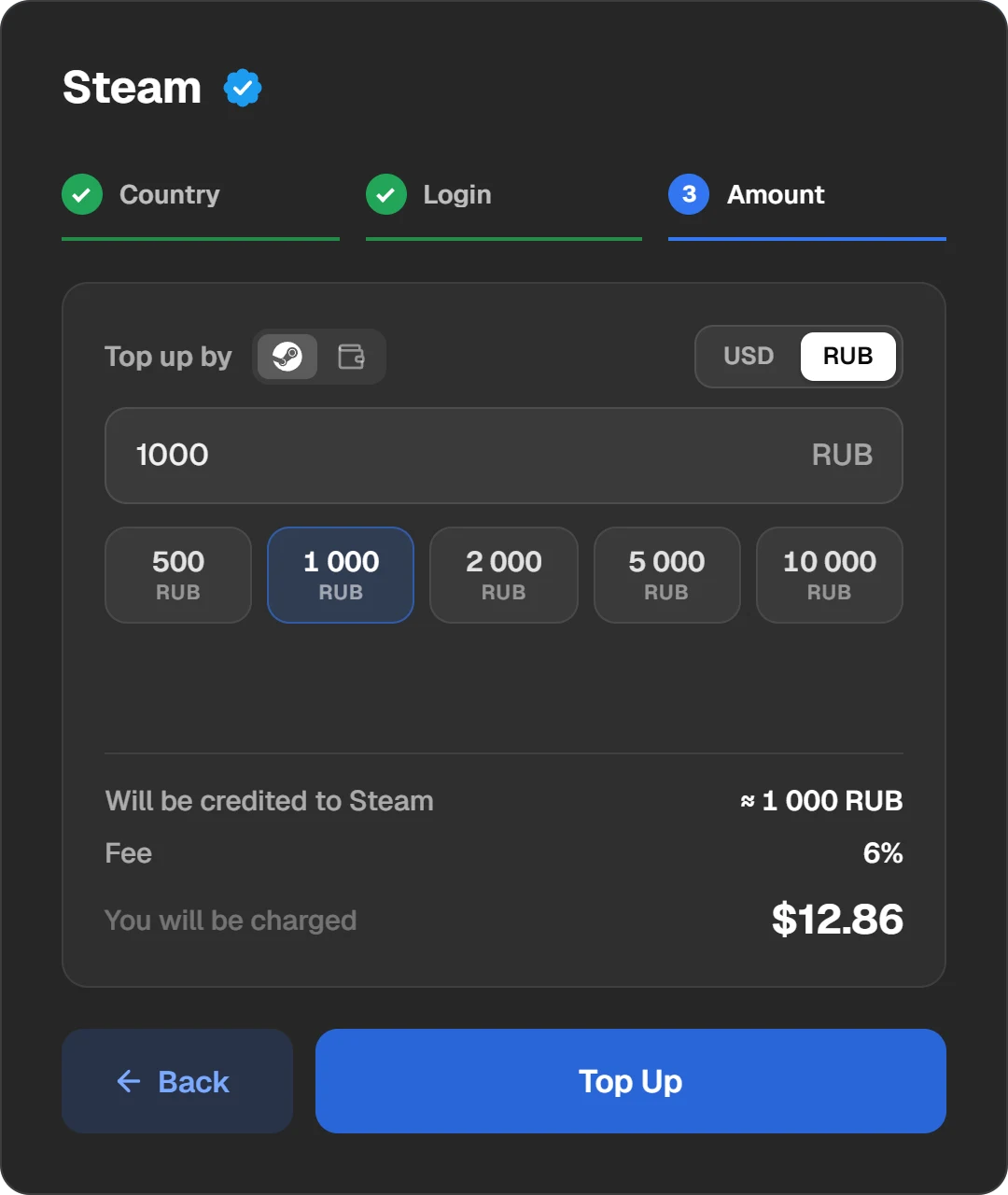
The credited amount, the fee and the charge, all before paying.
Pay without extra transfers
If your coins are on Binance, pay through Binance straight from the exchange balance. If they are in Telegram, use Walt or TON Connect. When sending coins, choose the network they are on: moving them between networks costs more, and a payment on the wrong network is not credited automatically.
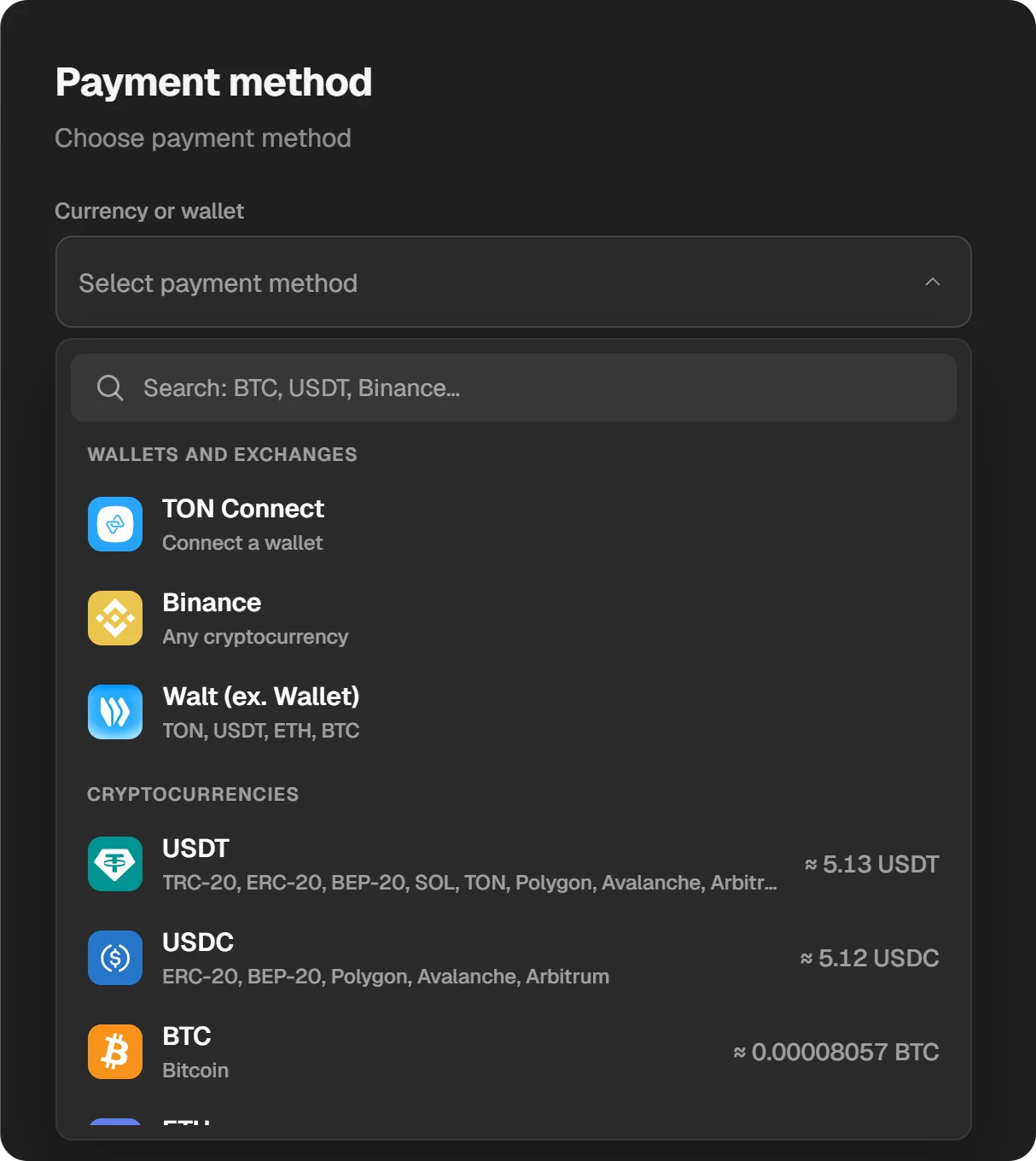
Wallets, exchanges and coins, each with the amount needed.
Enter a promo code if you have one
In the payment window, next to the “Currency or wallet” field, there is a “Have a promo code?” link. A code lowers the order total, and the new total is shown before you pay.
Spend your coins
Registered users earn coins through the referral programme when invited friends buy something. Coins can be spent in the Play Wallet shop.
The amount on Steam may differ from the estimate by about 1%: Steam does not publish its rates, so the site uses its own data. If the money is for a particular game, add a small margin.
Questions and answers
Can I top up Steam with no fee at all?
Yes, in Steam itself, if you have a payment method it accepts in your region: there the amount equals the price. Intermediaries always take a fee or build it into the rate.
Where can I get a promo code for a Steam top-up?
Shops hand out their own codes in their channels, newsletters and promotions. On Play Wallet you enter a code in the payment window through “Have a promo code?”, and the new total shows before you pay.
Why did less reach Steam than I paid?
Because of the service fee, the conversion rate and the network or bank fee. Play Wallet shows what will arrive before you pay; the result may differ by about 1% because of Steam’s rates.
Where is it cheapest to top up Steam?
Where more reaches Steam for the same payment. Compare that number, not “0%” promises.
Does the crypto network charge a fee?
Yes, a blockchain transfer costs something, and an exchange may charge for the withdrawal. That money goes to the network and the exchange, not the shop. Send so that exactly the amount due reaches the address.
Does Steam charge a fee for adding funds?
On Steam’s own add-funds page the amount and the price are the same. Only your bank or payment provider may charge something.