

Paying with crypto: how it works and what people buy
Paying with crypto means sending coins from your wallet to the shop’s address. There is no bank in between, so the payment has rules of its own: the network, the fee, the confirmations. If you have never paid this way, this article walks you through it using our payment window.
In short
- The shop issues an invoice: an exact amount in a coin, a network, an address and a QR code. You send the coins to it from a wallet or an exchange.
- The payment counts once the network confirms it. Depending on the network that takes from a couple of minutes to an hour.
- Play Wallet takes USDT, USDC, BTC, ETH, TON and a dozen more coins, plus Binance, Walt and TON Connect. The payment window does not take bank cards.
- On top of the order you pay the network’s or the exchange’s fee. The service fee is shown before you pay.
- A transfer cannot be undone. Check the coin, the network and the amount before you send.
What paying with crypto means
With a card, the bank takes money from your account and passes it to the shop. With crypto, you send coins yourself to an address the shop gives you. The transfer is written to the blockchain, and the shop sees that the money has arrived.
Your coins sit in your own wallet (an app such as Tonkeeper or Trust Wallet), on an exchange, or in a wallet service such as Walt in Telegram. That decides how you pay: by a transfer to an address, from an exchange balance, or by confirming in a connected wallet.
What happens between “Pay” and “Paid”
You place the order
On the product page you choose an amount or a package and say where it goes: a login, an ID or a username. You do not need to register on the site.
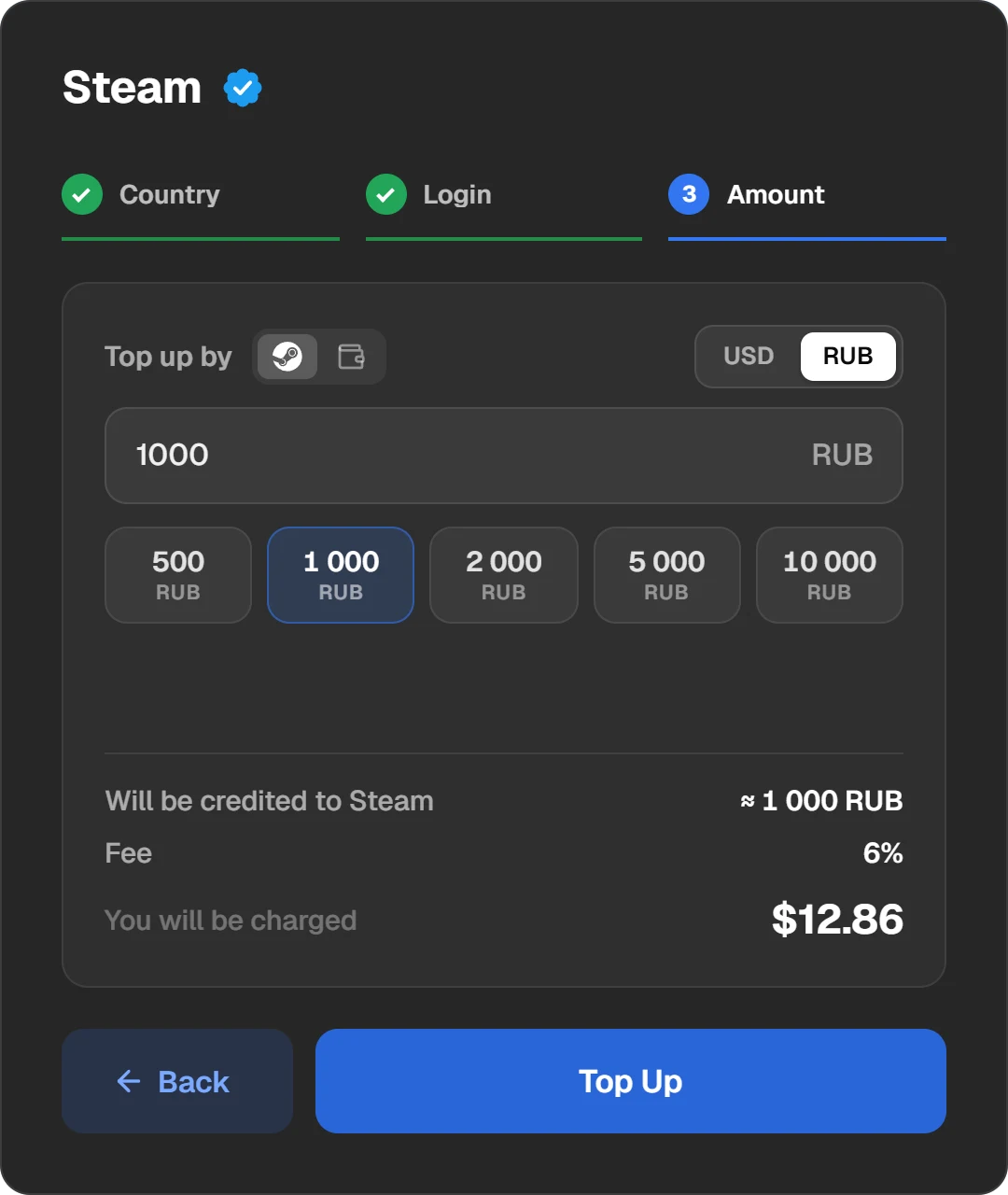
The order form: what you buy and for how much.
You choose what to pay with
The payment window has a “Currency or wallet” field. Next to each coin you see how much of it this order needs. If a coin runs on several networks, a second field, “Network”, appears.
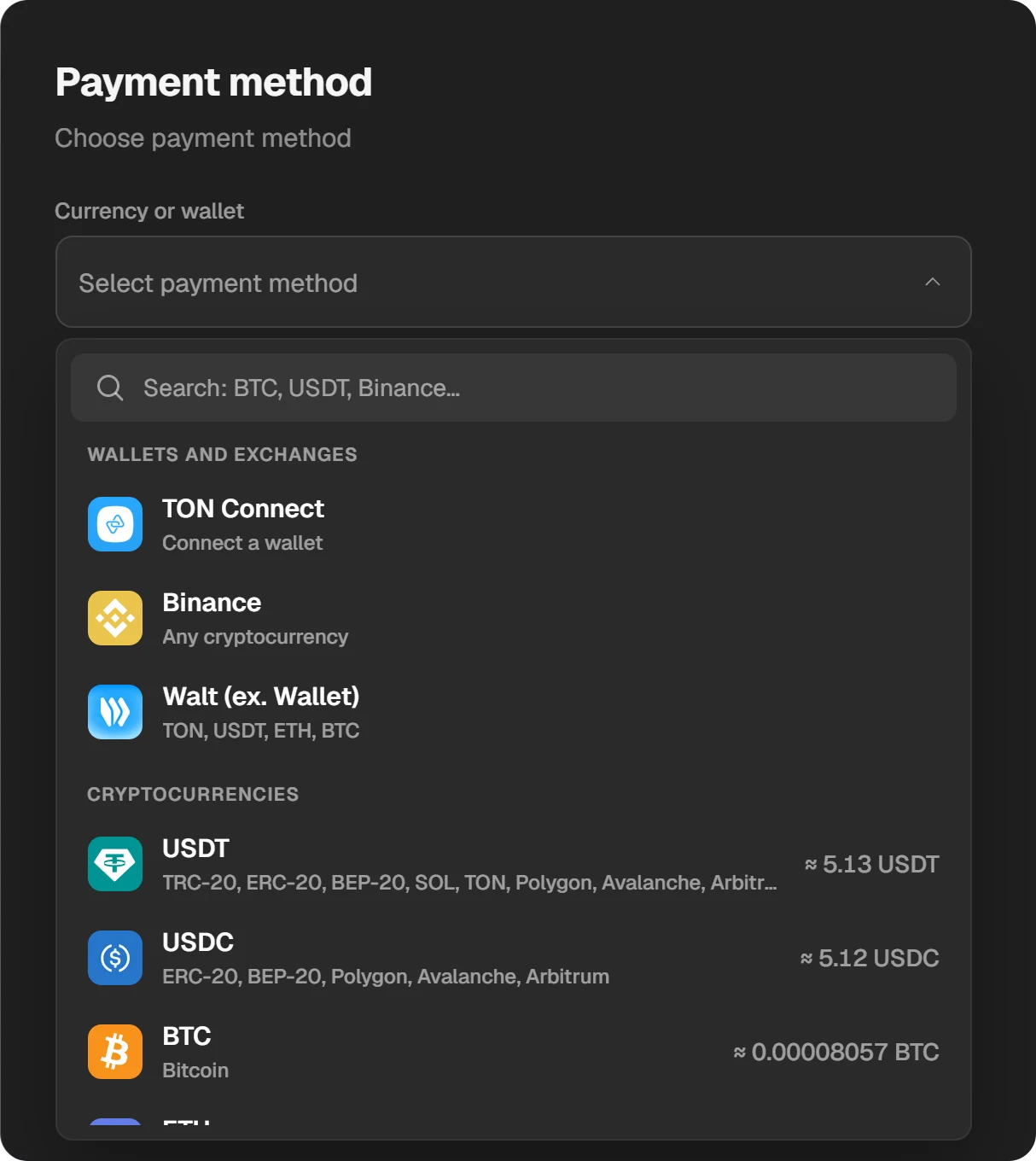
Wallets and exchanges on top, coins below. The amount in each coin is on the right.
You get an invoice
After “Pay” a payment page opens: the exact amount in the coin, the network, the address and a QR code. Every order gets its own address. You have 30 minutes to pay.
You send the coins
In your wallet or on the exchange you paste the address or scan the QR code, choose the same network and send the amount. The network or the exchange charges a transfer fee on top of the invoice.
The network confirms the transfer
The transfer enters the blockchain and collects confirmations. Until then the order waits for payment. TON and USDT on Tron usually take minutes; Bitcoin can take half an hour to an hour.
The order is fulfilled
The window shows by itself that the payment has arrived. The status goes Created, Paid, Topping up (Issuing for gift cards) and Done. You can close the window: the order stays in “History” at the top of the site.
Words you will meet
| Word | What it means |
|---|---|
| Address | A long string of letters and digits that coins are sent to. Like an account number, but for one network |
| Network | The blockchain the transfer travels on: Tron, TON, Ethereum and others. The sender and the recipient must use the same one |
| Network fee | The price of the transfer. It goes to the network, not the shop. An exchange charges a withdrawal fee instead |
| Confirmations | The network’s marks that the transfer is recorded. Until there are enough, the payment counts as not arrived |
| Hash, TxID | The transfer’s number on the blockchain. Support finds a payment by it |
| Stablecoin | A coin whose price is tied to the dollar: USDT, USDC |
| QR code | The same address as a picture. You scan it with the wallet app instead of copying |
What you can pay with on Play Wallet
The “Currency or wallet” field has two parts. The set of methods depends on the product, so your order may not show all of them.
| Method | How the payment goes | Who it suits |
|---|---|---|
| A coin to an address | A payment page with the address, the amount and a QR code. You send from any wallet or exchange | Anyone who holds coins. The most universal way |
| TON Connect | You connect a TON wallet to the payment window and confirm the payment in it. No address to copy | People with TON or USDT in Tonkeeper or another TON wallet |
| Walt (ex. Wallet) | A payment from the balance of the wallet in Telegram: TON, USDT, ETH or BTC | People who keep coins in Walt |
| Binance | A payment from the Binance exchange balance with any coin, no address and no network | People with a Binance account |
Coins you can send to an address (as of 22 November 2026):
- USDT on eight networks: Tron (TRC-20), Ethereum (ERC-20), BNB Smart Chain (BEP-20), Solana, TON, Polygon, Avalanche, Arbitrum.
- USDC on five networks: Ethereum, BNB Smart Chain, Polygon, Avalanche, Arbitrum.
- ETH on Ethereum, BNB Smart Chain and Arbitrum. POL on Ethereum and Polygon.
- BTC, TON, BNB, SOL, AVAX, TRX, LTC, DOGE, DASH, XMR, BCH, each on its own network.
- “Other cryptocurrencies”: the item at the bottom of the list opens a payment page where you pick the coin there.
In 2026 the TON coin was renamed Gram, ticker GRAM. The payment window still labels it TON. Each method has its own article: TON and TON Connect, Walt in Telegram, Binance Pay, which USDT network to choose.
What it costs
- The service fee. It is shown in the “Your order” block before you pay and is already inside the total.
- The network’s or the exchange’s fee. You pay it on top of the invoice. An exchange usually takes its withdrawal fee out of what you send, so less may reach the address. Send so that exactly the invoice amount arrives.
- The rate. The invoice is counted in the coin at the moment of payment. USDT and USDC are tied to the dollar and barely move during the transfer. Bitcoin and other coins can shift.
What people buy this way
Every product on Play Wallet is paid with crypto:
- A Steam top-up by login, from 0.5 to 400 dollars in one operation: the top-up page. Step by step: How to top up Steam with crypto.
- Telegram by username: Stars and Premium. More: How to buy Telegram Stars with crypto.
- Gift cards: PlayStation, Xbox, Nintendo, Apple, Google Play and more. You get a code in the order window and redeem it yourself.
- Game currency by player ID: PUBG Mobile, Genshin Impact, Mobile Legends and other games.
Each product has its own rule: one needs a login, another an ID, a third the account’s country. Check it on the product page before you pay. How a code differs from a direct top-up: Top-up by ID or by code.
How a transfer differs from a card payment
- It cannot be undone. A bank sometimes reverses a card payment. Nobody recalls a blockchain transfer: not the wallet, not the exchange, not the shop.
- A wrong network is not fixed automatically. Coins sent on another network are not seen by the order. The payment window warns about it plainly.
- The amount must be exact. If less arrives, the order is unpaid until you send the rest. If more arrives, the extra is returned through support.
- There is a time limit. If the payment does not arrive in time, the order is cancelled and the window says the time to pay has run out.
What to do in each of these cases is covered in I paid with crypto but the order is not paid. The help centre has a short illustrated guide too: How to pay for an order with crypto.
A card for paying with crypto: what it is
This is a crypto card: a Visa or Mastercard bank card linked to a crypto balance on an exchange or in a fintech service. When you pay with it, the service sells the needed part of your coins at that moment and sends ordinary money to the seller. The shop never sees crypto: to it this is a normal card payment. That is why such a card is used where crypto itself is not accepted.
Crypto cards come with their own terms: identity verification with a document, exchange and service fees, limits. They are not issued in every country, and each service has its own list of countries, which changes. We do not issue such cards and do not recommend any particular one. You do not need a card to pay on Play Wallet: coins are sent directly.
Where to start if you have no crypto yet
- Open the product you need and see in the payment window how many coins it takes. This commits you to nothing.
- Buy the coins with a small margin for the fee, on an exchange or in a wallet service available in your country.
- For a first time take USDT: its price does not jump. The whole payment step by step: How to pay for a purchase in USDT.
- Start with a small amount, to walk the path once without hurry.
This article is about how the payment works technically. It gives no legal advice: rules for crypto differ from country to country and change. If it matters to you, check the rules of your country.
Questions and answers
How do I pay with crypto if I have never done it?
Place the order, choose a coin and a network, press “Pay” and send the exact amount to the address on the payment page. The order updates by itself once the network confirms the transfer.
What can I buy with crypto on Play Wallet?
A Steam top-up by login, Telegram Stars and Premium, PlayStation, Xbox, Nintendo, Apple and Google Play gift cards, and game currency by ID.
Can I pay by QR code?
Yes. The payment page has a QR code next to the address. Scan it with your wallet app and check that the network and the amount match the invoice.
Which coin should a beginner choose?
USDT: its price is tied to the dollar and it is available almost everywhere. Choose the network your coins are on.
Can I pay with a bank card?
No, the payment window takes crypto only: coins, Binance, Walt and TON Connect.
What is a card for paying with crypto?
A Visa or Mastercard card from an exchange or a fintech service. On a purchase the service swaps your coins for ordinary money, and the shop gets a normal payment. You do not need one to pay here.
How long do I wait after the transfer?
Until the network confirms the payment: minutes for TON and USDT on Tron, up to an hour for Bitcoin. The status in the order window changes by itself.

