

How to redeem an Apple Gift Card
Redeeming an Apple Gift Card puts its value on your Apple Account balance. You do it in the App Store on iPhone, iPad and Mac, or in the Apple Music app on Windows. Here are all the ways and fixes for common errors.
In short
- On iPhone: App Store, your photo, Redeem Code, then Use Camera or Enter Code Manually.
- The code has 16 characters and starts with X.
- A card works only with an account of the country where it was bought.
- After redeeming, the amount shows under your name in the App Store.
- The balance pays for apps, games, subscriptions and iCloud+.
Before you enter the code
- Country. Your account’s country must match the card’s. A U.S. card redeems only on a U.S. account.
- Card type. Apple Gift Cards and App Store & iTunes cards redeem the same way. Apple Store gift cards (grey, white, silver or gold) cannot be redeemed in the App Store.
- Code. You need the 16-character code starting with X. Other numbers on the card, such as the serial number, do not work.
On iPhone and iPad
Open the App Store
Tap your photo, initials or the My Account button at the top. Sign in to your Apple Account if asked.
Tap Redeem Code
It is in the account menu.
Scan or type the code
Tap Use Camera and point it at the code. For a digital code, or if scanning fails, tap Enter Code Manually and paste it.
Confirm
Tap Redeem. The amount is added to your Apple Account balance.
In Wallet. In some countries you can redeem in the Wallet app on iPhone. Your Apple Account card must be in Wallet: open it, tap More, then Redeem.
On a Mac
- Open the App Store and click your name in the sidebar, or click Sign In.
- Click Redeem Code.
- Click Use Camera, or enter the code manually, and follow the instructions.
On a Windows PC
- Open the Apple Music app or the Apple TV app.
- Click your name at the bottom of the sidebar, then Redeem. Sign in first if needed.
- Follow the instructions and click Redeem.
An emailed card. Open the gift card email and tap Redeem in it.
Where to get a code
Play Wallet sells Apple Gift Cards for U.S., Austrian, Belgian and Spanish accounts. The code appears in the order window right after payment.
Choose the country and amount
On the Apple Gift Card page, pick your account’s country in “Region / currency”, then the amount. The price is shown before you pay. You pay with crypto.
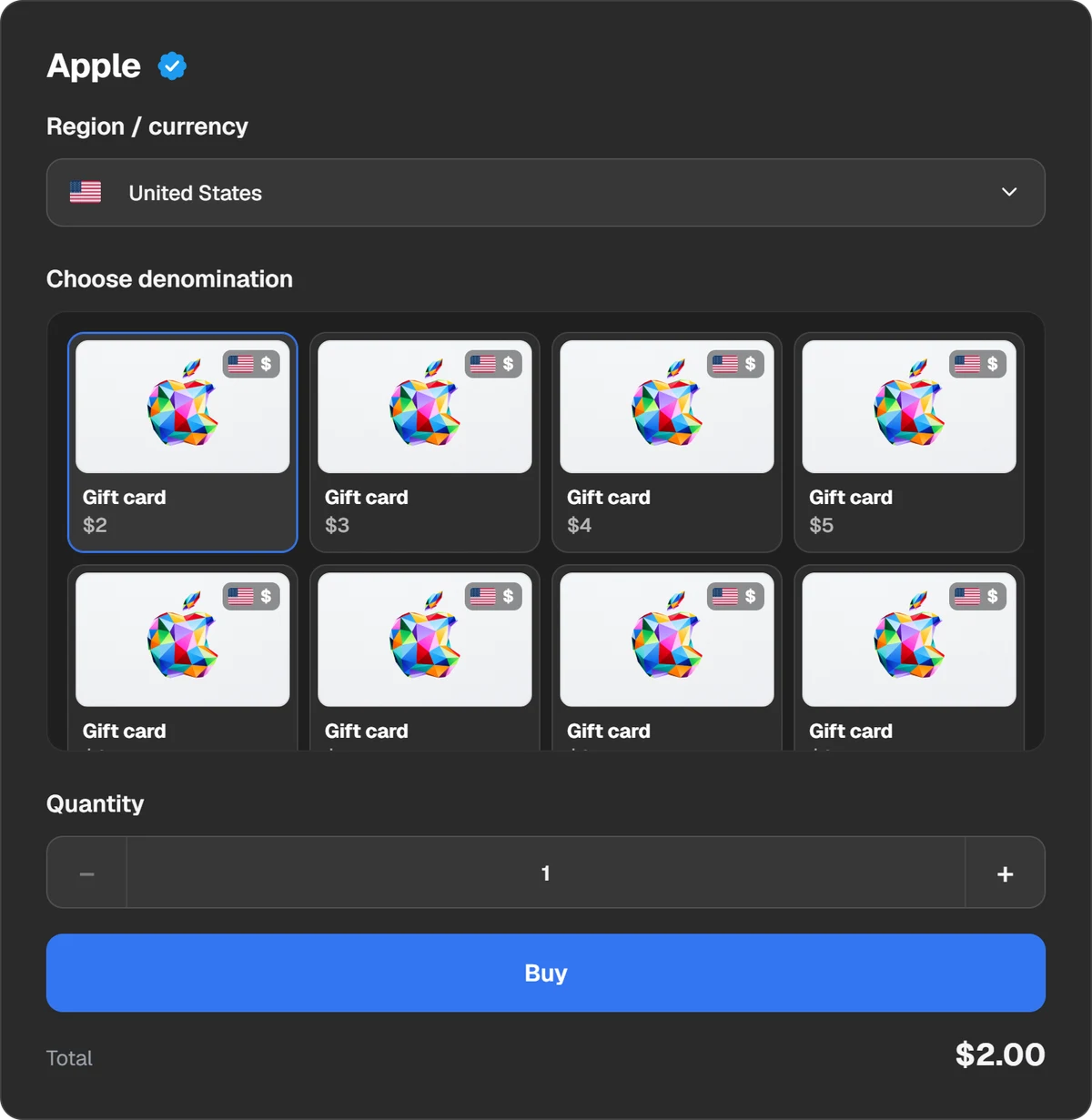
The card’s country must match the Apple Account’s country.
Copy the code from the order
When the order is done, “Your code” appears. Copy it and paste it into Enter Code Manually. The code also stays in “History” at the top of the site.
If the card will not redeem
| What you see | What to do |
|---|---|
| The card is not valid | Make sure it is not an Apple Store card. Enter the code manually; it starts with X. Check look-alikes: B and 8, D and O, E and 3, G and 6, O and Q, O and 0, S and 5, U and V, Z and 2. |
| The code must be redeemed in another country or region | The card is for another country and redeems only on an account of that country. |
| The card was already redeemed | Sign out of the App Store on all devices and sign back in to refresh the balance. The code may have been used. |
| The card is not activated | The store did not activate it. Contact the place you bought it. |
If you bought the code from us, write to support with the order ID. Apple Support will want a photo of the card or email, the receipt and the serial number, which starts with GCA, PBH or EPY and differs from the code.
Checking the balance
In the App Store, tap your photo, initials or My Account. If there is a balance, the amount is under your name. On Windows it is in Apple Music or Apple TV, under your name at the bottom of the sidebar. If it looks wrong, sign out and back in, and check your purchase history.
What the balance pays for
- Apps, games and in-app purchases in the App Store.
- Music, films and books in the iTunes Store, Apple TV and Apple Books.
- Subscriptions: Apple Music, Apple Arcade, Apple TV and subscriptions inside App Store apps.
- iCloud+; see How to pay for iCloud+ with a gift card.
The balance cannot buy gifts or gift cards, and Family Sharing members cannot use your balance. Apple first tries to pay the whole purchase from the balance; if it is not enough, it uses your primary payment method.
Questions and answers
Where do I redeem an Apple Gift Card on iPhone?
In the App Store: tap your photo at the top, then Redeem Code. Scan the code with the camera or enter it manually.
Can I redeem it on Android?
Apple’s instructions cover only iPhone, iPad, Mac, Apple Vision Pro and Windows PCs. There are no Android steps in its help.
How many characters does the code have?
Sixteen, starting with X. On a physical card it may be under a label or a scratch-off layer.
Why does it say the card is not valid?
Most often it is an Apple Store card or a look-alike character typo. Enter the code manually and check the letters and digits.
Can I redeem a card from another country?
No. A card redeems only on an account of the country where it was bought.
Where do I see the balance after redeeming?
In the App Store, under your name after you tap your photo. No amount means no balance.
