

Steam top-up promo codes: how they work and the scams
Steam itself has no promo codes for adding funds. A “Steam top-up promo code” is always a code of a middleman shop that lowers that shop’s fee or price. Here is how such codes work, how to tell whether one saves you money, and which “promo codes” are scams.
In short
- Steam has no discount codes for top-ups. Adding funds in Steam itself carries no Steam fee anyway.
- The code you enter in Steam is a wallet code. It is money, not a discount.
- A shop’s promo code lowers only that shop’s fee or price. Check the saving by what reaches Steam.
- “Free balance” codes, code generators and “Sign in through Steam” on another site are scams.
- On Play Wallet you enter a code in the payment window via “Have a promo code?”. The new total shows before you pay.
Does Steam have top-up promo codes
No. In Steam itself the amount you add equals the price. Steam gives no discount on adding funds, so there are no codes for it. Steam has three similar things, and none is a top-up promo code.
| What it is | What it gives | Where you enter it |
|---|---|---|
| Steam Wallet code | Money in your wallet’s currency. Bought like a gift card | Redeem a Steam Gift Card or Wallet Code |
| Game key | A game or DLC in your library | In the Steam client, into your library |
| Steam coupon | A discount on certain games. Usually does not stack with sales | Has nothing to do with wallet top-ups |
A wallet code is not a discount: someone has already paid for it. That is why a “free Steam balance code” from a stranger is almost always a trap. How real wallet codes work: Steam gift cards.
What a shop’s promo code gives
Top-up sites charge a fee for their work. A promo code lowers it or the order total. Steam knows nothing about it: ordinary money arrives in the wallet, you just paid less for it.
- “No fee”. The code removes the shop’s fee for one order or up to some amount.
- A percent off. The code lowers the total by a few percent.
- Conditions. Often a code works only on a first order, above a minimum amount, for a limited time or a limited number of uses.
How to check a code really saves money
- Take one payment amount and see how much reaches Steam without a code.
- Enter the code and look again. Compare the amount that reaches the wallet, in your account’s currency.
- Compare with another site without a code. A “10% off” on an inflated fee can cost more than an honest low fee.
- Pay only if the total is shown before payment. If the amount will be “recalculated later”, leave.
Where else the markup hides and how to compare services by one number: Steam top-up without a fee: does it exist.
The scams
“A promo code for free Steam balance”
Nobody gives away free Steam money. Such links lead to fake sign-in pages that steal your login and password.
Steam code generators
A wallet code cannot be “generated”: a real code exists only once someone paid for it. Generator programs are empty at best and malware at worst.
“Sign in through Steam to get the code”
A shop’s promo code never needs access to your Steam account. A top-up site needs only the login. You sign in to Steam only on store.steampowered.com and steamcommunity.com.
“Pay to activate the promo code”
If someone asks you to send money or a Steam card code to “activate” or “unlock” a discount, it is a scam. Steam says plainly: if someone asks you to pay them in Steam cards, you are most likely being scammed.
“We will move balance from another account at a discount”
Steam Wallet funds cannot be moved to another account. Such an offer is always a scam.
Check codes from comments and chats on the shop’s own site: type the address yourself rather than following a link. Fake sites copy the look of real ones.
How to enter a promo code on Play Wallet
Put the order together
On Steam top-up, choose the account’s country and enter the login and the amount. Below you see what reaches Steam, the fee and what you pay.
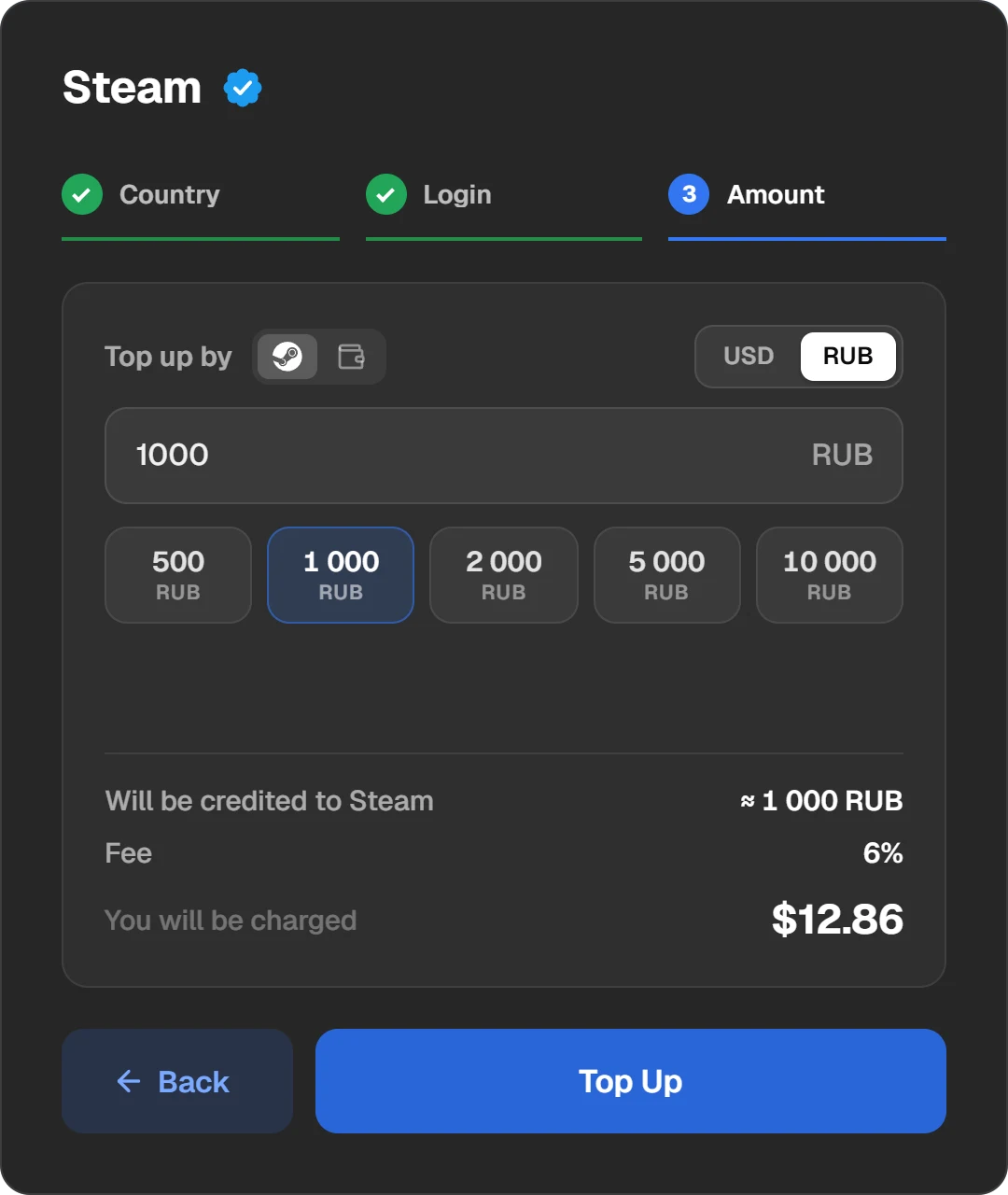
The amount for Steam, the fee and the charge, before you pay.
Open the promo code field
Press Top Up. In the payment window, next to the “Currency or wallet” field, there is a “Have a promo code?” link. Click it, type the code and press Apply.
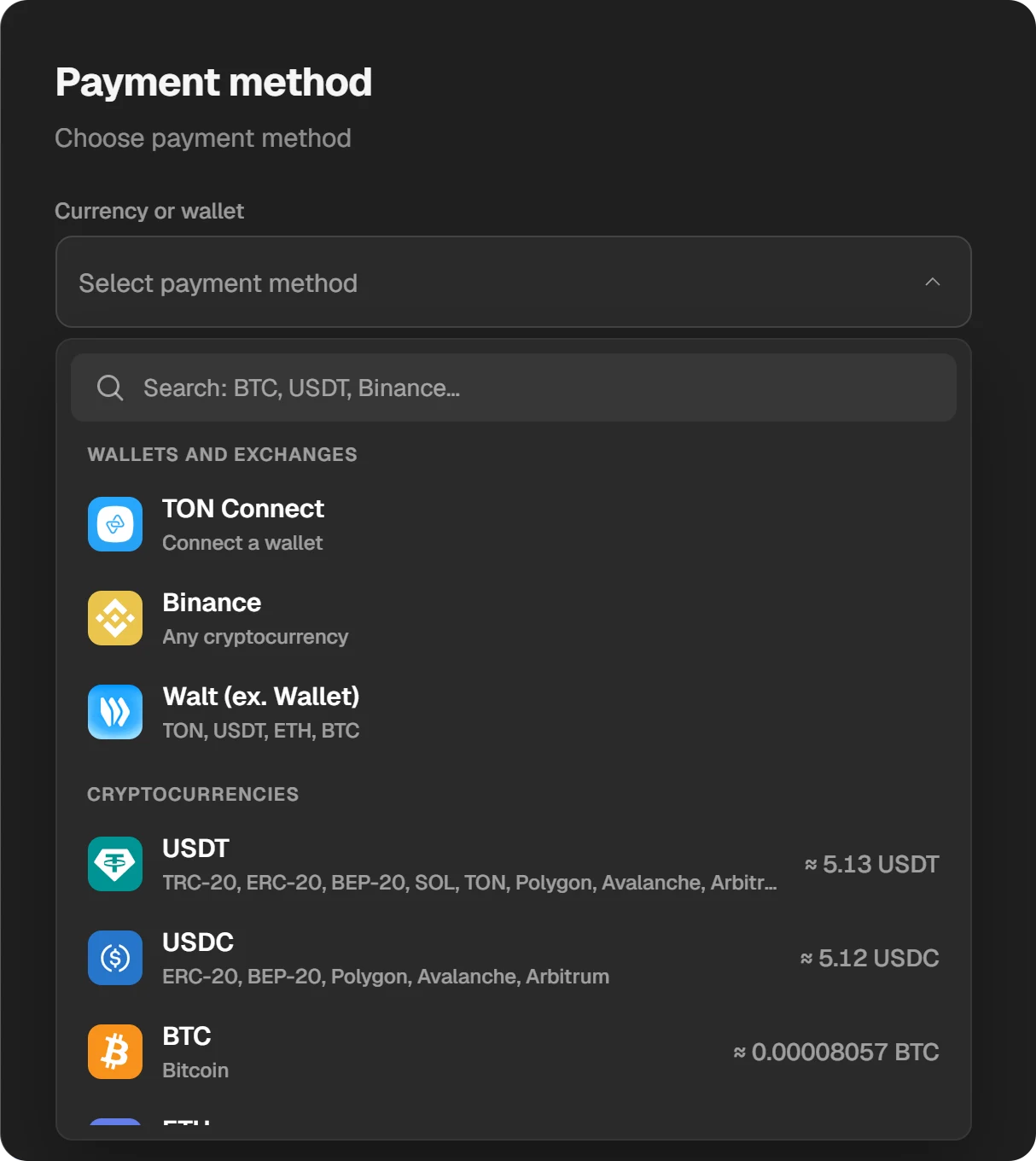
The payment window: choosing a coin or wallet. The promo code link is next to this field.
Check the new total
If the code works, the total goes down. The discount takes off the service fee first, and if it is bigger than the fee, the rest comes off the price. If the code fails, the window says why: for example, it has expired, it is for a first order only, or you need to sign in.
Pay
Choose a coin or wallet and pay. With a promo code, pay with crypto: it does not work with WP coins.
Questions and answers
Does Steam itself issue top-up promo codes?
No. Steam gives no discounts on adding funds: in Steam the amount you add equals the price. Top-up promo codes come only from middleman shops.
What is a “no fee” Steam top-up code?
A shop’s code that removes its fee for an order. The same amount reaches Steam and you pay less. Check the total before paying.
Where do I enter a Steam top-up promo code?
On the shop’s site, while placing the order. Steam itself has no such field; in Steam you enter only wallet codes and game keys.
How is a wallet code different from a promo code?
A wallet code is money: you redeem it in Steam and the balance grows by its value. A shop’s promo code is a discount on a purchase in that shop.
Are there free Steam balance codes?
No. Someone paid for every real wallet code. “Free codes” and generators lead to sites that steal accounts.
Why did my code not apply on Play Wallet?
The payment window says why: the code has expired, is not active yet, is for a first order only, the order is below the minimum or you need to sign in. Codes do not work with WP coins.
