

How to pay for a purchase in USDT, step by step
A USDT payment is three actions: choose USDT and a network in the order window, get an address, and send the exact amount to it. Mistakes are usually small ones: the wrong network, a fee the exchange took out, the time running out. Below is the whole way on Play Wallet, separately for an exchange and for your own wallet.
In short
- In the order window choose USDT and the network your coins are on.
- After “Pay” a page opens with the amount, the address and a QR code. You have 30 minutes.
- Exactly the invoice amount must reach the address. The network’s or the exchange’s fee is paid on top.
- A shortfall can be sent to the same address until the invoice expires. After that, or if you overpaid, write to support.
- A bank card cannot send USDT. You buy the coins first and pay with them afterwards.
What you need
- USDT on an exchange or in a wallet. Any place that can send USDT to an external address will do.
- A margin for the fee. An exchange charges its withdrawal fee in USDT. From your own wallet the fee is paid in the network’s main coin: TRX on Tron, TON on TON and so on.
- The order details. For example, a Steam login or a Telegram username. No account password is needed.
If your USDT is in Walt in Telegram or in a TON wallet, you may not need to copy an address at all. See “USDT without an address” near the end of this article.
Paying on the site, step by step
Place the order
Open a product, for example Steam top-up. Enter the login and the amount and press the buy button. The order window opens.
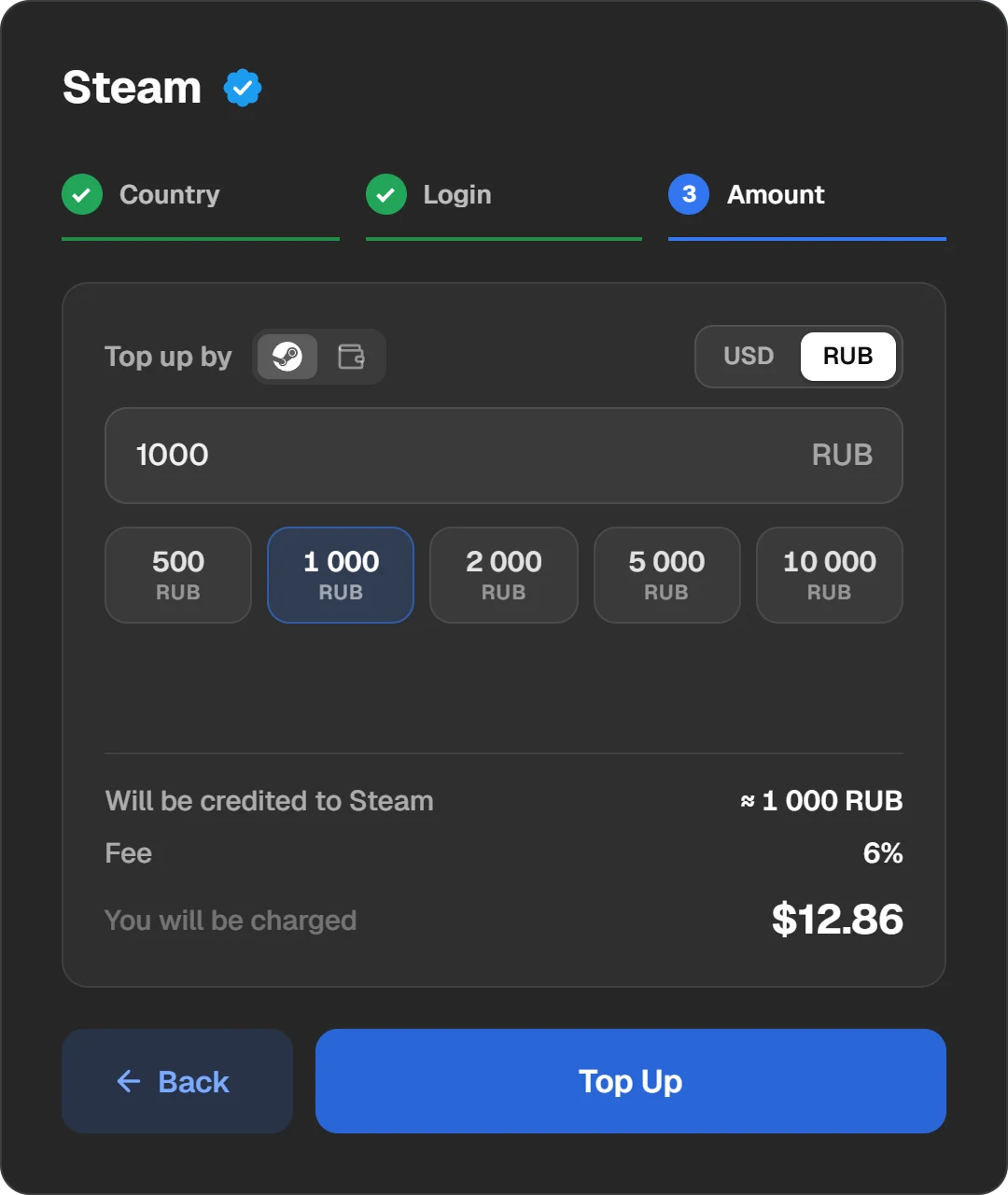
A Steam top-up: the login and the amount.
Choose USDT
Click the “Currency or wallet” field. USDT is in the “Cryptocurrencies” part; you can also find it with the search. To the right of the coin you see how much USDT this order needs.
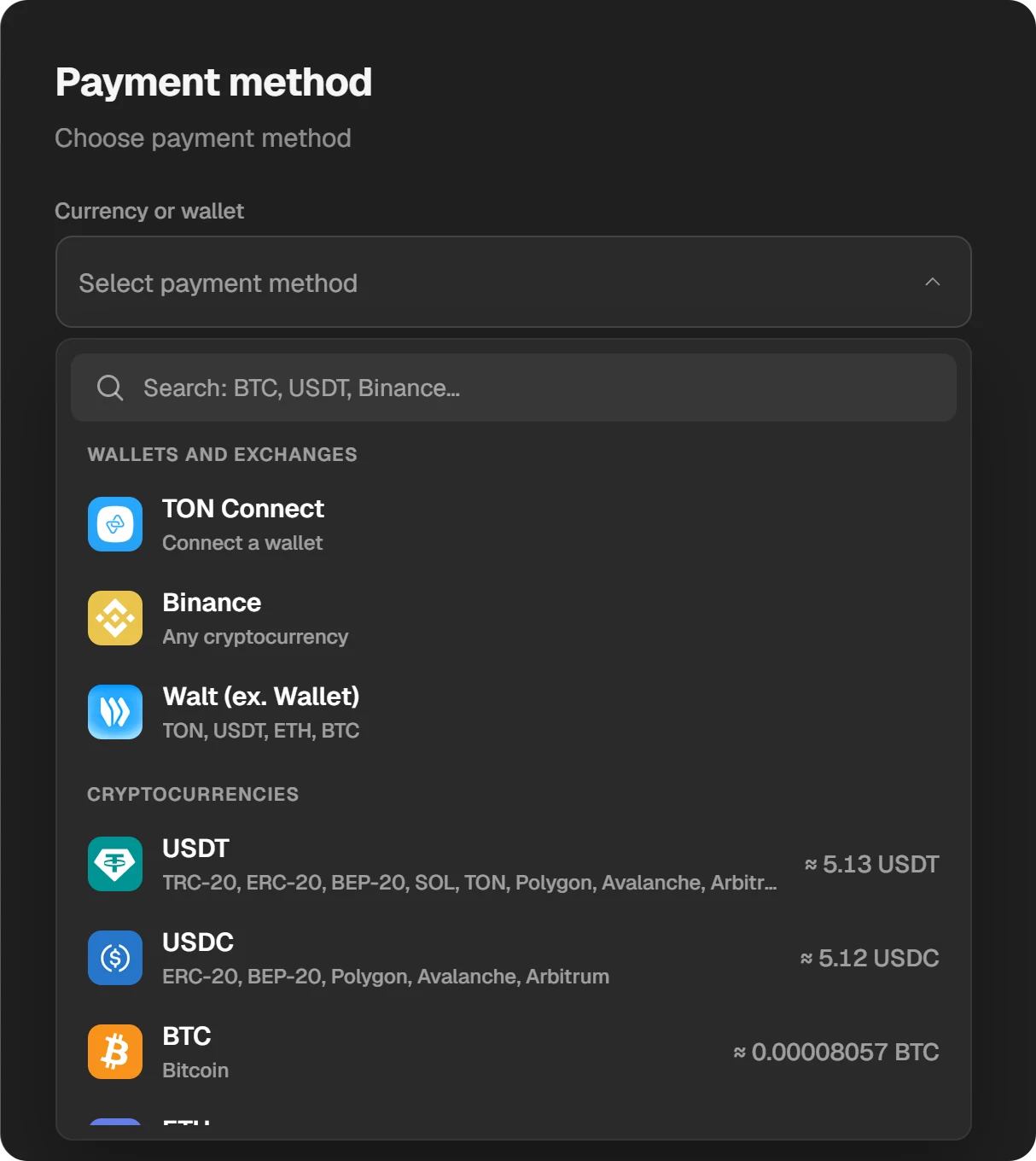
USDT in the list: its networks under the name, the amount on the right.
Choose the network
A “Network” field appears with eight networks: Tron (TRC-20), Ethereum (ERC-20), BNB Smart Chain (BEP-20), Solana, TON, Polygon, Avalanche, Arbitrum. Pick the one you will send from. The site remembers it: next time USDT with this network is under “Recently used”.
Check the order and press “Pay”
In the “Your order” block check the login, the amount and the fee. The total already includes the service fee.
Copy the address and the amount
A Cryptomus payment page opens: the amount in USDT, the network, the address and a QR code. Copy the address and the amount with the buttons, not by hand. The address is issued for this order and is valid for 30 minutes.
Send the USDT
From an exchange or a wallet, as described below. The same network, and an amount such that exactly the invoice sum reaches the address.
Wait for the status
The order window shows by itself that the payment has arrived. USDT on Tron usually arrives within a few minutes. You can close the window: the order stays in “History” at the top of the site.
How to send USDT from an exchange
- Open the withdrawal section and choose a crypto withdrawal to an external address.
- Choose the coin, USDT.
- Choose the network. It must match the network in the order window. An exchange may show a different one by default.
- Paste the address from the payment page. If the payment page shows a comment (memo or tag), paste that too.
- Enter the amount. The exchange shows its withdrawal fee and the amount the address will receive.
- Confirm the withdrawal with a code from your authenticator app or email.
The field that matters is the amount received. Say the invoice is 10.40 USDT and the exchange charges 1 USDT to withdraw. If you enter 10.40, the address gets 9.40 and the order stays unpaid. You need to enter 11.40 for the address to receive exactly 10.40. The numbers are an illustration: your exchange shows its own fee in the withdrawal form.
A “Completed” status on the exchange means the coins have left the exchange. They reach the address after the network confirms the transfer, which takes a few more minutes.
How to send USDT from your own wallet
- In the wallet open USDT on the right network. Wallets label the network next to the coin: “USDT TRC-20”, “USDT TON”.
- Press “Send” and paste the address, or scan the QR code on the payment page.
- Compare the start and the end of the address with the one on the payment page.
- Enter the exact amount from the invoice.
- Check the fee. A wallet takes it separately, in the network’s main coin, so the whole amount reaches the address. Without that coin the transfer will not go out.
- Confirm the transfer.
The address can reveal a gross mistake: a Tron address starts with the letter T, a TON address with UQ or EQ. Addresses on Ethereum, BNB Smart Chain, Polygon, Arbitrum and Avalanche look the same and start with 0x, so there you check the network by its name. How to choose a network and what the fee is paid in: Which USDT network to choose.
If the amount or the time did not match
| What happened | What follows | What to do |
|---|---|---|
| Less arrived, the invoice is still valid | The order waits for payment | Send the shortfall to the same address on the same network |
| Less arrived, the time is up | The order is cancelled | Write to support: the order ID and a note that the payment is incomplete |
| You paid after the 30 minutes | The window says the time to pay has run out, and that any funds charged are refunded automatically | Do not pay this order again. If the money does not come back, write to support with the transfer hash |
| More arrived | The extra stays with the seller | Write to support with the order ID: under Cryptomus’s rules the seller refunds an overpayment |
| You sent on another network | The order does not see the transfer | Send nothing more and write to support at once |
Write to support: the “ID” button in the order window copies the order ID. All of these cases in detail, with where to find the transfer hash and what to write, are in I paid with crypto but the order is not paid.
USDT without an address: Walt and TON Connect
- Walt (ex. Wallet). If your USDT is in the Walt wallet in Telegram, choose it under “Wallets and exchanges”. You confirm the payment in Telegram; no address and no network. More: Paying with Walt.
- TON Connect. If your USDT is in Tonkeeper or another TON wallet, connect it to the payment window, choose USDT in the “Coin” field and confirm the payment in the wallet. You need a little TON for the fee. More: Paying through TON Connect.
Not every product has these methods: the set depends on the order. A USDT transfer to an address is there whenever paying with coins is.
Can you pay USDT straight from a bank card
Not directly. USDT is a coin on a blockchain, not a bank currency: no bank’s card can send it to an address. It always takes two steps: first you buy USDT and receive it in a wallet or on an exchange, then you send it to the invoice’s address.
Buy a little more than the order needs: part goes to the withdrawal fee. If you use the “Binance” method in the payment window instead, you need a working Binance account, and Binance does not operate in every country.
A check before you send
The coin
USDT, not USDC and not the network’s main coin.
The network
The same in the order window and in the sending form.
The address
Copied with the button; the start and the end match.
The amount
Exactly the invoice sum reaches the address; the exchange’s fee is counted on top.
The time
Less than 30 minutes have passed since “Pay”.
If this is your first crypto payment, start with Paying with crypto: how it works: it explains the address, the network and confirmations.
Questions and answers
How do I pay in USDT TRC-20?
In the order window choose USDT and the Tron (TRC-20) network, press “Pay” and send the exact amount to the address on the payment page. Choose TRC-20 in your wallet or on the exchange too.
How much time do I have to pay?
30 minutes from the moment the payment page opens. If you are late, create a new order: it gets a new address.
Can I pay an invoice in two transfers?
One is better. But if less arrived, you can send the rest to the same address until the invoice expires.
Why is the order unpaid though I sent the exact amount?
Most likely the exchange took its withdrawal fee out of it and less reached the address. Send the difference while the invoice is valid, or write to support.
Does the transfer need a comment (memo)?
Only if the payment page shows one. Then put it into the transfer together with the address.
Can I pay USDT from a bank card?
No. A card cannot send USDT. You buy the coins first and then send them to the invoice’s address.
I sent USDT after the time ran out. What now?
Do not pay that order again. The order window says funds charged are refunded automatically. If that does not happen, write to support with the order ID and the transfer hash.

