

Payment method in the App Store: add, change, fix
On a US, Austrian, Belgian, Spanish or Turkish Apple Account you can pay in the App Store from the balance and top it up with a card from Play Wallet. Below is how, plus the steps from Apple’s help for changing a payment method and what to check when a payment does not go through.
In short
- Pay from the balance. Play Wallet sells Apple Gift Cards for US, Austrian, Belgian and Spanish accounts and App Store & iTunes cards for Turkish accounts.
- iPhone: Settings, your name, Payment & Shipping, Add Payment Method.
- Apple first charges the account balance for the full amount. If it cannot, the primary payment method is next, then the others from top to bottom.
- You cannot remove a payment method while you have a subscription, an unpaid order, or are a Family Sharing organizer with purchase sharing.
- When a payment is declined, Apple’s advice is to add another method, remove the old one and try again. Only the bank knows why a card was declined.
- Our cards do not fit a Russian Apple Account. The usual carrier payments there ended on 1 April 2026.
Paying from the balance with a Play Wallet card
The balance itself can be your payment method. An Apple gift card of the account’s country adds to it. We sell cards for US, Austrian, Belgian and Spanish accounts and App Store & iTunes cards for Turkey.
Choose the country and value
Open Apple Gift Card and pick your account’s country in the region field. Turkey has its own page. The amount and the fee show before you pay.
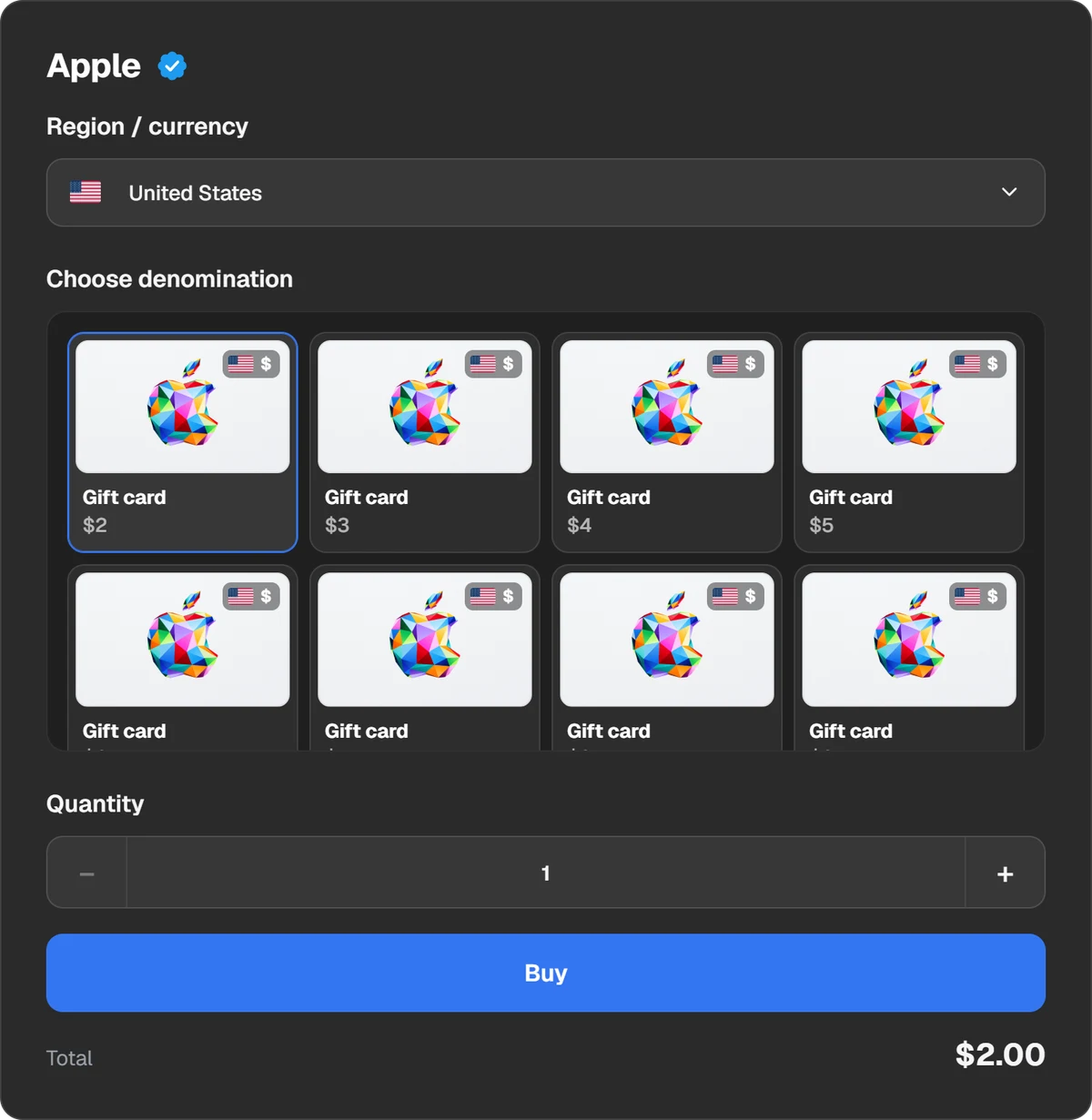
The card’s country must match the Apple Account’s.
Pay
Press “Buy” and choose a coin or a wallet: USDT, TON, BTC and other coins, Binance, Walt or TON Connect.
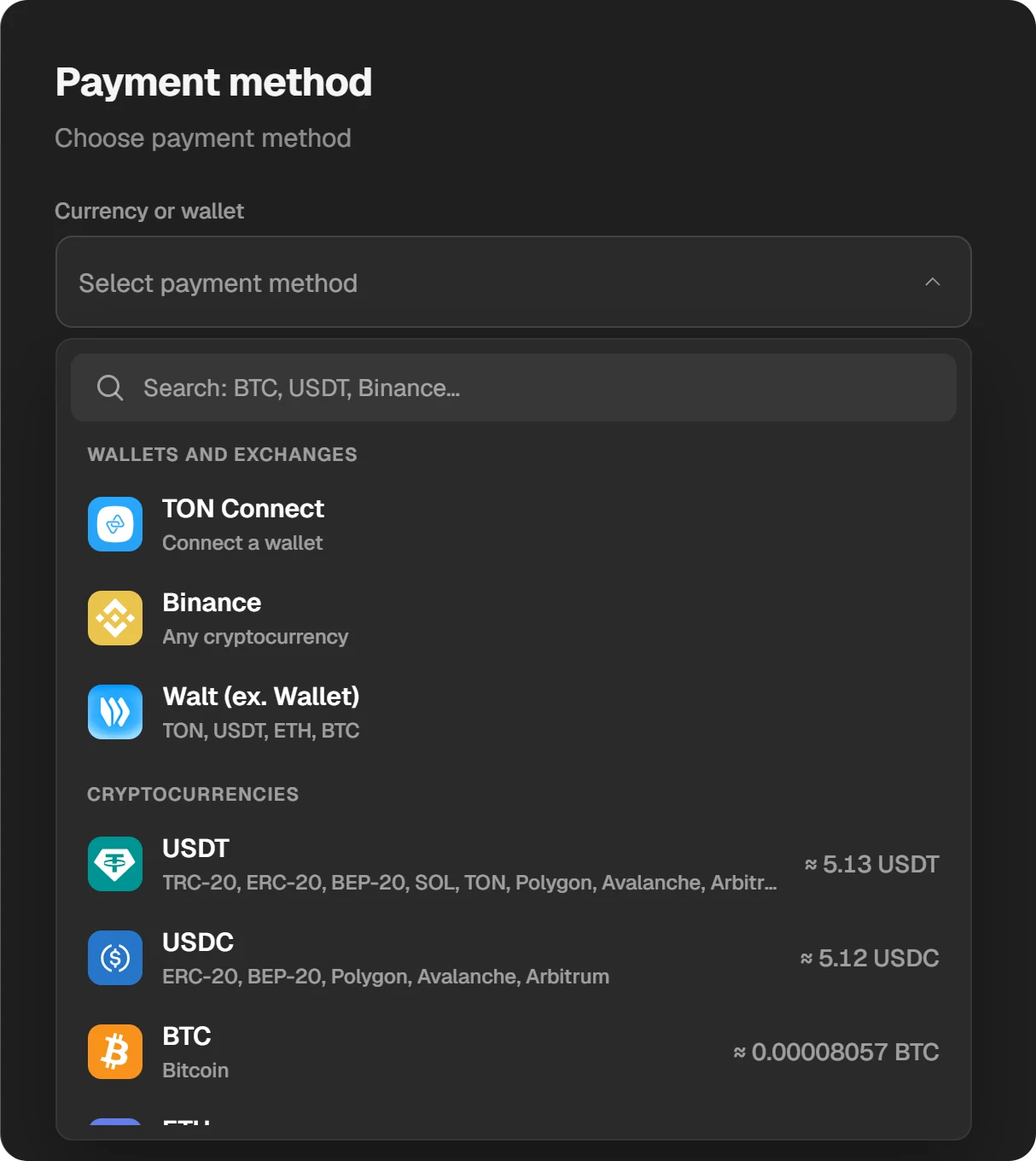
Payment methods on Play Wallet.
Redeem the code
The code appears in the order window and stays in “History”. How to enter it: How to redeem an Apple gift card.
How to add a payment method on iPhone and iPad
Open Settings and tap your name
It is at the very top of the Settings screen.
Open Payment & Shipping
Sign in to your Apple Account if asked. This screen lists all your payment methods.
Tap Add Payment Method
Pick a method from those Apple offers in your account’s country and enter its details.
Check the details and tap Done
Make sure your name, billing address and other details are free of errors, then save the method.
Apple notes that a payment method may be required even to download or update some free apps.
On Mac, Windows and the web
- Mac. Open the App Store and click your name at the bottom of the sidebar. On the page that opens click your name again, then Payment Methods and Add Payment Method. Enter the details and click Done.
- Windows. Open the Apple Music or Apple TV app. Click your name at the bottom of the sidebar, then View My Account. Next to Payment Information click Manage Payments, then Add Payment.
- The web or another device. Sign in at account.apple.com and add the method there.
How to change or update a card
- Open Settings, your name, Payment & Shipping.
- Select the card and tap Edit.
- Enter the new details and tap Done.
If the update fails, Apple suggests adding the new payment method first and then removing the old one. To change the order, tap Edit on the Payment & Shipping screen, touch and hold a method, drag it up or down and tap Done. The top method is the primary one. On Windows the order is changed with the arrows next to each method.
The order Apple charges in
- Apple Account balance. Apple tries it for the full amount.
- The primary payment method. Used if the balance is empty or does not cover the full amount.
- The other methods, top to bottom. Used if the primary one has a problem.
- A retry. If none of them works, Apple may try again.
If no method works, the account shows a negative balance, and you cannot buy, download or update apps until you change the payment method. Two more details from Apple’s help: a charge may come a few days after the purchase, and after you update billing details a small temporary authorization hold may appear on your statement. The card issuer removes it.
The balance cannot pay for gifts or gift cards. Some subscriptions are not charged to it, and AppleCare+ cannot be started with it.
Removing a payment method, and why it will not go
On iPhone: Settings, your name, Payment & Shipping, Edit, the red delete button next to the method, then Remove. On Mac and Windows: Edit next to the method, then Remove Payment Method.
| Why it will not go | What to do |
|---|---|
| You have an active subscription, such as iCloud+ | Subscriptions need at least one payment method. Cancel the subscription and remove the method once the paid period ends. |
| You are a Family Sharing organizer with purchase sharing | The organizer must have a payment method on file. Turn off purchase sharing, then remove it. |
| You have an unpaid order | You may not be able to remove the method. Change it to another one instead. |
| None of these, and it still will not go | Apple’s advice is to contact Apple Support. |
Older guides mention a “None” choice in the list of payment methods. Apple’s help today does not: it describes removing the method. On account.apple.com you sometimes have to add a new method before the old one can be removed.
Why a payment is declined in the App Store
Apple’s general advice is one line: add another payment method, remove the old one and try the purchase again. If that does not help, go down the list.
The card details match the bank’s
Your name, billing address and other details must be the same as at the bank.
The method is available in the account’s country
Apple accepts different methods in different countries. If the method is valid but the account is set to another country, by Apple’s rules the account’s country is changed first.
The method was not declined
Apple does not know the reason for a decline: whoever issued the payment method does.
No unpaid order
If the App Store mentions a billing problem with a previous purchase, pay that first: Payment & Shipping, Fix Payment Information, Try Again. You can also redeem a gift card, open the order marked Amount You Owe in Purchase History and tap Pay with Apple Account Credit.
No “Purchase Not Completed” message
That is Apple’s response to suspicious activity. Go back to the item, try again, choose Continue and submit the review request. Apple Support cannot submit it for you or speed it up.
If it says there are not enough funds
Apple has no separate article for this message. What follows from the order of charges: the balance pays only when it covers the full amount. If it does not, Apple goes to the card on file. When the card is short too, or there is no card, the payment fails.
- Check the balance: in the App Store tap your photo; the amount is under your name.
- If you pay with the balance, add enough to cover the whole purchase with a gift card of your account’s country.
If your account is set to Russia
Our cards do not fit a Russian Apple Account. The usual carrier payments there ended on 1 April 2026. The remaining balance and existing App Store promo codes can still pay. See whom our gift card suits in place of a bank card.
To pay from the balance, check the account’s country and buy an Apple Gift Card. A Turkish account needs App Store & iTunes.
Questions and answers
How do I add a payment method in the App Store?
On iPhone open Settings, tap your name, then Payment & Shipping and Add Payment Method. Enter the details and tap Done.
How do I change my App Store payment method?
In Payment & Shipping add the new method, then tap Edit and drag it to the top. The top method is the primary one. You can then remove the old one.
Why can I not remove my payment method?
Most likely you have an active subscription, an unpaid order, or you are a Family Sharing organizer with purchase sharing. In these cases Apple requires at least one payment method.
What is charged first, the balance or the card?
The balance. Apple tries it for the full amount. If the balance is empty or does not cover the full amount, the primary payment method is charged.
Why is my payment declined although the card has money?
Check the payment method’s details and whether it is available in your account’s country. Apple does not know the reason for a decline: whoever issued the method does.
Can I use the App Store without a payment method?
You can remove the payment method if you have no subscriptions and no unpaid orders. Apple notes that one may still be required even for some free apps.