Where to enter a Robux code: redeeming a Roblox gift card
A Roblox gift card code goes into one page: roblox.com/redeem. It works on a computer and in a phone’s browser. Below are the steps, what to do with Roblox Credit and why a code is sometimes refused.
In short
- Open roblox.com/redeem in a browser, sign in, paste the code and press “Redeem”.
- A Robux card adds Robux to the balance at once.
- A card for an amount in dollars or euros adds Roblox Credit. Turn it into Robux with “Get Robux”.
- Most phone apps and the consoles have no code field. Use a browser.
- A code from any country works on an account from any country.
Two kinds of codes
- A Robux card states a number of Robux, such as 400 or 800. The Robux are on your balance right after redeeming. Roblox calls these “Robux only” codes.
- A card for an amount states dollars or euros. Redeeming it adds Roblox Credit, which buys Robux or a 3-, 6- or 12-month Roblox Plus subscription.
If you bought the code from us, the card type is in the order: the Robux, USD and EUR tabs on the Roblox page.
Redeeming on a computer
Open roblox.com/redeem
Type the address into any browser. It is Roblox’s official gift card page.
Sign in
Sign in to the account that should get the Robux. If the code is a gift, let your friend enter it on their own account.
Paste the code
Copy the whole code and paste it into the field. Remove any spaces at the start or the end.
Press “Redeem”
Roblox confirms that the credit or the Robux were added. Cards go in one at a time; enter the next one after that.
Redeeming on a phone
Most Roblox apps cannot redeem codes. Roblox says the option exists in the Samsung Galaxy app and, in the U.S. only, on iPhone. Everyone else uses the phone’s browser.
- Open Safari, Chrome or another browser, not the Roblox app.
- Go to roblox.com/redeem and sign in.
- Paste the code and press “Redeem”.
- For a card for an amount, press “Get Robux” there, then “Buy”.
On Samsung Galaxy you can redeem in the app: open Roblox, go to the More page, tap the Redeem tile and enter the code.
Turning credit into Robux
Roblox Credit is shown and spent only in a browser. The app does not show it, which is why many people think “the Robux did not arrive”.
Check the credit
On roblox.com/redeem the available credit is shown under the “Redeem” button. It is also in Billing Settings, next to the Roblox Credit line.
Press “Get Robux”
Roblox preselects the largest Robux package your credit can buy. For a different package, open the Buy Robux page and pick it there.
Press “Buy”
A confirmation appears. If credit is left, Roblox offers to buy more Robux; “Cancel” keeps the credit for later.
A remainder smaller than a package
If the credit is not enough for a whole package, the redeem page shows “Convert Credit to Robux”. It turns the remainder into Robux; refresh the page to see the new balance.
You cannot top up credit with a card for one purchase. Roblox does not split payments: if the credit does not cover the purchase, it asks for another payment method for the whole amount.
When a code is refused
- Look-alike characters. Roblox suggests trying 0 as O, 1 as I, 2 as Z, 5 as S, 6 as G or Q, 8 as B. Copying the code is safer than retyping it.
- The wrong site. Codes go only into roblox.com/redeem. On other sites and in chats they get stolen.
- The wrong account. Check which account you are signed in to. A redeemed code cannot be moved.
- Already used. Each code works once. If you did not redeem it, contact the seller.
If you bought the code from us and it does not work, write to support with the order ID. The code and the order are always in “History” at the top of the site; see Where is my gift card code.
Where to get a code
Choose a card on Play Wallet
On the Roblox page choose the card type and the amount, press “Buy” and pay with crypto. No Roblox login is needed.
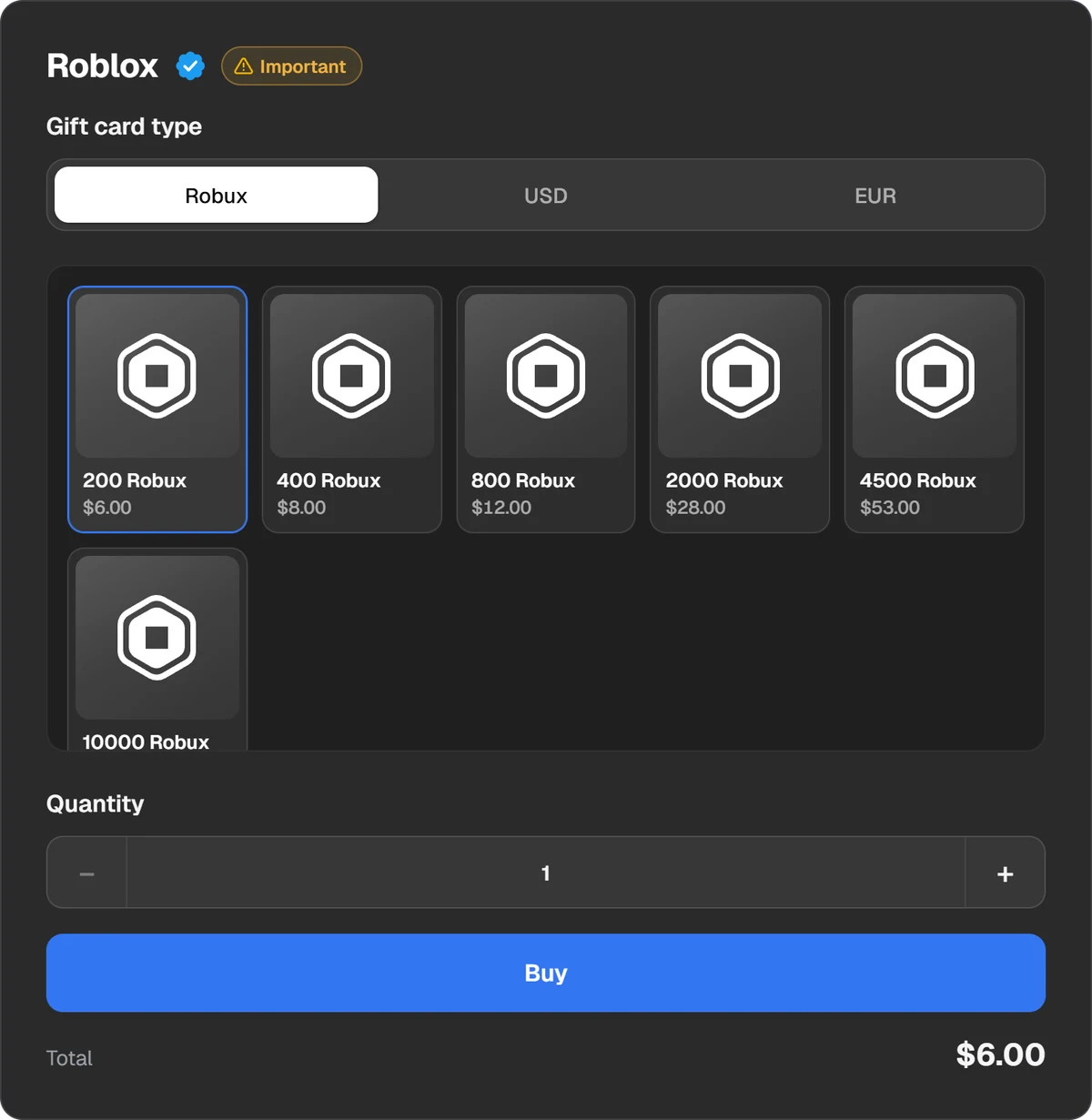
Card type, amount and quantity. The price is shown before you pay.
Copy the code from the order
When the order is done, the window shows “Your code”. Tap it to reveal it, copy it and redeem it at roblox.com/redeem as above.
Questions and answers
Where do I enter a Robux code on a phone?
In the phone’s browser at roblox.com/redeem. Most Roblox apps have no code field; the exceptions are the Samsung Galaxy app and iPhone in the U.S.
Can I redeem a code on Xbox or PlayStation?
No. Roblox says codes cannot be redeemed on consoles. Redeem it in a browser on a computer or phone; the Robux appear on the same account.
I redeemed a code, but my Robux did not go up. What now?
It was a card for an amount, so the account got credit. Open roblox.com/redeem in a browser and press “Get Robux”, then “Buy”.
Can I redeem several codes?
Yes, as many as you like, one at a time. Redeem the first, wait for the confirmation, then enter the next.
Does a card bought for another country work?
Yes. Roblox codes work worldwide, and the value converts to the account’s currency.
Can I get a refund for a Roblox gift card?
Roblox does not refund gift cards. Redeem the code on your own account and never show it to anyone.
Are there free Robux codes?
Robux generators do not exist. Roblox calls them a scam and asks you to report them with Report Abuse. Robux are bought from Roblox or earned as a creator.