Which USDT network to choose: TRC-20, TON, BEP-20
USDT is the same dollar token on several networks: Tron, TON, BNB Smart Chain, Ethereum and others. One thing matters when you pay: the network in the payment window and the network you send from must match. Here are the networks Play Wallet accepts, how to pick a convenient one and how not to lose a transfer.
In short
- Choose the network your USDT is on, on an exchange or in a wallet.
- The network in the payment window and the one you send on must match. A transfer on another network is not credited automatically.
- Play Wallet accepts USDT on 8 networks: TRC-20, ERC-20, BEP-20, Solana, TON, Polygon, Avalanche, Arbitrum.
- From your own wallet, the network fee is paid in the network’s native coin: TRX, ETH, TON and so on.
- Do not want to choose a network? Pay through Binance, Walt or TON Connect.
What a USDT network is
USDT (Tether) is a coin tied to the dollar. It is issued on several blockchains, called networks. USDT on Tron and USDT on TON are worth the same but live in different systems, with different addresses; coins cannot be sent directly from one network to another.
Names like TRC-20, ERC-20 and BEP-20 are token standards on Tron, Ethereum and BNB Smart Chain. “USDT TRC20” on an exchange means USDT on Tron.
Networks Play Wallet accepts
| Network | Also called | Network fee paid in |
|---|---|---|
| Tron | TRC-20, TRC20 | TRX |
| Ethereum | ERC-20, ERC20 | ETH |
| BNB Smart Chain | BEP-20, BSC | BNB |
| Solana | SOL, SPL | SOL |
| TON | TON, Jetton | TON |
| Polygon | Polygon, MATIC | POL |
| Avalanche | C-Chain, AVAX-C | AVAX |
| Arbitrum One | Arbitrum, ARB | ETH |
USDC can be sent on five networks: Ethereum, BNB Smart Chain, Polygon, Avalanche and Arbitrum. Besides stablecoins, the payment window has BTC, ETH, TON, SOL, BNB, TRX, LTC, DOGE and other coins.
What a transfer costs
The network fee is not fixed. Ethereum says gas fees rise and fall with demand. On Tron a token transfer uses network resources, Energy and Bandwidth; without them TRX is burned to pay. On TON you need a little TON to send USDT.
- From an exchange. The exchange charges its own withdrawal fee, usually out of the USDT amount. It is shown in the withdrawal window before you confirm.
- From your own wallet. The fee is paid in the network’s native coin. No TRX means no USDT transfer on Tron; no TON means no USDT transfer on TON.
Before sending, compare the fee for different networks in the exchange’s withdrawal window or in your wallet: it shows the exact amount at that moment.
Our order fee is separate and already part of “Total to pay”. It is shown before you pay, on the amount step and in the payment window.
How to choose
| Where your USDT is | Which network |
|---|---|
| On an exchange | Any the exchange offers for withdrawal that the payment window also has. Compare withdrawal fees |
| In Tonkeeper or Telegram | TON, or connect the wallet through TON Connect |
| In Trust Wallet, MetaMask and others | The one the coins are on. Make sure you hold the fee coin |
| In a Tron wallet | Tron (TRC-20). You need TRX for the fee |
If your coins are already on one network, do not move them to another just to pay: it is an extra fee and an extra step. Choose the network they are on.
Paying with USDT step by step
Place the order
Choose a product, for example a Steam top-up by login or Telegram Stars by username. Set the amount or pack and press the buy button.
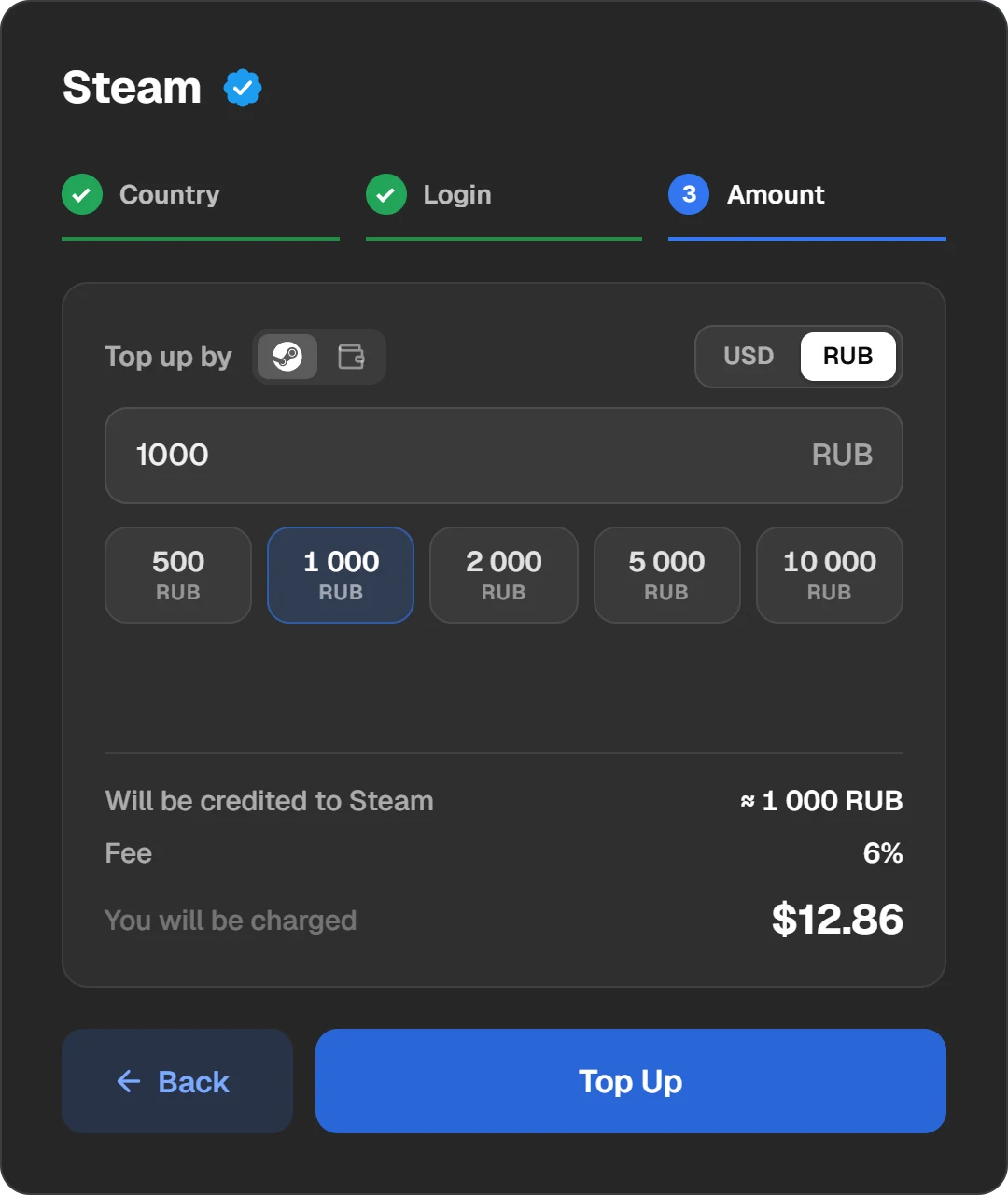
The order form: what you buy and for how much.
Choose USDT
In the payment window, choose USDT in the “Currency or wallet” field. The amount of coin you need is shown next to it.
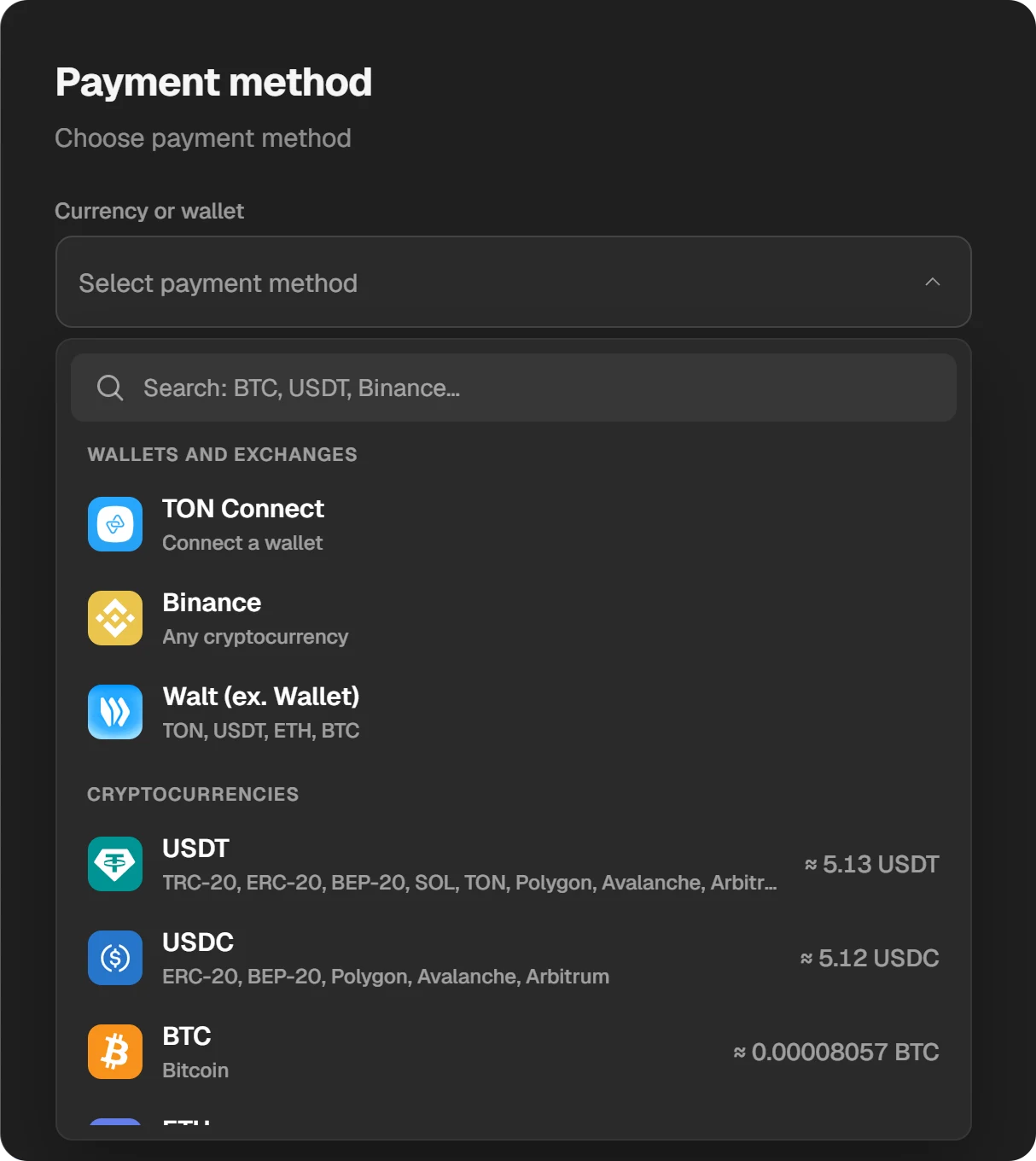
USDT, USDC and other coins in the payment window.
Choose the network
In the “Network” field, choose the network you will send from. The site warns you: send only USDT and only on the chosen network.
Get the address
Press Pay. A Cryptomus page opens with the amount, the network, the address and a QR code. Every order gets its own address. You have 30 minutes to pay.
Send the USDT
On the exchange, open a USDT withdrawal, paste the address and choose the same network. Send enough for exactly the shown amount to arrive: the exchange’s fee comes out of what you send.
Wait for confirmation
While the network confirms the transfer, the order says Waiting for payment. You can close the window: the order is in History at the top of the site and updates by itself.
If you sent on the wrong network
This is the most common mistake, for example USDT sent on BEP-20 to an address issued for TRC-20. Such a transfer is not credited automatically, and getting it back is not always possible.
- Do not send a second transfer until the first one is sorted out.
- Find the transaction hash (TxID) in the exchange’s or wallet’s withdrawal history.
- Write to support with the order ID, the network, the amount and the hash.
Before every transfer check three things: the coin (USDT, not USDC), the network and the amount. On an exchange the network is a separate field, and its default may be the wrong one.
Paying without choosing a network
- Binance. If your money is on Binance, choose Binance under “Wallets and exchanges”. You pay from the exchange balance with any coin; no address or network needed.
- Walt. A wallet in Telegram; pay in TON, USDT, ETH or BTC.
- TON Connect. Connect a TON wallet such as Tonkeeper and confirm the payment in it.
Any product on the site can be paid with USDT. For a Steam top-up with every payment screen, see How to top up Steam with crypto.
Questions and answers
Which USDT network should I choose?
The one your coins are on now. If they are on an exchange, pick any network available for withdrawal and in the payment window, and compare the withdrawal fees.
How is TRC-20 different from BEP-20?
They are USDT on different networks: TRC-20 on Tron, BEP-20 on BNB Smart Chain. Same coin, different addresses and fees. You cannot send directly from one to the other.
What if I send USDT on the wrong network?
It is not credited automatically and getting it back is not always possible. Write to support with the order ID and the transaction hash.
Why did less arrive than I sent?
The exchange keeps its withdrawal fee out of the amount sent. Send so that exactly the payment window’s amount arrives.
Do I need TRX to send USDT on TRC-20?
From your own wallet, yes: Tron charges the fee in TRX. From an exchange, no; the exchange takes its own fee.