

How to buy Telegram Premium on an iPhone in 2026
If the App Store will not take your payment, you can get Telegram Premium on an iPhone on Play Wallet right in Safari: 3, 6 or 12 months by @username, paid with crypto. Where Apple cannot bill you, a purchase in the app ends in an error. Here are the steps and the rules.
In short
- On an iPhone you can buy Telegram Premium on Play Wallet in Safari, by @username with crypto, for yourself or a friend.
- The term is 3, 6 or 12 months. We have no one-month term and do not take bank cards.
- Since 1 April 2026 Apple takes no subscription payments in Russia, and the usual carrier billing has ended.
- Our Apple cards do not fit a Russian account. Premium by @username does not need them.
- Premium belongs to the account, not the phone. Once it is on, it works on the iPhone too.
How to get Premium on an iPhone through Play Wallet
Find your @username
In Telegram, open Settings and look for the Username line. If it is empty, set any free name. A gift needs one.
Open the Premium page in Safari
Go to Telegram Premium. Paste the @username into “Recipient’s Telegram” and check the name and picture the form shows. Choose 3, 6 or 12 months: each term’s price is shown at once.
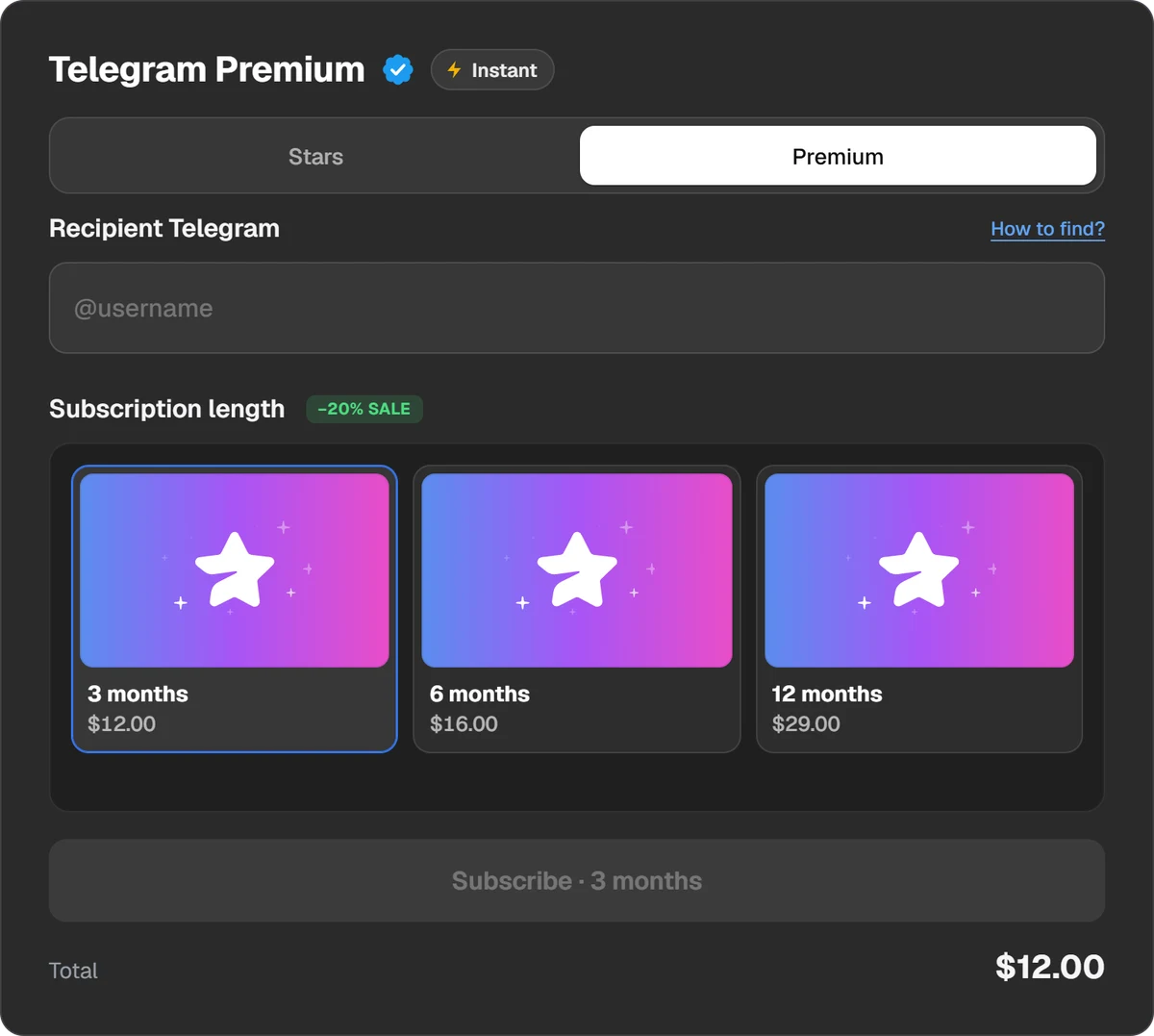
The recipient and the term. The price is shown before you pay.
Choose how to pay
Press the order button. In the payment window, pick a coin or a wallet. On an iPhone it is easiest to pay from an exchange or wallet app: copy the address and the amount, or use TON Connect if your coins are in Tonkeeper or another TON wallet.
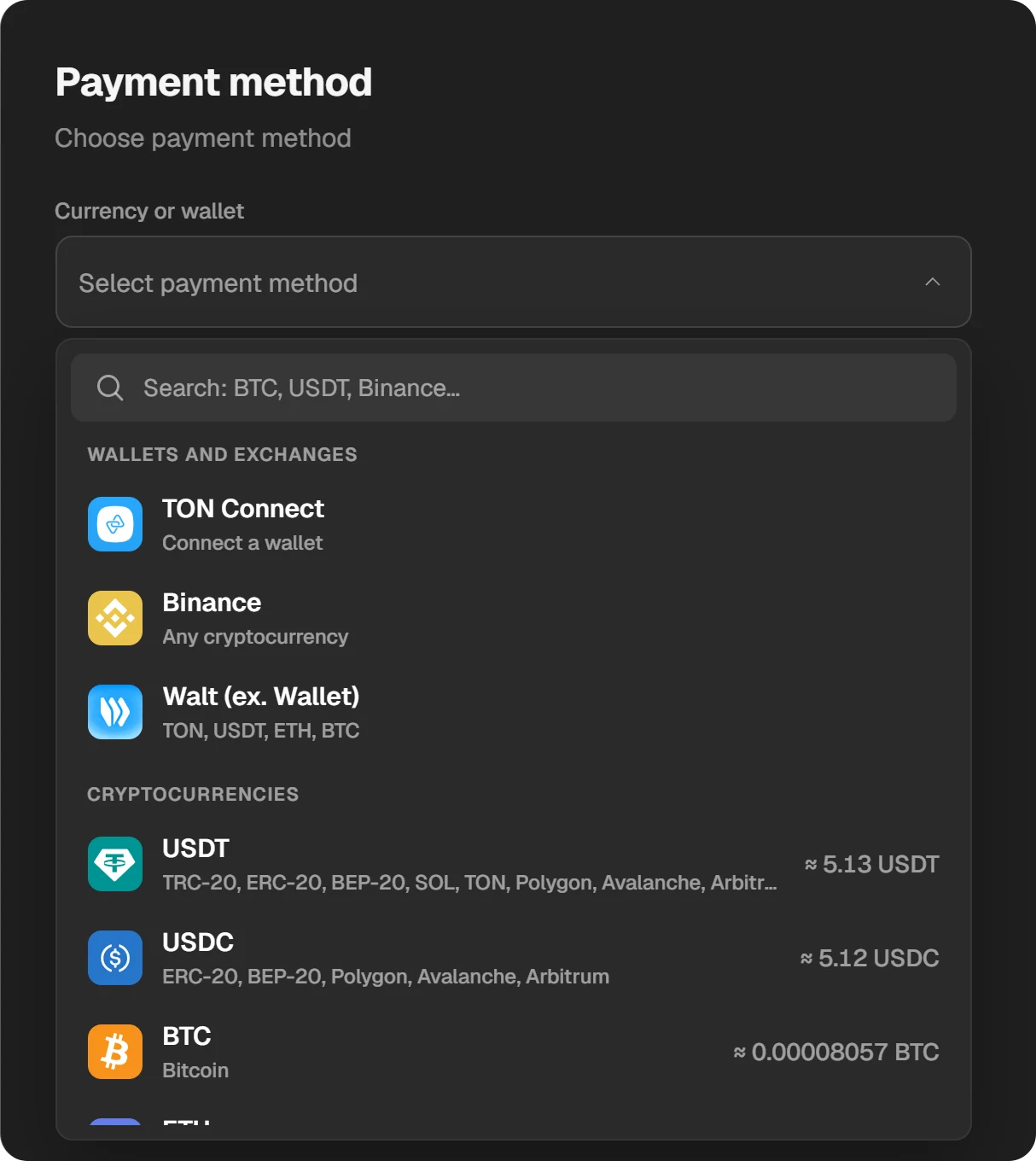
The amount in each coin is right in the list.
Check Premium
The window shows by itself when the payment arrives. Open Telegram on the iPhone: Settings → Telegram Premium shows the subscription. The order stays in “History” at the top of the site.
Send exactly the amount, on exactly the network, chosen in the payment window. A transfer on another network is not credited automatically.
It is a term of 3, 6 or 12 months with no auto-renewal. When it ends, Premium simply switches off, and a new order extends it. There is no one-month gift; see Telegram Premium for one month.
Telegram says Premium works on all your devices, whatever platform it came from. Bought on the website, it works in the iPhone app too.
Why it fails for accounts in Russia
- Apple stopped billing in Russia. From 1 April 2026, payments for subscriptions and digital purchases and the usual carrier billing are unavailable in Russia, as Apple’s support page on billing in Russia says.
- An existing balance still works. Money left on the Apple Account still pays for purchases and renewals until it runs out.
- The subscription then ends. If Apple cannot bill a renewal, the App Store subscription to Premium stops.
- One subscription per Apple ID. Telegram says a single Apple ID supports only one ongoing Premium subscription.
We do not suggest changing your Apple Account’s country or using someone else’s address to pay. Apple has its own rules for that, and the balance is lost. See How to change your Apple ID country.
If you had an App Store subscription
- Open Settings on the iPhone, tap your name and choose Subscriptions.
- Find Telegram Premium and tap Cancel Subscription.
- Premium stays until the end of the paid period.
Deleting Telegram does not cancel an App Store subscription. For other ways of paying, see How to cancel Telegram Premium.
Staying safe
- Never send your login code. A Premium gift needs only the @username. A seller who asks for a code or a password wants your account.
- Never share your Apple ID either. Offers like “we’ll pay with our Apple ID, let us sign in” put your phone and purchases at risk.
- Check the @username twice. Premium goes to the account named in the order.
Open Telegram Premium in Safari, paste the @username and choose a term: this purchase needs no App Store.
Questions and answers
Can I pay for Premium on an iPhone with a Russian card?
Not through the App Store: since 1 April 2026 Apple takes no subscription payments in Russia. On Play Wallet you get Premium by @username with crypto; we do not take cards.
Will Premium work on my iPhone if I did not pay through the App Store?
Yes. Premium belongs to your Telegram account and works on every device you are signed in on, iPhone and iPad included.
Do I need to do anything in the App Store after a gift?
No. The gift switches on for the Telegram account by itself. Check it in Settings → Telegram Premium.
What happens when my Apple balance runs out?
Apple cannot bill the renewal and the subscription ends. You can keep Premium going on Play Wallet by your own @username.

