

Telegram Premium stickers and emoji: how to use them
Sending premium stickers and custom emoji and setting an emoji status needs Telegram Premium. You can buy it on Play Wallet by @username for 3, 6 or 12 months. Everyone sees the stickers and emoji. Here is how to use them and what works without a subscription.
In short
- For custom emoji and stickers buy Premium on Play Wallet by @username: 3, 6 or 12 months, paid with crypto.
- Everyone sees premium stickers and custom emoji. Sending them to chats needs Premium.
- Without a subscription you can try any custom emoji for free in Saved Messages.
- A boosted group can have its own emoji pack that every member can use, Premium or not.
- One message can hold up to 100 custom emoji.
- Anyone can make a sticker or emoji pack with the @Stickers bot.
What is what
| Feature | What it looks like | Without Premium |
|---|---|---|
| Premium stickers | A sticker with a full-screen animation everyone in the chat sees | Visible, but you cannot send them |
| Custom emoji | Animated emoji inside message text and captions | Visible. Sendable only in Saved Messages and in a group with its own pack |
| Emoji status | An icon next to your name | Not available |
| Reactions | More reaction emoji and up to 3 reactions per message | One reaction per message from the standard set |
| Favourite stickers | Quick access to stickers you like | Up to 5; up to 10 with Premium |
Premium stickers
These are stickers whose animation spills out of the frame and briefly fills the chat. Both sender and recipient see it, even if the recipient has no Premium. Telegram adds to the collection every month and keeps the full list in the official @Premium channel.
Open the sticker panel
In any chat, tap the sticker icon next to the message field.
Find the Premium section
Premium stickers have their own section in the panel. Telegram also suggests them when you type a regular emoji.
Send the sticker
Tap a sticker. The full-screen animation plays in the chat, and the other person sees it too.
Custom emoji in messages
Custom emoji look like regular emoji but are drawn by artists or users, often animated. You can put them in the text and in photo captions. Packs come from Telegram and from independent authors.
Open the emoji panel
Tap the smiley in the message field. It holds the standard emoji and your packs.
Add a pack
If someone’s message has an emoji you like, tap it. Telegram shows the whole pack with a button to add it.
Insert emoji into text
Tap an emoji in the panel to place it at the cursor. One message can hold up to 100 custom emoji.
The limit of 100 per message comes from Telegram’s developer documentation and is a default value Telegram can change. If some emoji will not send, split the text into two messages.
What works without Premium
- Seeing everything. Premium stickers, custom emoji and other people’s statuses show on any account.
- Trying emoji in Saved Messages. Telegram lets everyone send any custom emoji to Saved Messages for free, to see how they look.
- A group’s own emoji. When a group reaches the required boost level, its admins can pick one emoji pack, and every member can use it in that group, Premium or not.
- Joining premium reactions. If a subscriber has added a rare reaction, others can tap it to add theirs.
- Making packs. Anyone can create a pack; sending its emoji to regular chats needs Premium.
Emoji status
An emoji status sits next to your name, where other people see it. You can change it at any time, picking from your emoji packs. It is a Premium feature; when the subscription ends, the icon next to your name goes away.
How to make your own emoji or sticker pack
You do not need Premium for this. Packs are created in the official @Stickers bot, which also has a mini app for managing them. Simple stickers can also be made in Telegram’s built-in editor.
- Emoji size: exactly 100×100 pixels. For a sticker, one side must be exactly 512 pixels and the other no larger.
- Formats: PNG or WEBP images, WEBM video with the VP9 codec, or TGS animations.
- Emoji that match the text colour: send /adaptive to the bot while creating the set, and simple icons will take the theme or text colour.
How to get Premium on Play Wallet
Premium comes as a gift to the @username. We have no one-month term and take no bank cards. If Premium is already on, order after it ends: a new term may not add to the current one.
Enter the @username and the term
Open Telegram Premium, paste the @username into the Recipient Telegram field and check the name and photo. Pick 3, 6 or 12 months.
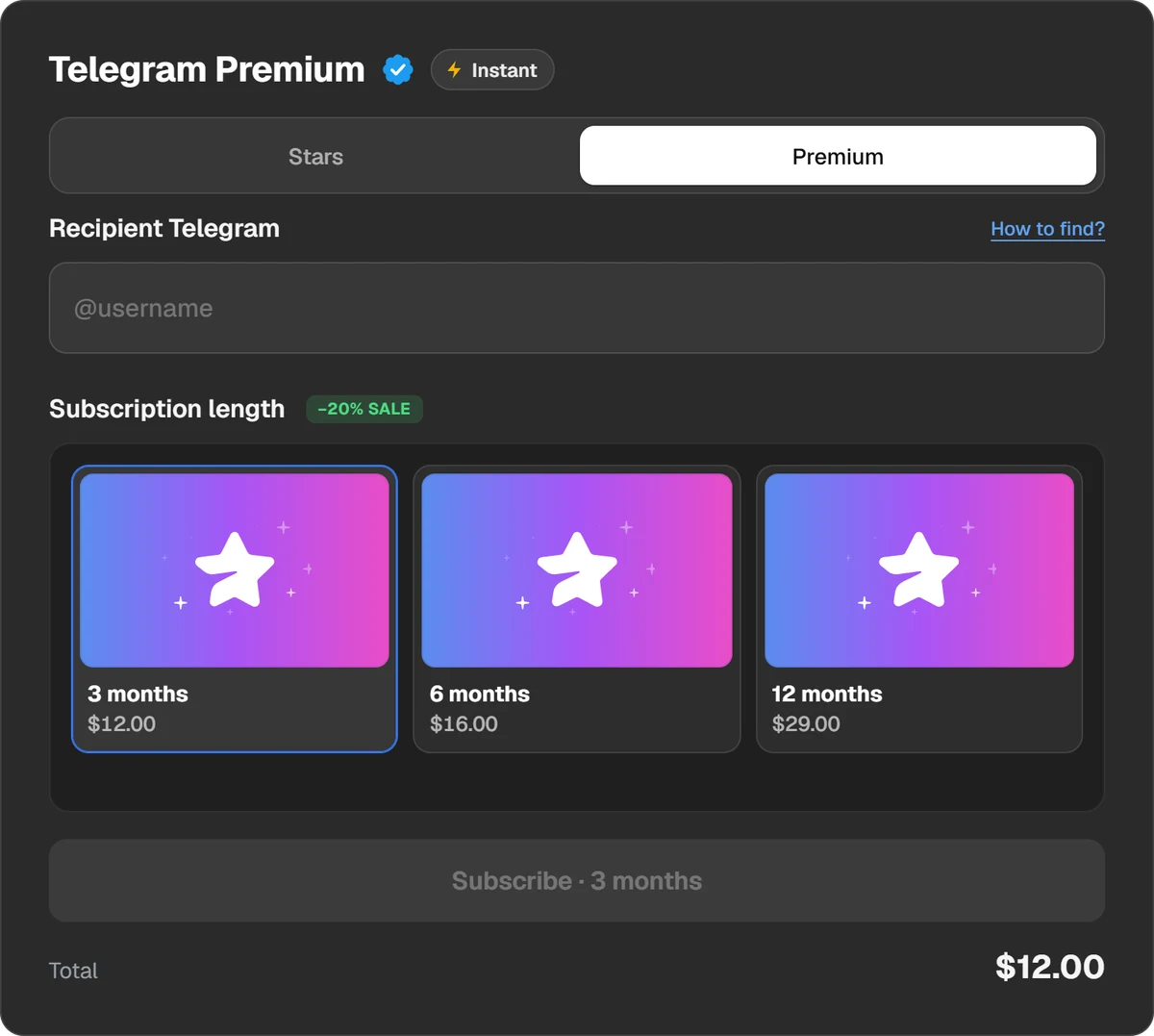
Premium on Play Wallet: the recipient’s @username and the term.
Pay with crypto
Press Subscribe and choose a coin or wallet. When the order is done, check Settings → Telegram Premium.
What the price depends on: How much Telegram Premium costs. Every other perk, from 4 GB files to voice-to-text: What Telegram Premium gives you.
To send emoji from your pack to any chat, get Premium on Play Wallet.
Questions and answers
Can people without Premium see premium stickers?
Yes. Everyone in the chat sees the animation. Only subscribers can send such stickers.
Can I use premium emoji for free?
Partly. Any custom emoji works in Saved Messages for everyone, and you can use a group’s own pack if it has one. Sending them to other chats needs Premium.
How many custom emoji fit in one message?
Telegram’s documentation gives up to 100 per message. It is a default that Telegram can change.
How do I add an emoji pack?
Tap an emoji in someone’s message. Telegram shows the whole pack and a button to add it to your emoji panel.
Do I need Premium to make a pack?
No. Anyone can create a sticker or emoji pack with the @Stickers bot. Premium is needed to send your custom emoji to regular chats.
What happens to my emoji status when Premium ends?
The status and the Premium badge disappear. If you get Premium again, you can set the status again.

