How to buy Diablo IV in 2026: stores, editions, Balance
Diablo IV is sold in four stores, and the right one depends on where you play and which country your account belongs to. Here is where the game is sold, which editions exist after Lord of Hatred, how a Battle.net Balance code pays for it, and what does not work for accounts in Russia.
In short
- Diablo IV is sold on Battle.net, on Steam and in the Xbox and PlayStation stores. On Xbox it is also part of Game Pass.
- On a Battle.net account in euros or dollars you can pay for the game, the expansions and Platinum with Battle.net Balance, topped up with a code in the same currency.
- Activision Blizzard stopped sales in Russia in March 2022, and the Russian Steam store has no page for Diablo IV.
- Platinum is shared between Battle.net, Xbox and PlayStation. On consoles you buy it through the console store.
- We do not suggest a VPN or a false address to change an account’s country.
Where Diablo IV is sold
| Platform | Store | Good to know |
|---|---|---|
| PC | Battle.net Shop | Battle.net Balance is accepted |
| PC | Steam | A Battle.net account is required (Steam says so on the game page). Paid from the Steam Wallet |
| Xbox Series X|S, Xbox One | Microsoft Store | Included with Game Pass |
| PS5, PS4 | PlayStation Store | A Battle.net account is required too |
Progress is shared: Blizzard says the game has cross-progression on all platforms. Characters live on your Battle.net account, while the game itself is bought separately on each platform.
Which edition to pick
- Diablo IV. The base game.
- Vessel of Hatred. The first expansion, released in October 2024.
- Lord of Hatred. The second expansion, released in April 2026. Blizzard says it also includes Vessel of Hatred. It needs the base game and comes in Standard, Deluxe and Ultimate editions.
- Age of Hatred Collection. A bundle with the base game and the expansions, meant for players who do not own Diablo IV yet.
What each edition contains and what it costs differs by store and changes during sales. Open the edition’s page before paying and read what is inside. If you already own the base game, a bundle that includes it is wasted money.
Paying on Battle.net with Balance
Blizzard says Battle.net Balance buys most products in the Battle.net Shop. The currency of the Balance must match the currency of the Shop, so a euro account needs a euro code and a dollar account a dollar code.
Check the account’s currency
Open the Battle.net Shop and look at the price of Diablo IV. A € sign means euros, a $ sign means dollars. Note the price of the edition you want.
Check the Balance limit
An account can hold at most €250 or $350. Without a Battle.net Authenticator the limit is €110 or $110. If the edition costs more, attach the authenticator first.
Buy a Balance code
Open Battle.net top-up, choose the account’s currency and the amount. If one code does not cover the edition, take several. Your Battle.net login and password are not needed.
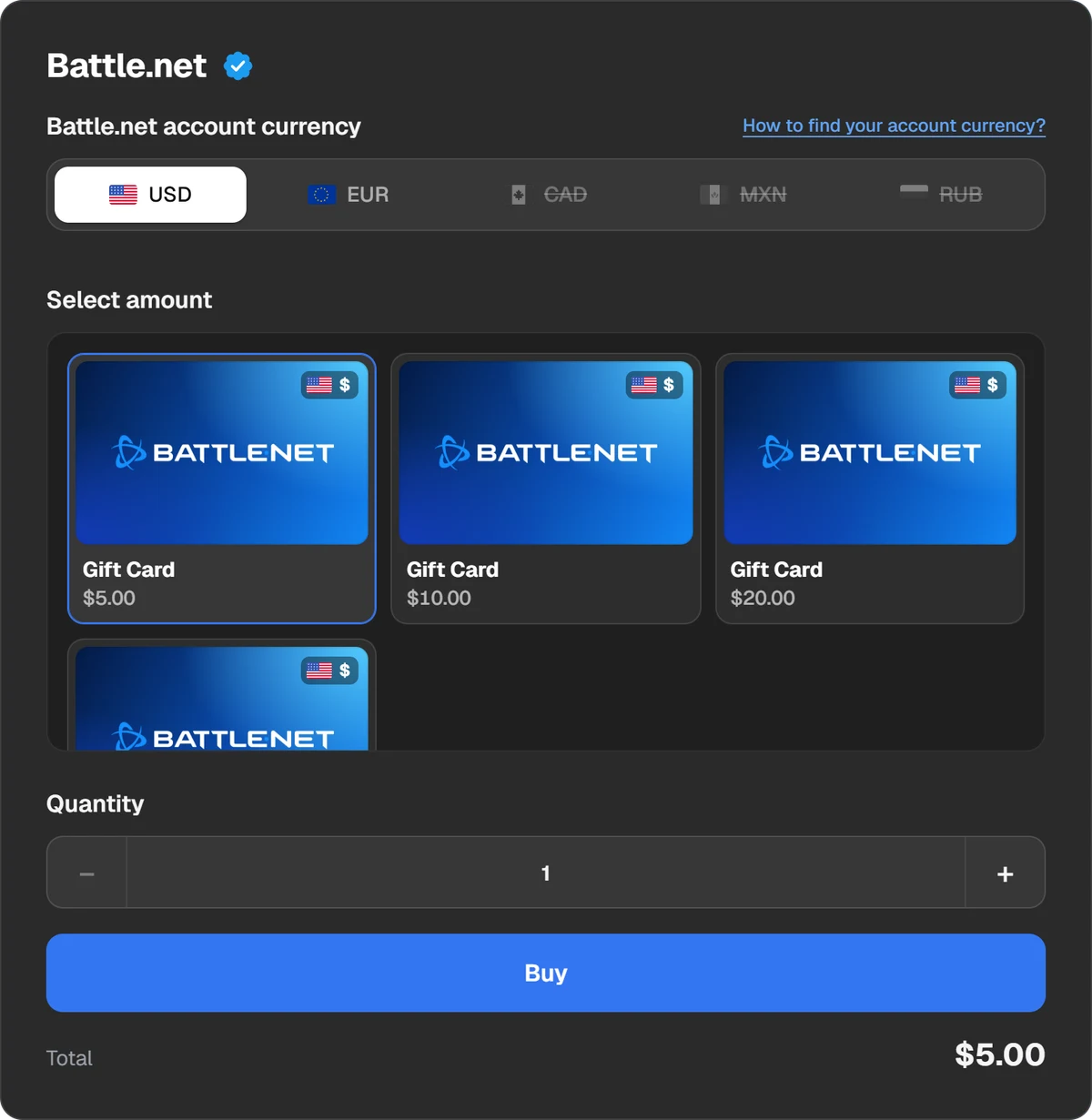
The account’s currency, the code’s value and the quantity.
Pay for the order
You can pay in USDT, USDC, BTC, TON and other coins, or through Binance, Walt and TON Connect. The amount and the fee are shown before you pay. The code appears in the order window and stays in “History” at the top of the site.
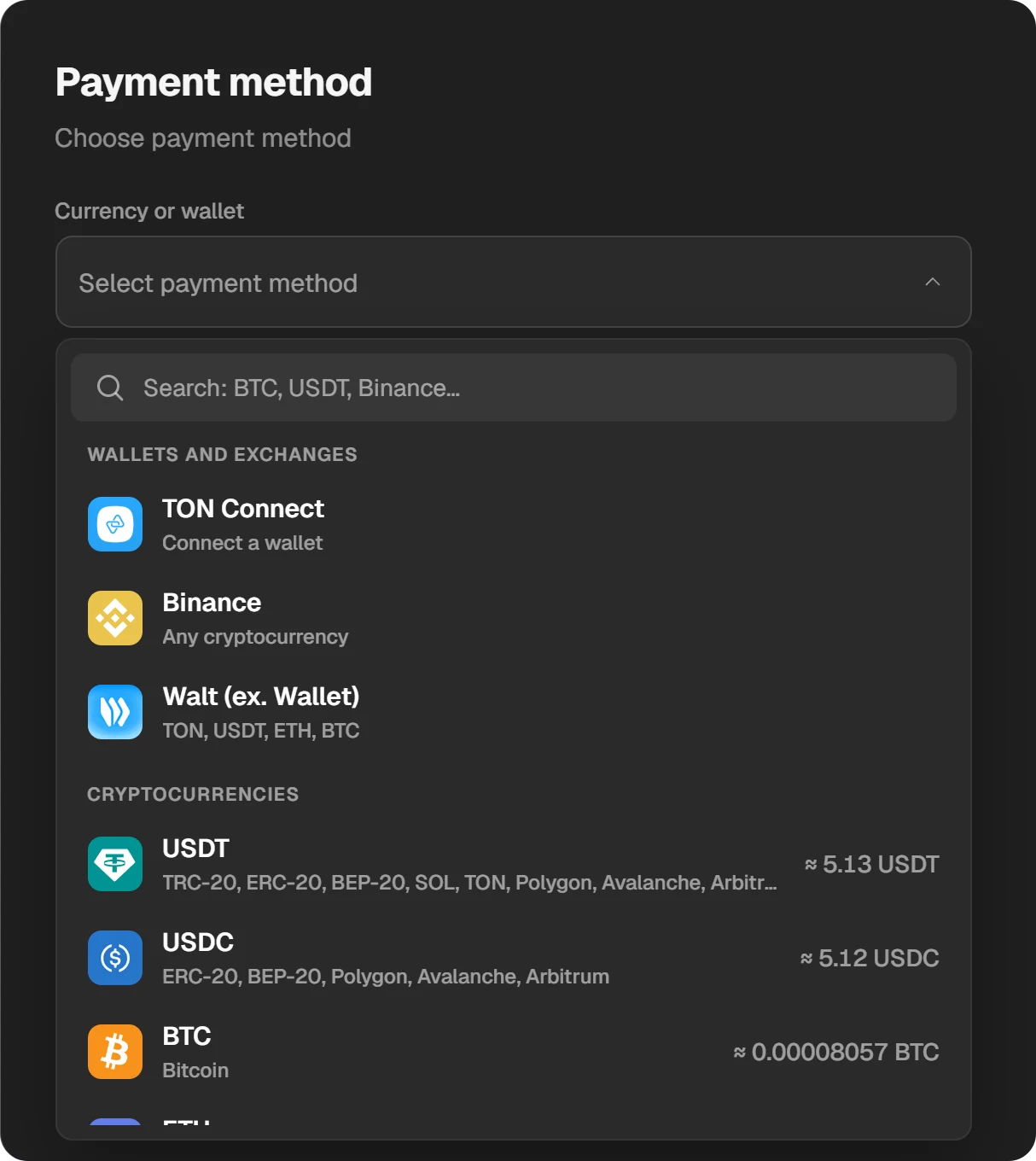
Choosing a coin or a wallet in the payment window.
Redeem the code
On battle.net open Account Overview and use “Redeem a Code”. In the desktop app the same item is under the profile icon. The steps are in How to top up Battle.net.
Buy the game with Balance
Open Diablo IV in the Battle.net Shop, pick the edition and choose Battle.net Balance as the payment method. If the Balance does not cover the full price, the option may not appear.
Balance pays only for your own account: Blizzard does not let you use it for a gift order. It does not work on consoles or on Steam either.
How to buy Platinum
Platinum is the currency of the in-game shop. It is bought with real money and spent on the Battle Pass, cosmetics and bundles. None of it makes a character stronger.
- On PC through Battle.net. You buy Platinum in the in-game shop. If the account has enough Battle.net Balance to cover the price with tax, the game offers it first. So the route is the same: code, Balance, Platinum.
- On Xbox and PlayStation. The purchase goes through the console store. Battle.net Balance is not accepted there; you need Microsoft account balance or PS Store wallet funds.
- One shared pool. Blizzard says Platinum bought on Battle.net, Xbox and PlayStation is shared across those three. Steam is not named in that list, so on the Steam version buy Platinum where you play.
Steam, PlayStation and Xbox
- Steam. The purchase is paid from the Steam Wallet. We top up the wallet by login, in the account’s currency. This only helps if the game is sold in your account’s country.
- PlayStation. The wallet is topped up with a PS Store card of the same country as the account.
- Xbox. The balance is topped up with an Xbox gift card in the account’s currency. Game Pass is another route: the Xbox page marks the game as included. See Xbox Game Pass tiers for which plan you need.
If your account is in Russia
In March 2022 Activision Blizzard announced it was suspending new sales of and in its games in Russia. A Russian Battle.net account cannot buy the game, an expansion or Platinum, and our codes do not load onto a rouble account. According to Steam’s own store data on 21 November 2026, Diablo IV and both expansions are not shown for Russia. The PlayStation Store does not work for Russian accounts, and Microsoft stopped new sales there in 2022.
We do not suggest a VPN or a false address to change an account’s country. Blizzard allows a country change only after a real move, and the Steam Subscriber Agreement forbids using a proxy to get around regional restrictions. Accounts get restricted for this.
What not to do
- Buying someone’s account with the game. The seller can take it back through support, and Blizzard’s rules do not allow account transfers. More in the risks of bought accounts.
- Giving your password “so we can buy it for you”. With the password you hand over every game and the balance.
- Buying a key without knowing its region. A key made for another country may not activate. We sell no game keys, only balance top-ups.
Questions and answers
Where should I buy Diablo IV on PC: Battle.net or Steam?
It is the same game and both need a Battle.net account. On Battle.net you can pay with Battle.net Balance; on Steam the purchase comes from the Steam Wallet.
Can I pay for Diablo IV with Battle.net Balance?
Yes, if the Balance currency matches the Shop currency and covers the full price. Mind the limit: €250 or $350, or 110 without an authenticator.
How do I buy Platinum?
In the in-game shop. On the Battle.net version you can pay with Battle.net Balance; on consoles the purchase goes through the console store.
Is Diablo IV on Game Pass?
The game’s page on xbox.com marks it as included with Game Pass. The catalogue changes, so check it before you subscribe.
Do I need to buy Vessel of Hatred separately?
Not if you buy Lord of Hatred: Blizzard says the first expansion is included. You still need the base game.
Can I buy Diablo IV from Russia?
Not with a Russian account: Activision Blizzard stopped sales in Russia in 2022, the Russian Steam store does not list the game, and the PlayStation and Microsoft stores do not sell there.