

“Not available in your region” on Steam: what to do
The message means the developer or publisher does not sell the game in your account’s country. Steam Support cannot lift it. Here is where the message appears, what legitimate options remain and what you risk by “getting around” the region.
In short
- On Steam, your region is your account’s store country, not where you happen to be.
- The developer or publisher sets the restriction. Steam Support cannot remove it.
- You cannot buy the game in the Steam store on that account. You can wait, wishlist it, or look for a key made for your region.
- The store country changes only if you really move, at most once every 3 months.
- A VPN or a fake address breaks Steam’s rules. The account may be restricted and a gift may not run.
Where Steam shows the restriction
| Where | What you see | Why |
|---|---|---|
| The game’s store page | No purchase button and a note about your region. | The game is not sold in your account’s country. |
| Activating a key | “Game not available in your territory”. | The key was made for another region. |
| A gift from a friend | The gift cannot be sent or accepted; its description lists countries. | Gifts bought in some regions redeem only there. |
| The “Purchase as a gift” option | It is missing. | Steam names version differences or the publisher’s region restrictions. |
Your region is the store country on the account. It is set by the first purchase and shown on Account Details. See How to check your Steam account’s region.
How to check your Steam account region
Open “Account details”
Click your profile name at the top right of Steam and choose “Account details”. On a phone, open store.steampowered.com/account in a browser and sign in.
Find the “Country” line
It is in the “Store & Purchase History” block. That is your account’s region: prices and the wallet currency depend on it.

The “Country” line, shown on an example account.
Why games are unavailable in some countries
Steam does not decide this. The developer or publisher chooses where and at what price a game is sold. That is why one game from a publisher may be available and another not.
Steam Support says plainly that it cannot modify or remove region restrictions. Asking it to “unlock” a game will not help.
What Steam’s rules allow
Wishlist the game
Steam notifies you about discounts on wishlisted games, and the game stays at hand in case the publisher opens sales in your region.
Look for a key made for your region
A game missing from your Steam store is sometimes sold as a key for your country by the publisher or its stores. Check the key’s region first: Steam will not accept a key for another region. Keys and gifts as ways to get a game: How to buy a Steam game from Russia.
Change the country if you moved
If you live in another country now, Steam offers to change the store country at checkout. You need a payment method from the new country. The country can change once every 3 months.
What not to do
- A VPN or proxy. The Steam Subscriber Agreement forbids disguising where you live to get around geographical restrictions. Valve may terminate access to the account.
- Someone else’s address. Your store country must be where you live, and it changes only with a payment method from the new country.
- Redeeming a gift through a VPN. If you redeem a region-restricted gift and your location does not match your past activity, Steam shows a warning. Such a gift may not run, and you would have to buy the game again.
- Buying someone’s account. A Steam account is personal and may not be sold or transferred.
If the game is sold but you cannot pay
People often mix this up with another problem: the game is on sale in your store, but your card is refused. The region has nothing to do with it. Top up your Steam Wallet by login and buy the game with the balance.
Top up the wallet
Open Steam top-up, choose your account’s country, enter your login and the amount. The money arrives in your account’s currency. The amount credited and the fee are shown before you pay.
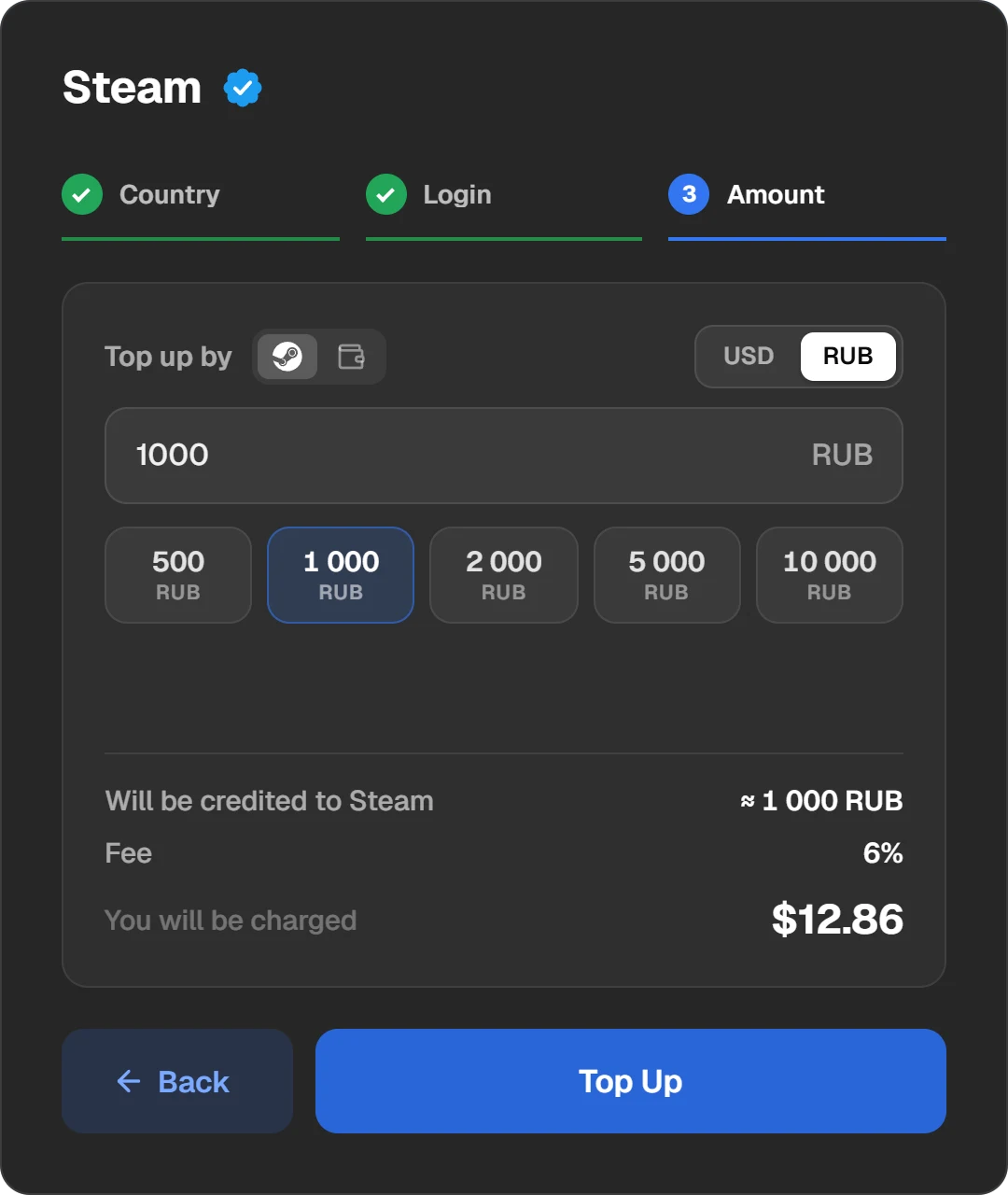
Country, login and amount. No password needed.
Buy the game on Steam
Add the game to your cart and pay with your Steam Wallet. Where the balance is and how it is spent: Where is the Steam Wallet.
A top-up does not change your region or unlock games closed to your country. It only puts money in the wallet.
Questions and answers
Will Steam Support help?
No. Steam says Support cannot modify or remove region restrictions.
Can I get around it with a VPN?
That breaks the Steam Subscriber Agreement. Valve may restrict or close the account, and what you bought that way may stop working.
Can a friend abroad gift me the game?
Often not. Gifts from some regions redeem only there; Steam lists the countries when the gift is bought.
What if a key is “not available in your territory”?
The key was made for another region. Ask the seller for a refund: Steam does not refund keys from other stores.
Can I buy a game that is not sold in my region?
Not in the Steam store on that account. What remains is a key made for your region, or waiting until the publisher opens sales.
