

How to switch a Steam account back to Russia
You live in Russia, but the account shows Kazakhstan, Uzbekistan or another country. The rules are on your side: the store country should be Russia. The hard part is one condition, a Russian payment method. Here is the official route. While the old country stands, you can top up the account by login on Play Wallet in its current currency, paying in crypto.
In short
- There is one official route: while in Russia, choose Russia in the cart and complete a purchase with a Russian payment method.
- Need funds while the region stays? Play Wallet tops up by the country in Account details: by login for Russia, Ukraine, Kazakhstan and the CIS, by code for some others. It does not bring Russia back. You pay in crypto.
- The country can change once every three months at most.
- If checkout offers nothing you can pay with from Russia, you cannot switch back by yourself within the rules. Steam Support is what remains, with no guaranteed result.
- A wallet code, a game key, a top-up by login, the language and the download region do not change the store country.
Check that the region really changed
Click your profile name, open “Account details” and find the “Country” line. Do not judge by the language or by prices in a signed-out tab: a signed-out store does not know your account’s country.

The “Country” line in “Store & Purchase History”.
| What you see | What it means |
|---|---|
| Country Russia, balance in roubles | There is nothing to switch |
| Another currency only when signed out | Sign in, turn off the VPN and reopen the store |
| English interface, country Russia | That is the language, unrelated to the region |
| Kazakhstan and tenge | The store country changed. That is the case covered here |
| Dollars and a CIS country | Also a country change: these countries have no Steam currency of their own |
A new account can end up like this after its first top-up, because the currency is not fixed until then. If the country was changed on purpose, the way back is the same.
The official way back
Check the conditions
You live and are in Russia, any VPN or proxy is off, and three months have passed since the last change. Steam declines purchases through anonymous proxies.
Put a game in the cart
When your location differs from the store country, Steam offers a choice of country in the cart or at checkout. Choosing Russia updates prices and payment methods.

The purchase box on a game’s page: the “Add to Cart” button.
Read the payment methods
Steam lists all that the country has. If a working Russian method of yours is there, pay with it. If not, stop: the choice alone fixes nothing without that purchase.
Check Account details
After a successful purchase the country should be Russia and the balance in roubles.
Where the route stops
In March 2022 the Bank of Russia said that Visa and Mastercard cards of Russian banks do not work in foreign online shops. Steam still requires a local payment method. Its help has no list of Russian methods: you see them only at checkout.
So, plainly: if that list holds nothing you can pay with, you have no working official way to switch back on your own at the moment. We know of none, and a top-up service is no substitute.
This is where sellers offer another person’s card or ask to sign in to your account. The agreement forbids sharing access and expects the payer to be the card’s authorized user. What a dispute over such a payment does: a paid region change.
What will not bring Russia back
| Action | Why it fails |
|---|---|
| A Steam Wallet code | Steam Support says codes do not change the country |
| A game key | The same rule |
| A top-up by login | An existing wallet receives funds in its current currency, even at a zero balance |
| Paying from the wallet | The help asks for a payment method of the new country and does not name the wallet as one |
| Spending down to zero | The wallet keeps its currency |
| Russian as the language | It is only the interface language |
| The download region | It is a download server |
| Waiting three months | That only limits how often you change. Nothing switches by itself |
What Steam Support can do
Steam’s help describes no procedure for Support to change a store country on request and lists no documents for it. It says plainly that Support does not lift regional restrictions on games and gifts. A purchase that keeps failing, though, is a reason to contact it.
Open Purchases
Sign in at help.steampowered.com, choose “Purchases”, then the option about a purchase you cannot complete.

“Purchases” on the Steam Support site.
Describe it as it is
Give the account name, where you live, the country shown, when it changed and the exact error. Ask which way within the rules is open to you.
Wait for the answer
Do not invent a move or attach another person’s details. Steam decides, and nobody can promise the result.
The balance and the games
- Balance. Account details treats the country and the wallet currency as one change. Steam’s help gives no rate. You can estimate with the Steam rates with USD as the base: divide by the old currency’s rate and multiply by the RUB one; the result shows in the purchase history.
- Games bought for yourself. Steam says most have no regional restrictions, and any restriction is noted on the store page.
- Gifts and keys. These are restricted more often. A gift lists its countries, and the publisher sets a key’s restrictions.
- New purchases. Prices and the catalogue become Russian. Some games you can buy now may not be sold in Russia.
- A new account moves nothing. Games and funds cannot be transferred between accounts.
If you need funds in the meantime
We do not change regions and cannot affect them. Choosing Russia for a tenge account will not turn it into a rouble one. Avoid a large sum before switching, as it would be converted too.
Choose the country in your “Country” line
It sets the currency and the estimate. Pick the one on the account now.
Add a small sum
On the Steam top-up page enter the login and an amount from 0.5 to 400 dollars. If the country has codes only, pick a value. You pay in crypto.
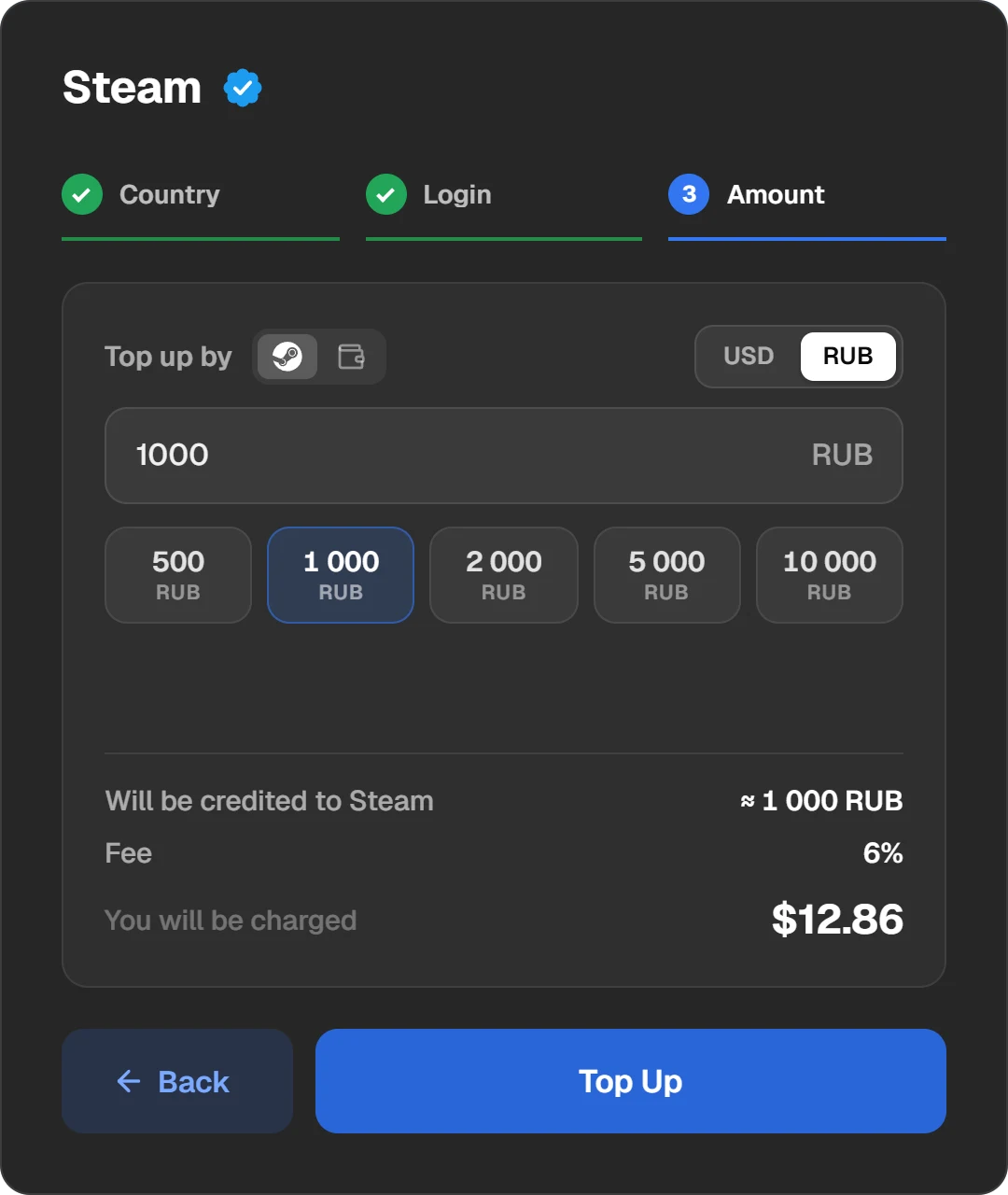
The account’s country, login and amount.
You need not wait for the switch to buy a game the present country sells too. Top up Steam on Play Wallet with its price and no more, and buy it from the balance.
Questions and answers
How do I change the Steam region to Russian?
For the country, you need a purchase with a Russian payment method while in Russia. For the Russian language, use Steam’s settings; the country is not affected.
Can I switch back straight away?
Not within three months of the last change. Steam allows one change every three months.
Can a top-up bring Russia back?
No. A top-up by login lands in the wallet’s existing currency and does not switch the store country.
Can a friend in Russia pay with their card?
We do not advise it. You state to Steam that you are authorized to use the card, and a dispute over it can restrict your account.
Will I lose games after switching back?
The store country help describes no removal of games. Most own purchases have no regional restrictions; check gifts and keys separately.
