How to give Robux to a friend: every official way
For a long time Roblox had no way to just send Robux to a friend. Now it does, but only for Roblox Plus subscribers and with limits. Here is how it works, plus the other honest ways to give Robux.
In short
- Only Roblox Plus subscribers can send Robux. The recipient does not need a subscription.
- By default you can send up to 500 Robux a day and 1,000 a month; more with 2-Step Verification.
- Under 16, a parent approves every transfer. A transfer cannot be reversed.
- Without a subscription, the simplest gift is a Roblox gift card code. It works in any country.
- Never give your password to anyone who offers to “send you Robux”. It is a scam.
Way 1. Send Robux with Roblox Plus
Roblox Plus is Roblox’s paid subscription. One of its benefits is sending Robux to other users for free. The sender needs the subscription; the recipient does not.
Who can send and receive
- 16 and over: complete Roblox’s Age Check.
- Under 16: a linked parent account is needed, and the parent approves every transfer, both sent and received.
- Some regions require parent approval up to 18 because of local law.
Start a transfer
A transfer starts from your friend’s profile or from the Buy Robux page.
Enter the amount
Type how many Robux to send and select “Continue”.
Review and send
Check the recipient and the amount and select “Send”. If you are under 16, a prompt asks your parent to review it.
Your friend accepts
Your friend gets a notification and selects “Accept”; the Robux are added at once. The transfer shows in their My Transactions.
How much you can send
| Condition | Per day | Per month |
|---|---|---|
| Standard limit | 500 Robux | 1,000 Robux |
| 2-Step Verification on, account in good standing | 5,000 Robux | 10,000 Robux |
Roblox notes the limits may change. In parental controls a parent can set lower limits for a child and choose whether to approve each transfer.
A transfer is final and cannot be cancelled. Send Robux only to people you know. Roblox never asks you to send Robux to verify your account.
If your friend did not get the Robux
- Your friend has to select “Accept” in the notification. Until then nothing is added.
- If your friend is under 16, the transfer waits for their parent’s approval.
- If the age requirements are not met within 7 days, the transfer is cancelled and the Robux go back to the sender. Meanwhile the amount shows under Pending Robux in My Transactions.
- If the parent declines, or does not link an account within 7 days, the Robux also go back.
Robux received by transfer can be spent only inside Roblox; they are not eligible for DevEx.
Way 2. Give a gift card code
This needs no subscription and no age check for the giver. You buy a code, pass it to your friend, and they redeem it on their account. Roblox codes work on accounts from any country, so a friend abroad can use it too.
Buy a card
Open the Roblox page and choose the card type. A Robux card adds exactly the stated Robux, the clearest gift. A USD or EUR card adds credit your friend spends on Robux or Roblox Plus. Press “Buy” and pay.
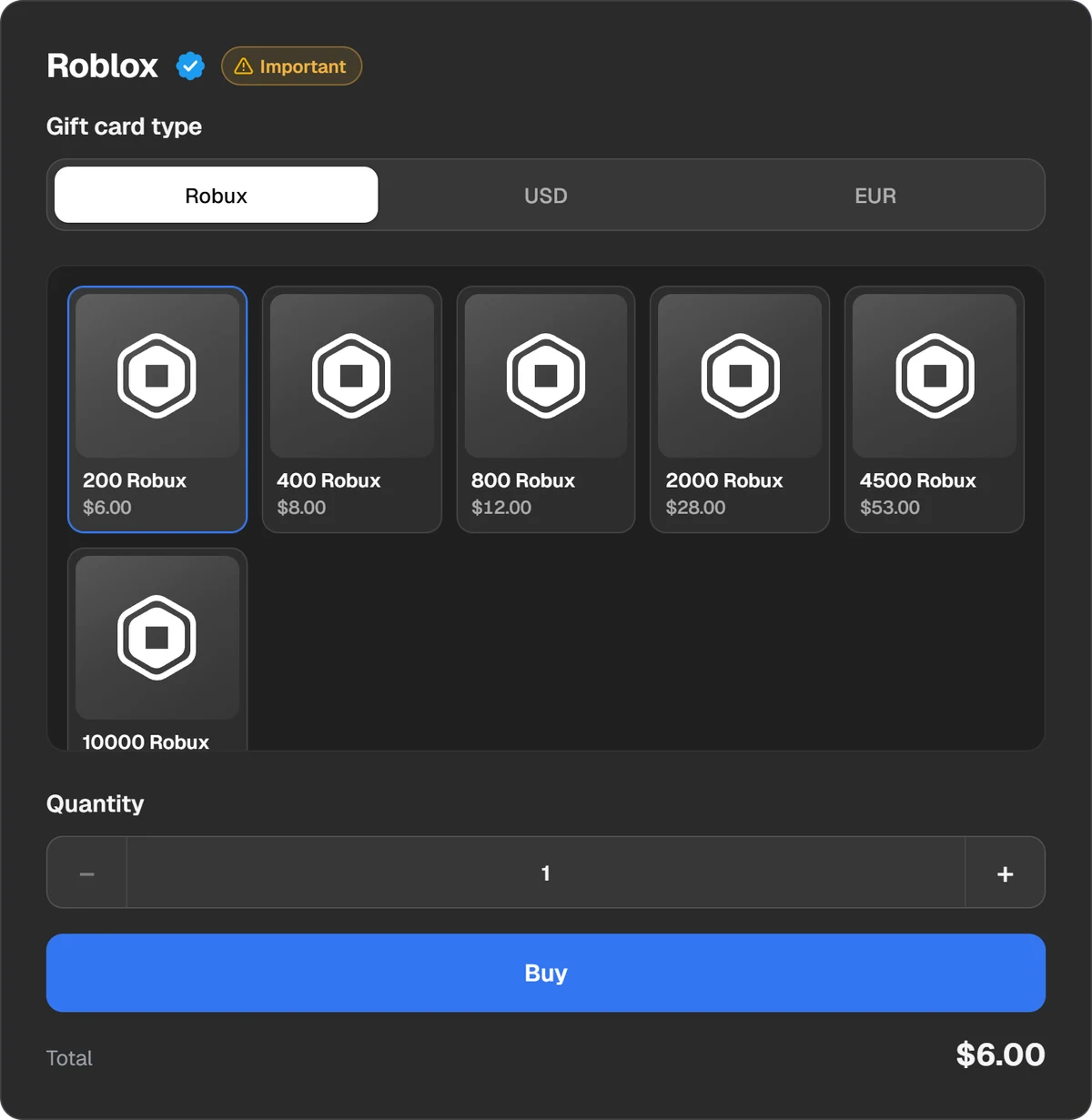
Robux cards and cards for an amount. The price is shown before you pay.
Copy the code
The finished order shows “Your code”. Copy it. If you bought several cards, all codes are in one order and can be copied at once.
Send the code to your friend
Send it in a private message, not a group chat. Whoever redeems it first gets the Robux.
Your friend redeems it
They open roblox.com/redeem in a browser, sign in, paste the code and press “Redeem”. Details: Where to enter a Robux code.
Other ways
- The “Request Robux” link. A user shares a link, and someone else buys Robux into their account through it. For now it works only in the U.S., on the web, and both people must be 18 or older.
- Community payouts. A Roblox community (group) owner can pay members Robux the community earned from sales. As a way to gift a friend it is awkward: the community has to sell something first.
What is always a scam
- “Give me your password and I will send you Robux.” A password is only needed to steal the account.
- “Send Robux to verify your account” or “to get more back”. Roblox never does that.
- Free Robux generators. They do not exist; Roblox calls them a scam.
- A “seller” asking you to send them the card code so they can “redeem it for you”. Only the account owner redeems, at roblox.com/redeem.
Which way to choose
| Way | Who it suits | Limits |
|---|---|---|
| Sending with Roblox Plus | Subscribers who already have Robux | Daily and monthly limits, age check, parent approval under 16 |
| A gift card code | Everyone, including a friend in another country | One-time code; pass it privately |
| “Request Robux” link | Adults in the U.S. | U.S. only, 18+, card payment on the web |
Questions and answers
Can I send Robux without Roblox Plus?
Not directly: only Roblox Plus subscribers can send Robux. Without a subscription, give your friend a Roblox gift card code.
How many Robux can I send a day?
By default up to 500 a day and 1,000 a month. With 2-Step Verification and an account in good standing, up to 5,000 a day and 10,000 a month.
Can I cancel a Robux transfer?
No, it is final. The Robux come back only if the recipient does not accept or does not meet the age requirements within 7 days.
Why is my transfer pending?
The recipient has not selected “Accept” yet, a parent has not approved it, or the recipient has not completed the age check. They have 7 days.
Can I give Robux to a friend in another country?
Yes, with a gift card code. Roblox codes work worldwide and convert to your friend’s account currency.
Can I give Robux by buying a friend’s game pass?
You can buy a pass in their game, but it is not a transfer. Roblox takes a fee from the sale, and the Robux first sit as pending on their side. A gift card is simpler.